4
1. Description
RigExpert AA-600, A-1000 and AA-1400
are powerful antenna analyzers designed
for testing, checking, tuning or repairing
antennas and antenna feedlines.
Graphical SWR (Standing Wave Ratio)
and impedance, as well as Smith/polar
chart displays are key features of these
analyzers which significantly reduce the
time required to adjust an antenna.
Easy-to use measurement modes, as well
as additional features such as connection
to a personal computer make RigExpert
AA-600, AA-1000 and AA-1400
attractive for professionals and hobbyists.
The MultiSWR™ and SWR2Air™ modes
are unique for RigExpert antenna
analyzers.
The built-in TDR (Time Domain
Reflectometer) mode is ideal for locating
cable faults.
The following tasks are easily
accomplished by using these analyzers:
• Rapid check-out of an antenna
• Tuning an antenna to resonance
• Comparing characteristics of an
antenna before and after specific
event (rain, hurricane, etc.)
• Making coaxial stubs or measuring
their parameters
• Cable fault location
• Measuring capacitance or
inductance of reactive loads
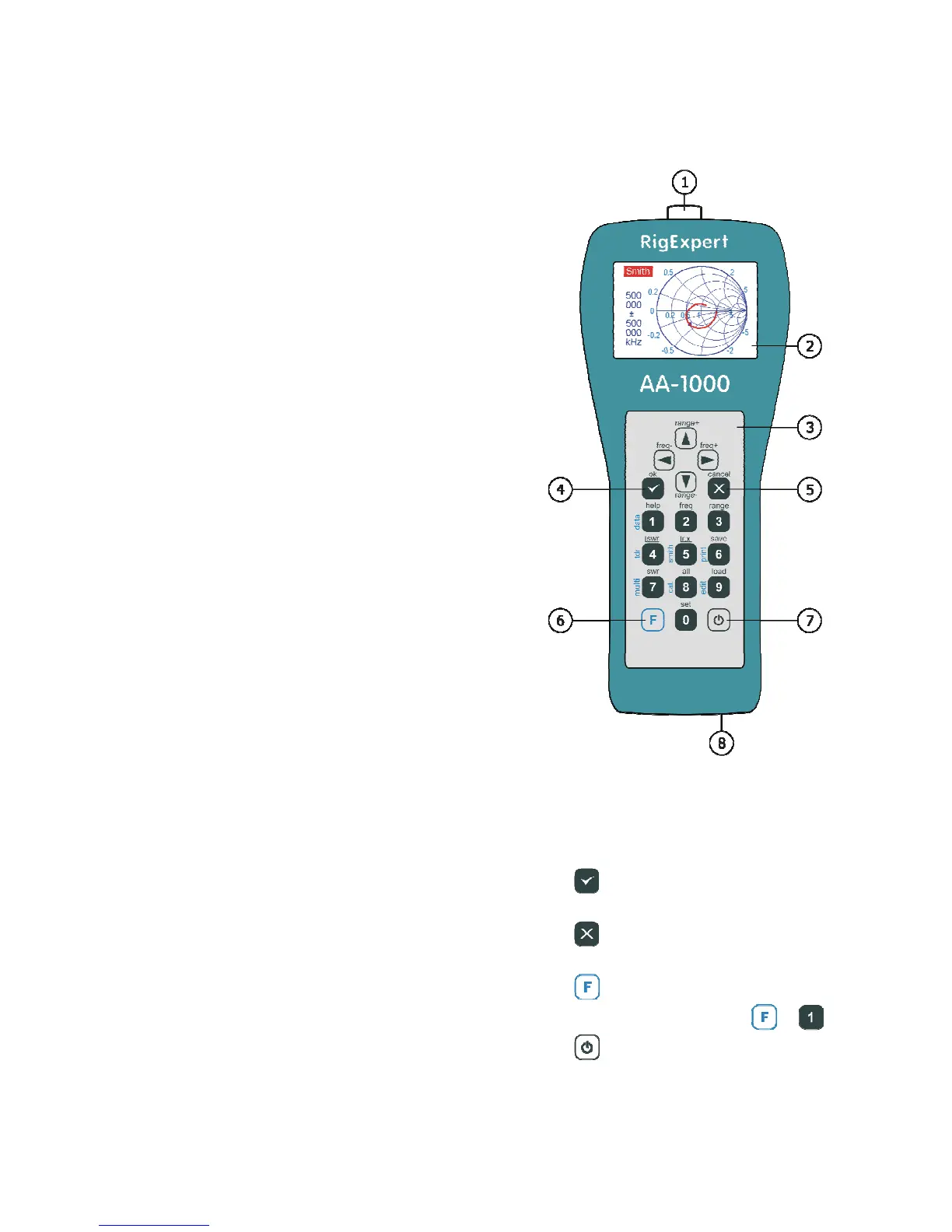
1. Antenna connector
2. LCD (Liquid Crystal Display)
3. Keypad
4. Ok button (start/stop
measurement, enter)
5.
Cancel
menu, cancel)
6. Function button
combination, such as +
7. Power on/off button
8. USB connector













 To Next Page