8
Before you can take advantage of the useful functions, it is
important to know the names and functions of the various
components.
This section describes these
component names and
functions.
Read This First
Component Names
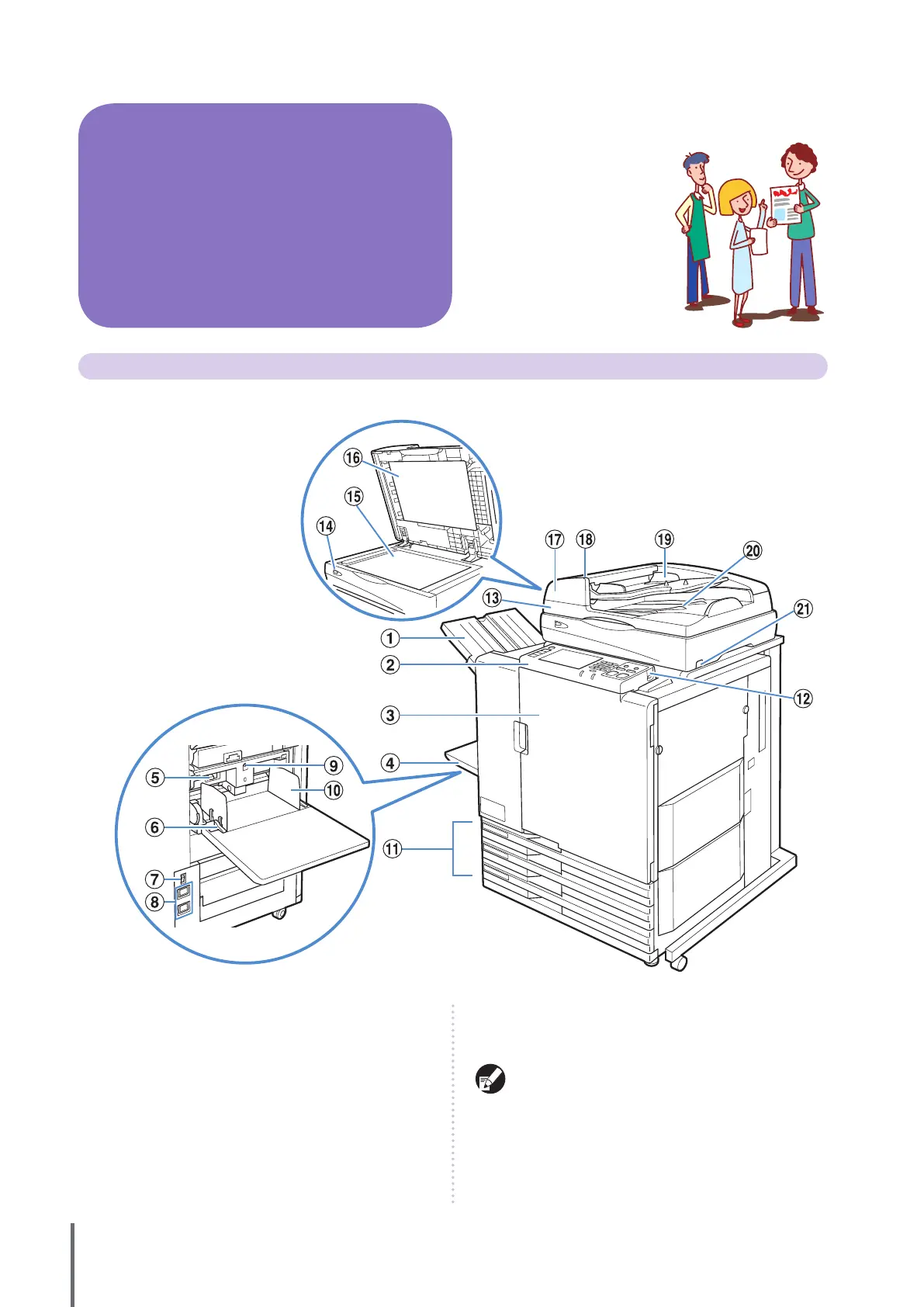
The ComColor 9050 is shown in this illustration.
●
① Face Down Tray
The printouts are output here face Down. When the optional
face down oset tray is installed, the machine stacks each
print job slightly shifted apart from one another.
② Operation Panel
Use to perform operations or settings. (See p. 11.)
③ Front Cover
Open when paper is jammed or when replacing an ink
cartridge.
Normally (when there are no problems such as paper jams), this
cannot be opened. When you want to open it, turn the [Front
doors release] to ON. For details, see “F
ront doors release” (p. 47).
④ Standard Tray
Load special paper (thick paper, envelopes, and so on) here.
Standard paper can also be loaded in the standard tray.
For details, see “P
aper and Originals” (p. 17).
ComColor Series Basic Guide 02










 To Next Page