19
Preparations for Use >> Paper and Originals
1
In the Standard Tray
1
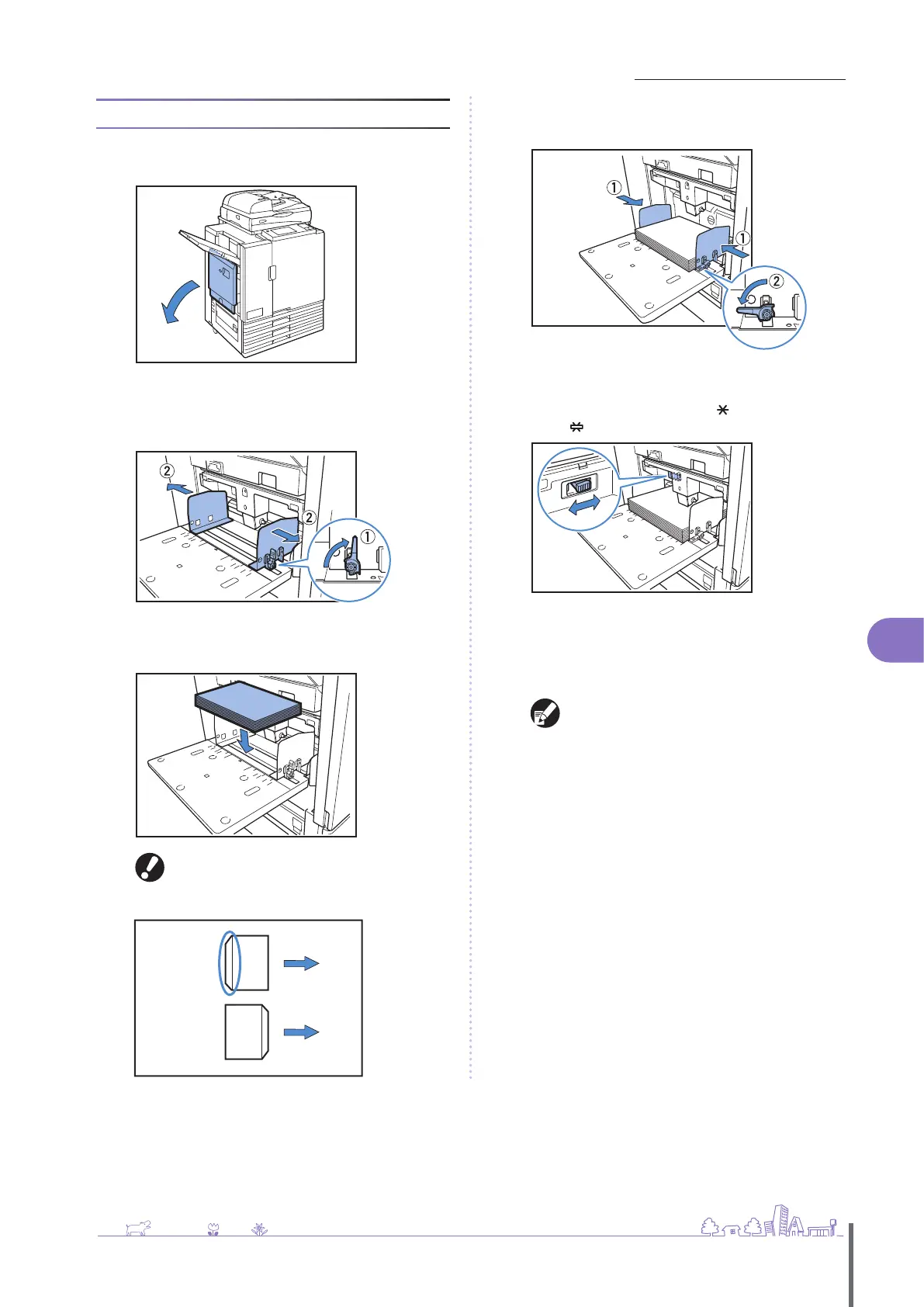
Open the standard tray until it stops.
2
Spread the guides.
Set the paper feed guide levers (in two positions on both
sides) to unlock the guides and slide the guides.
3
Load the paper.
Load paper with the printing side face-up.
Printing on envelopes requires a multifunction
nisher or stacking tray.
Be sure to load an envelope with its ap open
and its bottom side entering the machine rst.
•
•
NO
YES
4
Move the guides against the edges of the paper, and
push the lever to lock.
5
Set the paper feed pressure adjustment lever.
Normally, keep this lever position to (NORMAL) unless you
set it to (CARD) for envelopes and similar paper.
6
On the operation panel, check the tray settings.
When you have switched to a dierent type or size of paper,
update the feed tray settings. For details, see “Feed Tray”
(p. 39).
The [Rotate] feature is convenient when printing on
envelopes from a computer.
For details, see “Printing with Originals Rotated”
(p
. 33
).
ComColor Series Basic Guide 02
ComColor Series Basic Guide 02










 To Next Page