10
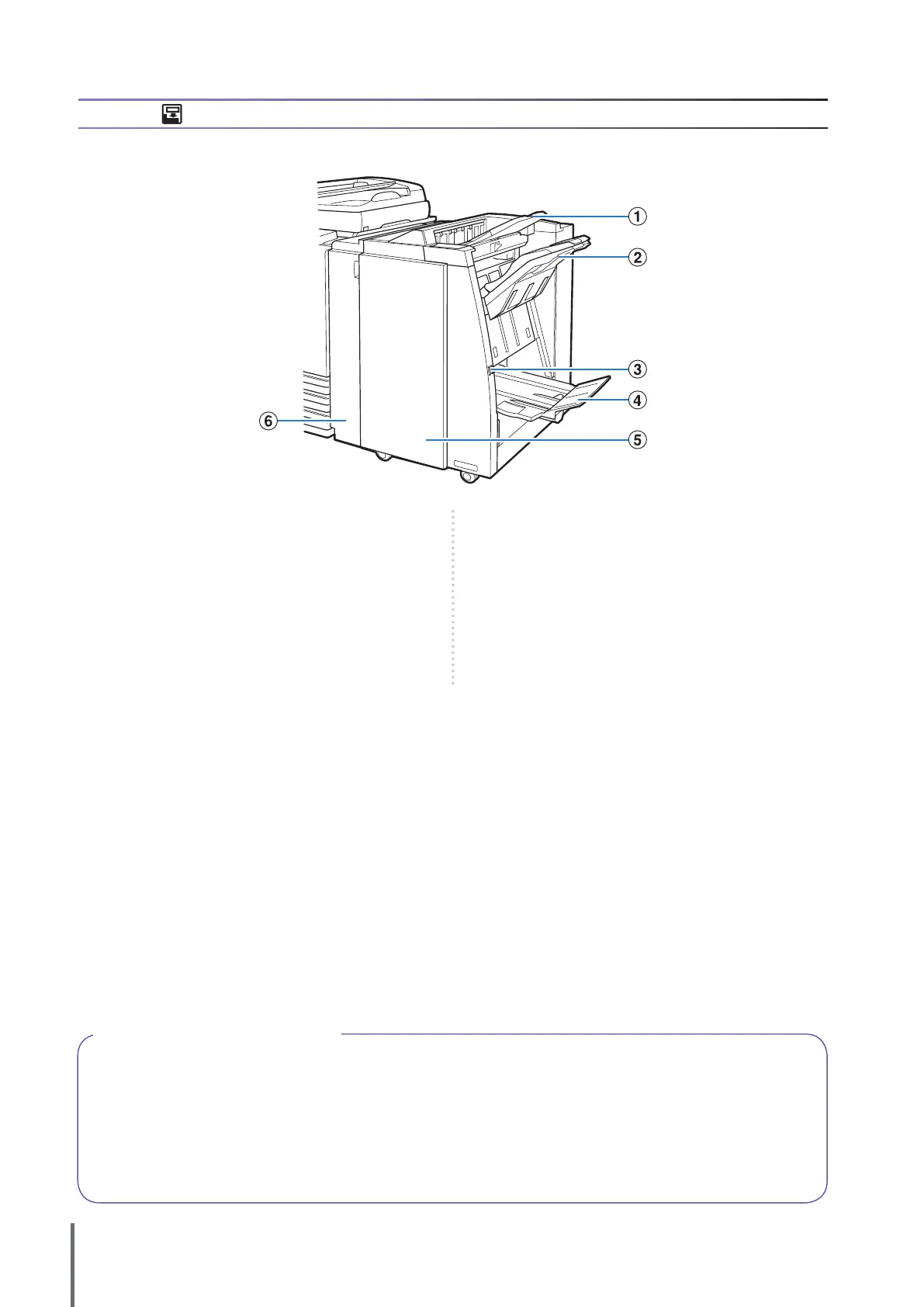
① Top Tray
The printouts are output here when punching is performed.
② Stacking Tray
The printouts are output here when the staple or oset
output function is used.
③ Eject Button
Use this button to move the printouts in the booklet tray to
the position where you can easily retrieve them.
④ Booklet Tray
Booklets and 2-fold printouts are output here.
⑤ Right Cover
Open to replace the staple cartridge or if paper is jammed.
⑥ Left Cover
Open to remove the jammed paper from the paper feed
path between the printer and the nisher.
Finisher
If you connect the optional multifunction nisher, you can staple or punch the printed paper or create a booklet.
Backlight OFF and Sleep Status
When the machine is not operated for a certain period of time, it automatically enters power saving mode depending on
how the administrator has congured the settings.
Backlight OFF
The status when the touch panel is o and the [Wake up] key lights up. In this case, normal status is restored
immediately after an original is loaded in the scanner or the [Wake up] key on the operation panel is pressed.
Sleep Status
The status when the touch panel is o and the [Wake up] key lights up. Press the [Wake up] key to restore. This takes
longer to restore than from backlight OFF.
●
●
ComColor Series Basic Guide 02










 To Next Page