28
Finishing Tab
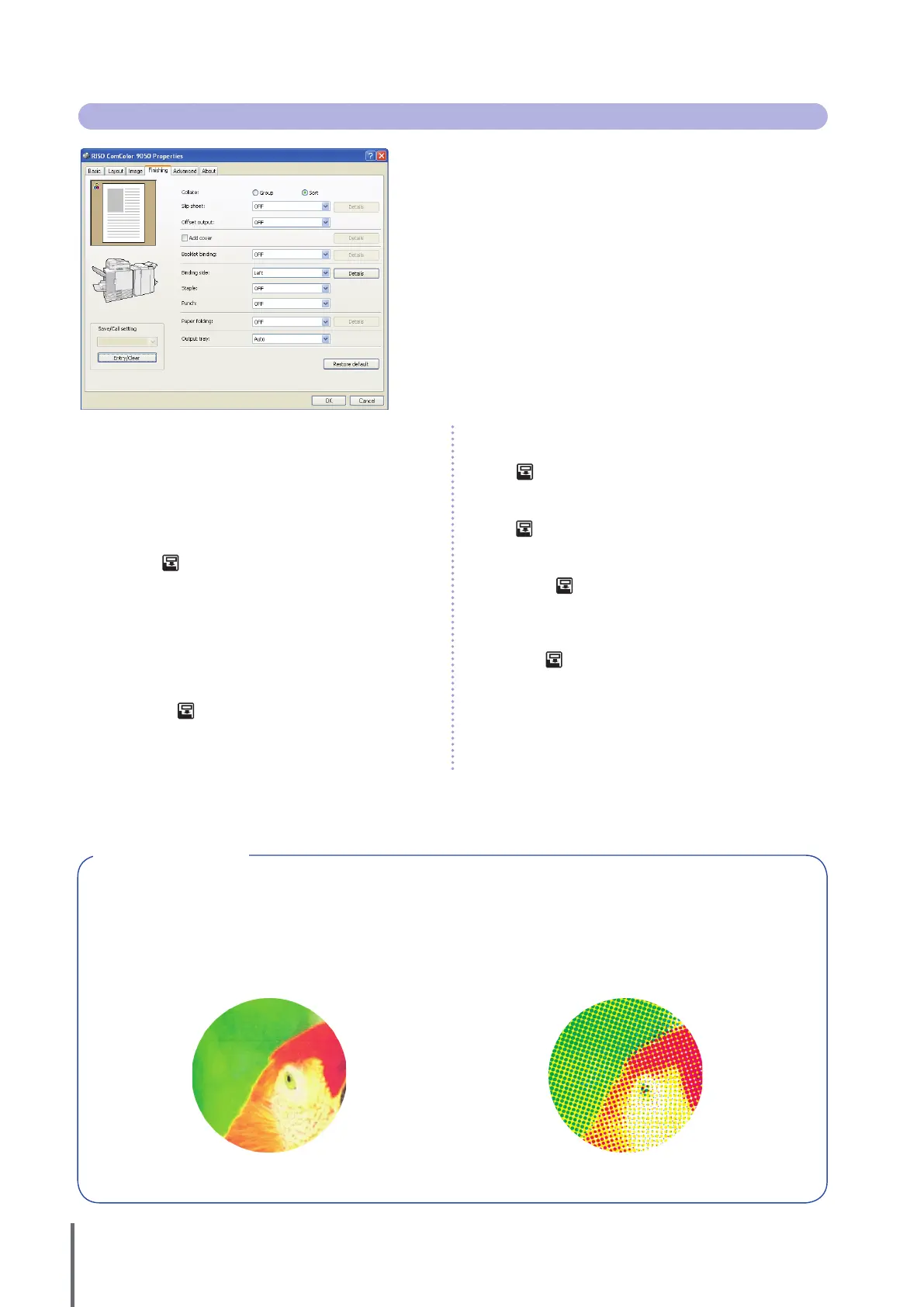
Complete nishing settings on this tab, such as for collation and
booklets.
[Collate]
Specify whether to print originals page by page or in sets.
[Slip sheet]
Specify whether to insert a sheet between printouts. When you have
selected [Between sets] or [Between jobs], you can specify the source
tray for these sheets in [Details]. Selecting [Between sets] will insert a
sheet between sets based on the unit specied in [Collate].
[Oset output]
When you have connected an optional multifunction nisher or face
down oset tray, you can select whether to oset printouts in
[Between sets] or [Between jobs].
[Add cover]
Specify whether to add a cover. Selecting this option will display
additional options under [Details], and you can specify the tray
where the front cover is loaded.
[Booklet binding]
When you have connected an optional multifunction nisher, specify
whether to create booklets. Selecting this option will display
additional options under [Details].
[Binding side]
Specify the position for binding. Details can be specied in [Details].
[Staple]
When you have connected an optional multifunction nisher, specify
whether to staple printouts.
[Punch]
When you have connected an optional multifunction nisher, specify
whether to punch holes in printouts.
[Paper folding]
When you have connected an optional multifunction nisher, specify
whether to fold printouts. Selecting an option other than [OFF] will
display additional options under [Details].
[Output tray]
When you have connected an optional multifunction nisher or the
stacking tray, specify the output destination.
[Save/Call setting], [Entry/Clear], and [Restore default]
See “Basic
Tab” (p. 26).
What is Screening?
Screening is a processing method that varies the density and size of ink dots printed on paper to give the appearance of
continuous color gradation when only using a limited number of inks. Two methods are available.
Error Diusion (Default Setting) Dot Process
Expresses gradation through the density of dots. We
recommend using this method for color printing of originals
that contain photographs.
Expresses gradation by changing the size of dots. We
recommend using this method when printing with only one or
a small number of colors.
Simulated Image●
ComColor Series Basic Guide 02










 To Next Page