13
Preparations for Use >> Read This First
1
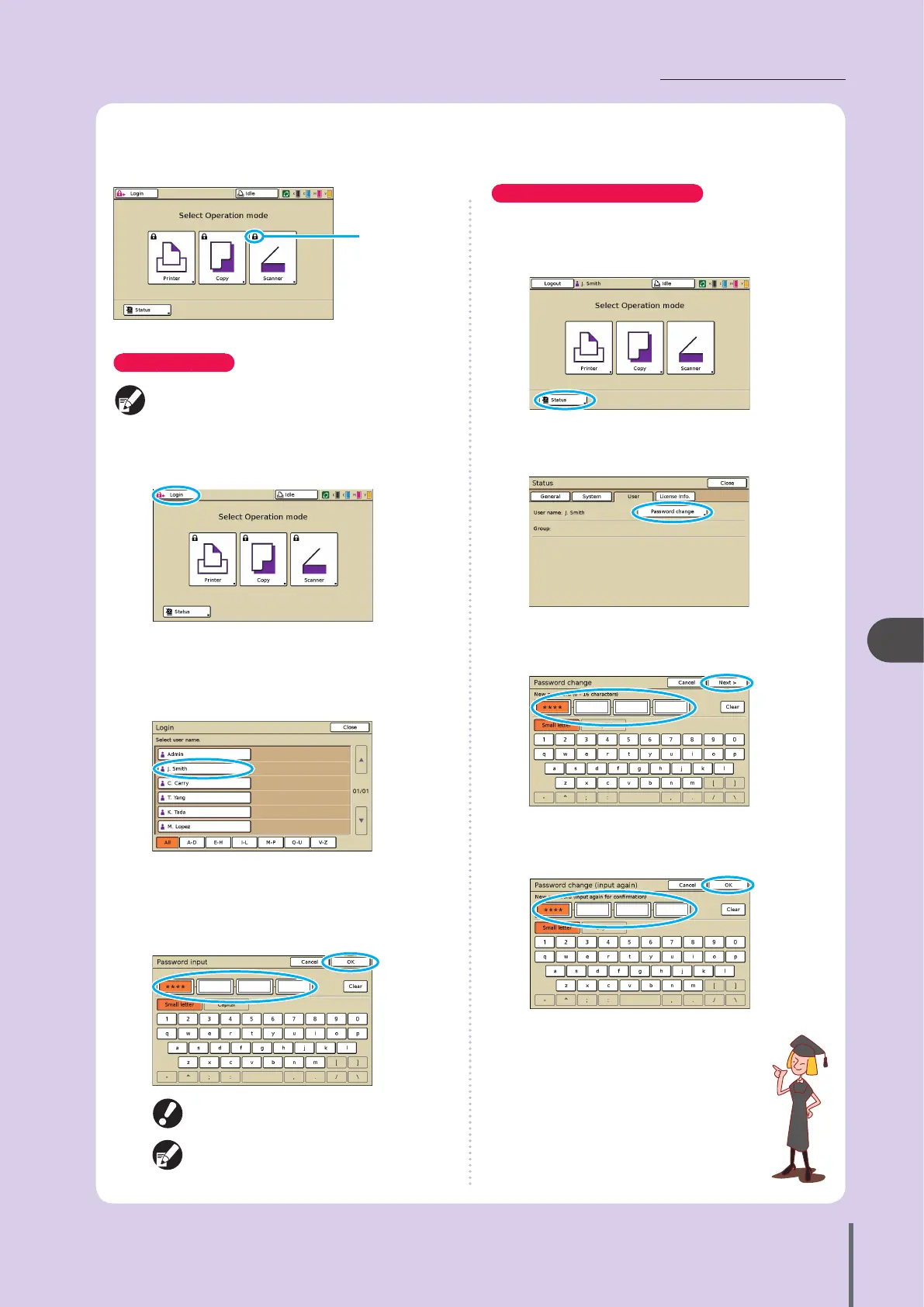
Lock icon
How to Log In
When using an optional IC card reader, you can log in
by holding the IC card over the card reader.
1
Press [Login].
2
On the [Login] screen, select your name.
To nd your name, press [▲] or [▼] at right to scroll
through names, or press the index buttons on the bottom
of the screen to display their corresponding names.
After you select your name, the [Password input] screen is
displayed.
3
Enter the password and press [OK].
After nishing operations, be sure to press
[Logout].
Ask your administrator if you cannot nd your
name, or if you have forgotten the password.
Changing Login Passwords
Login passwords can be changed.
1
Once you are logged in, press [Status] on the
mode screen.
2
On the [User] screen, press [Password change].
3
Enter the new password and press [Next].
4
On the [Password change (input again)] screen,
enter the new password again and press [OK].
Logging In
Lock icons in the upper left corner of mode buttons indicate that you must log in to access those modes.
ComColor Series Basic Guide 02
ComColor Series Basic Guide 02










 To Next Page