6.17. CYCLE PARAMETERS SETTING
1. Switch on the machine (See “Machine switching on and off”).
2. Choose the recipe number.
3. Press the button of the parameter to be edited to display the current value.
4. Press the buttons + / -, or scroll with the cursor, to increase or decrease the value until the required one is
obtained (See “programming window”).
This value will be stored in the relevant program.
6.18. DESCRIPTION OF THE WRAPPING CYCLES
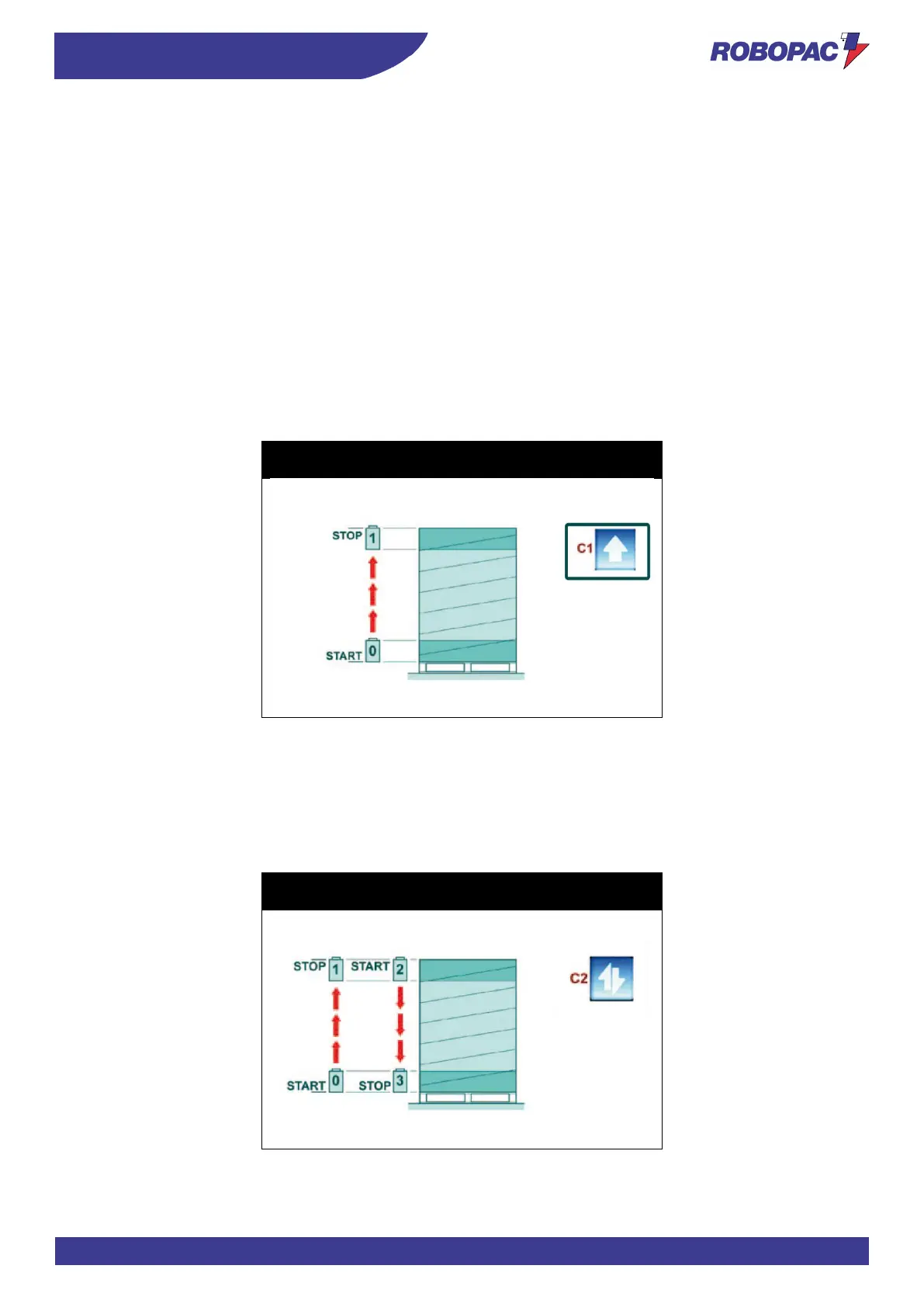
6.18.1. SINGLE WRAPPING CYCLE
To select the “single cycle”, press the button (C1) and check that the relevant LED turns on.
The spool carriage starts moving from the pallet base and stops when it reaches the upper end, after having
performed the required number of wrapping turns at the base and at the upper end of the pallet.
Press the “START” button again to perform a second single wrapping cycle which starts from the top and goes down
until reaching the pallet base.
(See Paragraph “Wrapping cycle page”).
6.18.2. DOUBLE WRAPPING CYCLE
To select the “double cycle”, press the button (C2) and check that the relevant LED turns on.
The spool carriage starts moving from the pallet base, rises until reaching the upper end and moves down until
reaching the base, performing a double load wrapping.
(See Paragraph “Wrapping cycle page”).



 To Next Page