➼
When used in combination with the STRING SELECT
dial, you can make settings for each string individually.
First, using the following procedure, let’s change the set-
ting of all the strings together.
<Changing the Transposition of the First Tone>
1. Select patch A43, which you used in selecting the
first tone in the section on tone numbers (TONE#),
then press [EDIT/PLAY] to enter Edit mode.
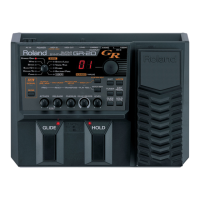
2. Set the EDIT TARGET dial to TONE MIX, and the
PARAMETER SELECT dial to “B” (TRANS 1ST).
3. Set the STRING SELECT knob on the top panel to
“ALL.”
4. Pressing the [+] and [-] buttons switches the set-
tings of all the strings simultaneously. The avail-
able range of transposition, by semitone units, is -
36 to +24. Setting the transposition to “12” raises
the sound by one octave; set it to “-24,” and the
sound is shifted down two octaves.
5. When you get it set to sound the way you like,
switch the PARAMETER SELECT dial to “WRITE
PATCH?”, and press the [+] and [-] buttons simul-
taneously to write the patch.
➼
When saving to another patch number, before step 5,
turn the PARAMETER SELECT dial to “WRITE
TO...”, and use the [+] and [-] buttons to designate a
patch number as the destination.
➼
To change the transposition of the second tone, at step 2,
set the PARAMETER SELECT dial to TRANS 2ND
(C) instead of TRANS 1ST (B), and change the transpo-
sition in the same manner as before. When you go ahead
and actually have the second tone sound, change the
LAYER setting using the previously mentioned proce-
dure on p. 34.
Choosing Different Settings for
Different Strings (STRING SELECT)
By using the STRING SELECT dial in conjunction
with the three TONE MIX settings — LAYER, TRANS
1ST, and TRANS 2ND, you can make settings for each
string individually.
<<fig 5-3>>
❍ When making settings for each string individually,
use the [+] and [-] buttons to change settings val-
ues, switch the STRING SELECT dial to any of the
string numbers 6 to 1. For example, turning the
dial to “3,” and then pressing the [+] and [-] but-
tons changes the settings for string 3. (After this,
when the STRING SELECT dial is switched to
“All,” the display starts to flash. This indicates
that the identical setting for all the strings is no
longer in effect. The number flashing in the dis-
play is the setting value for string 1.)
✽
In LAYER, the number displayed in the first place of the
display (the string number) switches to the selected
number, allowing you to check and see which string is in
the process of having settings made. However, in
TRANS 1ST and TRANS 2ND, due to the limited
number of places in the display, the string number does
not appear. While making these settings, carefully note
the position of the STRING SELECT dial.
❍ When you want to make settings to all of strings
together, switch the STRING SELECT dial to ALL.
Pressing the [+] and [-] buttons changes the set-
tings for all the strings simultaneously. If you
want to change the settings only on strings 5 and
6, turn the STRING SELECT dial to the 6—5 posi-
tion. (In LAYER, “L” (Low String) appears in the
first place of the display.)
➼
Other individual settings made with the STRING
SELECT dial that You can also send to external MIDI
devices include tone selection data and transposition.
(Refer to MIDI “PG CHNG#” (p. 72) and MIDI
“TRANSPOSE” (p. 76).)
Determining the Volume
Balance of Two Tones (1:2 BAL)
When the first and second tones are being played
simultaneously, you will need to balance the volume
of the two tones. You can set this for each patch using
the TONE BALANCE setting.
<Balancing the Volume of Two Tones>
1. Select a patch which has LAYER(p. 34) set so both
first and second tones play, then press
[EDIT/PLAY] to enter the Edit mode.
2.
Set the EDIT TARGET dial to TONE MIX, and the
PARAMETER SELECT dial to “D” (1:2 BALANCE).
3. With the [+] and [-] buttons, change the values,
within a range of -50 to 50. Setting to “50” pro-
duces the first tone only and to “-50” produces the
second tone only; setting to “0” makes the vol-
umes exactly the same.
35
5






 To Next Page
