6
Panel Descriptions
Multi-View Monitor Display
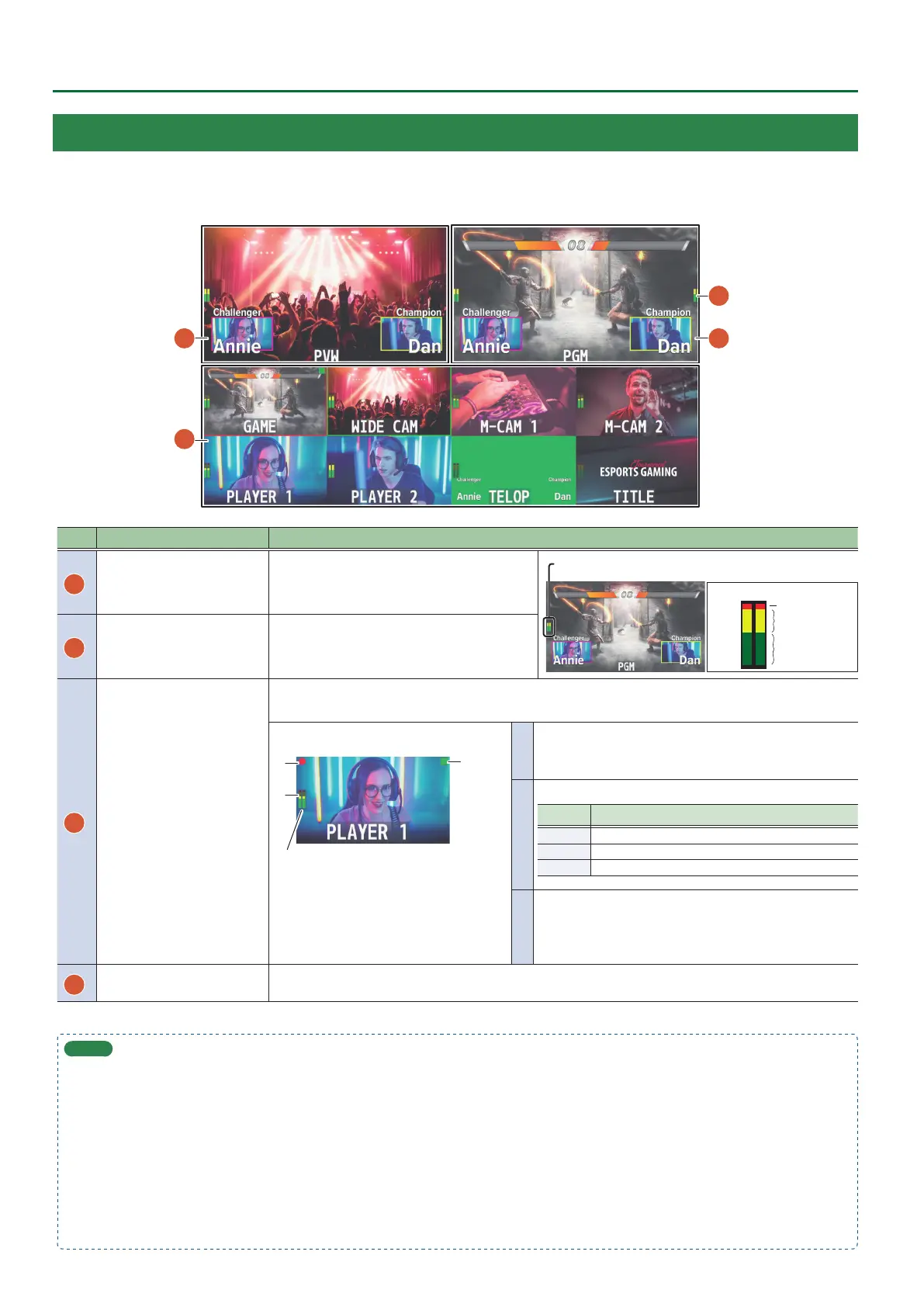
This unit’s monitor shows a list of the input/output video (nal output, preview output, input channels 1–8), a level meter, and a menu.
If you press the [MENU] button, the menu is shown overlaid on the multi-view.
1
2
3
4
No. Name Explanation
1
PVW (preview) section
Displays the preset video (the video to be output
next).
Displays the level meter for AUDIO OUT.
Red (Excessive)
Yellow (Suitable)
Green
(Insucient)
(dB)
-30
-20
-6
0
-50
2
PGM (program) section Displays the nal output video.
3
Channel section
Displays video input via channels 1–8.
The nal video output and preset video (the video to be output next) are displayed with tally frames.
Channel information
2
3
1
When the multi-view monitor is shown on an
external display, an “MT” indication is shown when
the audio mute function (p. 39) is on.
When the audio follow function (p. 37) is on, an
“A.F” indication is shown.
* This is not shown on this unit’s display.
1
Displays a audio level meter.
* The indicators for the level meter are the same as for AUDIO
OUT.
2
Indicates the function selected by the [MODE] button.
Indicator Explanation
Green AUX (AUX bus selected)
Yellow PinP 1 SOURCE (PinP 1 source screen selected)
Magenta PinP 2 SOURCE (PinP 2 source screen selected)
3
The REC indicator is shown.
If a camera that supports the HDMI REC TRIGGER function is
connected, this is shown when the camera’s REC button is
pressed.
4
AUDIO IN level meter
The audio level meter for AUDIO IN is shown above or below.
* The indicators for the level meter are the same as for AUDIO OUT.
MEMO
5 In the SYSTEM menu, you can specify whether the “label name,” “tally frame,” “audio level meter,” “AUX indicator,” “PinP indicator,” and “REC
indicator” are visible or hidden.
– MULTI-VIEW LABEL (label names)
– TALLY FRAME
– AUDIO LEVEL METER
AUDIO IN (AUDIO IN level meter)
– AUX/PinP INDICATOR (AUX indicator/PinP indicator)
– REC INDICATOR
5 You can edit the label name. Use the SYSTEM menu item “MULTI-VIEW LABEL EDIT” to edit the label name.
5 For details on the cameras that support the REC indicator function, refer to the Roland website.
https://proav.roland.com/



 To Next Page