68
Menu List
5: SPLIT/VFX
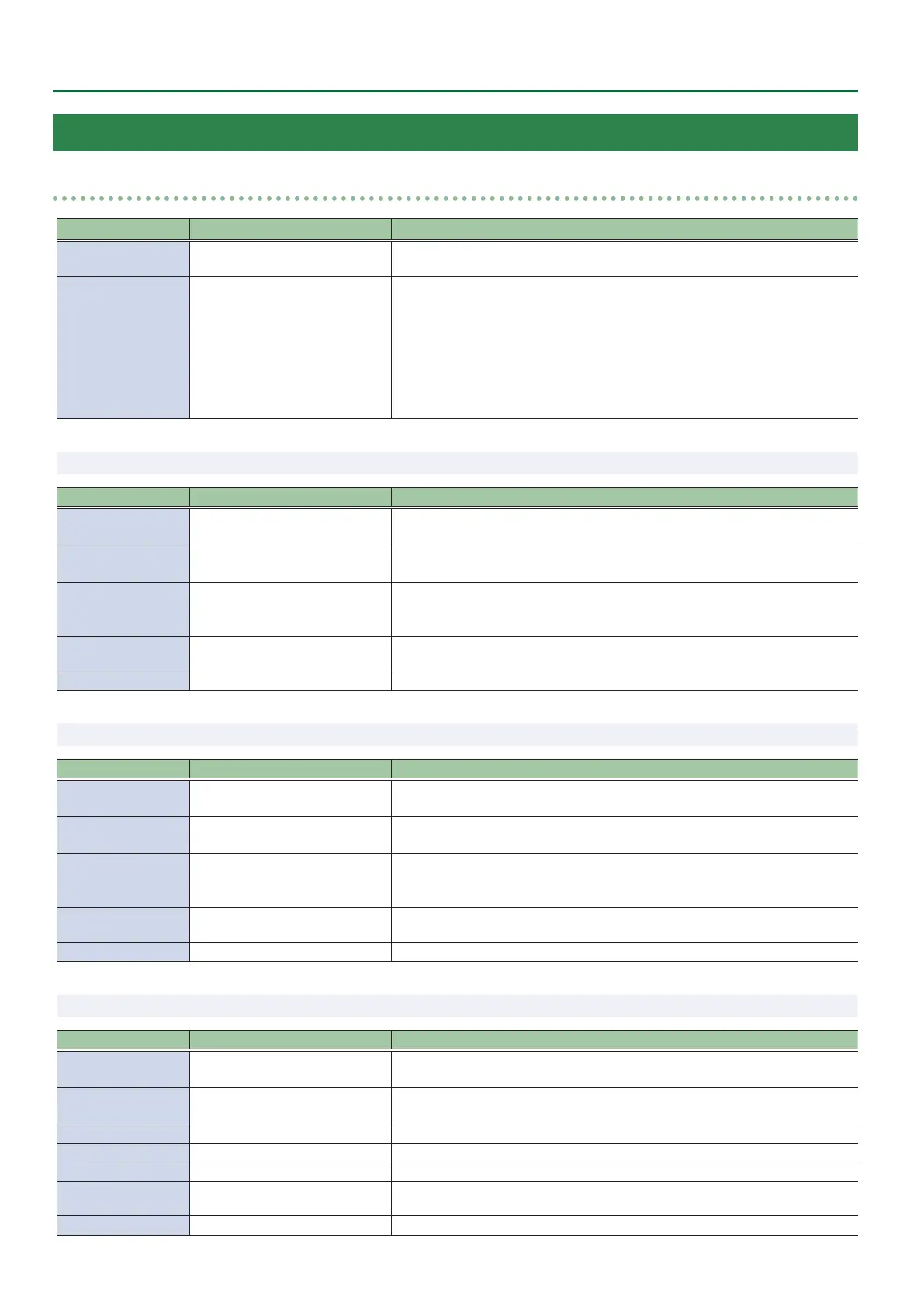
SPLIT/VFX A, B
Menu item Value (Bold: default) Explanation
SPLIT/VFX OFF, ON
Turns the split/visual eect on/o.
You can also use the SPLIT/VFX [A] or [B] button to turn this on/o.
SPLIT/VFX TYPE
SPLIT V, SPLIT H, PART MOSAIC,
BACKGROUND MOSAIC,
FULL MOSAIC, WAVE,
RGB REPLACE, COLORPASS,
NEGATIVE, COLORIZE, POSTERIZE,
SILHOUETTE, EMBOSS,
FIND EDGES, MONOCOLOR,
HUE OFFSET, SATURATION OFFSET,
VALUE OFFSET
Species the split/visual eect types.
* The menu items dier for each split/visual eect.
9 SPLIT/VFX TYPE: SPLIT V Composites two videos split vertically at their centers.
Menu item Value (Bold: default) Explanation
A-CENTER -25.0–0.0–25.0%
Adjusts the horizontal position of the video shown on the left (A/PGM side).
You can adjust this by turning the SPLIT/VFX [A] knob.
B-CENTER -25.0–0.0–25.0%
Adjusts the horizontal position of the video shown on the right (B/PST side).
You can adjust this by turning the SPLIT/VFX [B] knob.
CENTER POSITION -50.0–0.0–50.0%
Adjusts the position of the boundary.
You can change the size of the two videos by shifting the boundary line.
You can adjust this by turning the SPLIT/VFX [A] or [B] knob while pressing it.
BORDER COLOR
WHITE, YELLOW, CYAN, GREEN,
MAGENTA, RED, BLUE, BLACK
Species the color of the border.
BORDER WIDTH 0–3–14 Adjusts the width of the border.
9 SPLIT/VFX TYPE: SPLIT H Composites two videos split horizontally at their centers.
Menu item
Value (Bold: default)
Explanation
A-CENTER -25.0–0.0–25.0%
Adjusts the vertical position of the video shown above (A/PGM side).
You can adjust this by turning the SPLIT/VFX [A] knob.
B-CENTER -25.0–0.0–25.0%
Adjusts the vertical position of the video shown above (B/PST side).
You can adjust this by turning the SPLIT/VFX [B] knob.
CENTER POSITION -50.0–0.0–50.0%
Adjusts the position of the boundary.
You can change the size of the two videos by shifting the boundary line.
You can adjust this by turning the SPLIT/VFX [A] or [B] knob while pressing it.
BORDER COLOR
WHITE, YELLOW, CYAN, GREEN,
MAGENTA, RED, BLUE, BLACK
Species the color of the border.
BORDER WIDTH 0–3 –14 Adjusts the width of the border.
9 SPLIT/VFX TYPE: PART MOSAIC Applies a mosaic to the selected region.
Menu item Value (Bold: default) Explanation
POSITION H -100.0–0.0–100.0%
Adjusts the horizontal position of the selected area.
You can adjust this by turning the SPLIT/VFX [A] or [B] knob.
POSITION V -100.0–0.0–100.0%
Adjusts the vertical position of the selected area.
You can adjust this by turning the SPLIT/VFX [A] or [B] knob while pressing it.
AREA SIZE 10.0–40.0–100.0% Adjusts the size (zoom) of the selected area.
CORRECTION H -2000–0–2000 Adjusts the horizontal size of the selected area.
CORRECTION V -2000–0–2000 Adjusts the vertical size of the selected area.
BLOCK SIZE
OFF (1x1), 4x4, 8x8, 16x16, 32x32,
64x64, 128x128, 256x256
Species the neness (block size) of the mosaic.
MIX LEVEL 0–255 Adjusts the intensity (output level) of the video with the visual eect applied.


 To Next Page