75
Menu List
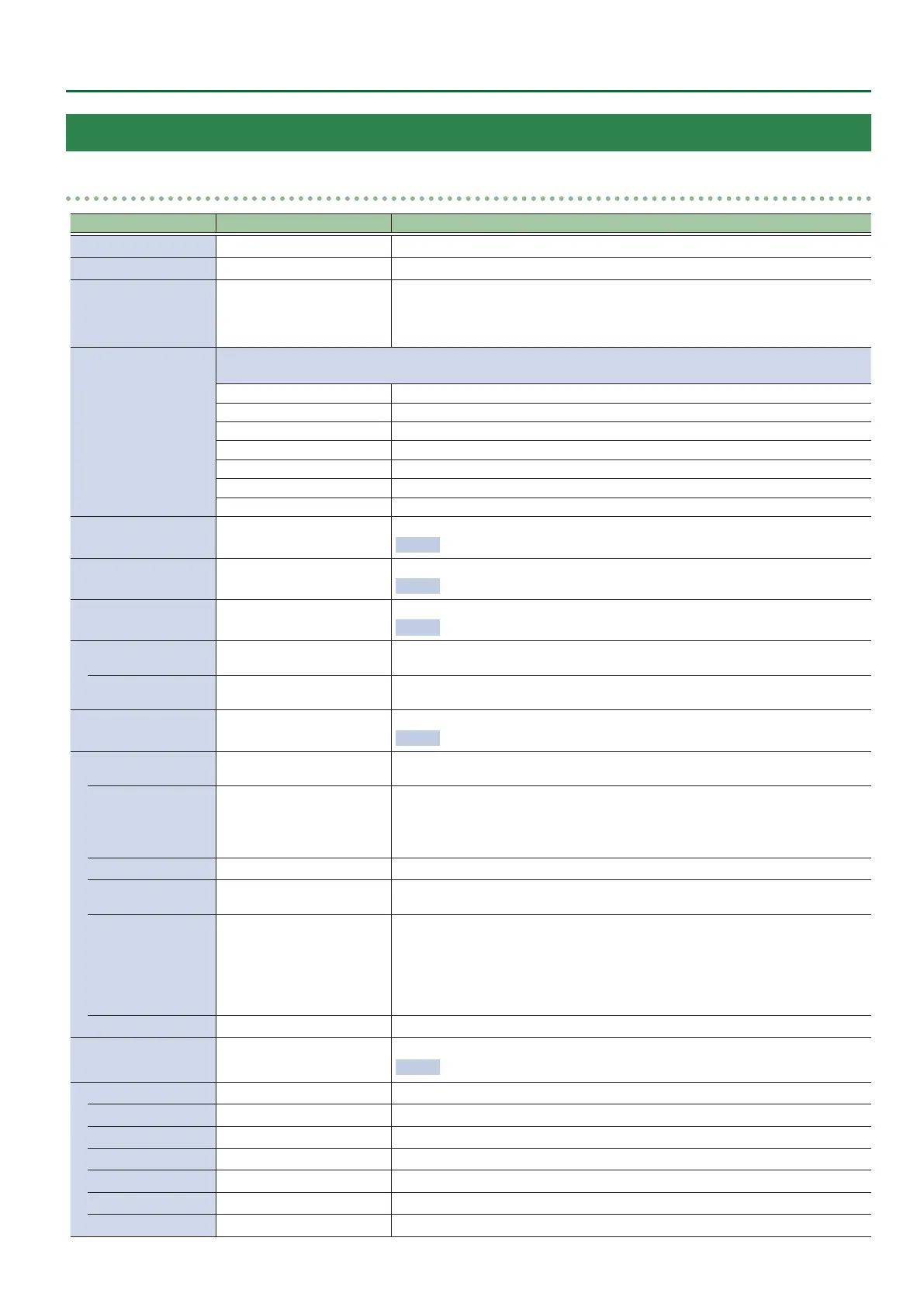
8: AUDIO INPUT
HDMI IN 1–8, AUDIO INPUT
Menu item Value (Bold: default) Explanation
INPUT LEVEL
-INF–0.0–10.0dB Adjusts the input volume.
INPUT MUTE
OFF, ON Turns the mute function on/o. If this is “ON,” the input audio is temporarily silenced.
SOLO
OFF, ON
Turns the solo function on/o. Only the audio for which this is “ON” is heard in the
headphones.
* The solo function applies to the headphone output. It does not aect output other
than the headphones.
EFFECT PRESET
Species an eect preset (high-pass lter, compressor, equalizer).
* When you change a preset, the settings of each eect are overwritten.
DEFAULT For line input (default setting)
MEETING For meetings
INTERVIEW For interviews
AMBIENT MIC For capturing ambient sound
WINDY FIELD For capturing ambient sound in a windy area
DE-ESS & POPS SOFT
For reducing sibilants
DE-ESS & POPS HARD For reducing plosives
DELAY
0.0–500.0msec
(0.0–29.9/25.0frame)
Adjusts the delay time of the audio.
Eect This outputs audio with a delay.
HIGH PASS FILTER 75Hz
OFF, ON
Turns the high-pass lter on/o.
Eect Cuts o unneeded low-band audio. The cuto frequency is 75 Hz.
NOISE GATE
OFF, ON
Turns the noise gate on/o.
Eect This mutes audio that is below a specied level.
THRESHOLD
-80.0–-50.0–0.0dB
Species the level used as the threshold for removing audio. Audio below the level set
here is removed.
RELEASE
30–380–5000ms
Adjusts the length of time until the audio is fully attenuated after audio falls below
the threshold.
COMPRESSOR
OFF, ON
Turns the compressor on/o.
Eect This compresses audio that exceeds a specied level.
THRESHOLD
-80.0–-50.0–0.0dB
Species the level used as the threshold at which the compressor is applied.
Compression is applied to audio that exceeds the threshold.
RATIO
1.00: 1, 1.12: 1, 1.25: 1, 1.40: 1,
1.60: 1, 1.80: 1, 2.00: 1, 2.50: 1,
3.20: 1, 4.00: 1, 5.60: 1, 8.00: 1,
16.0: 1, INF: 1
Species the degree of compression applied to the audio. The state in which no
compression is applied is dened as “1.”
ATTACK
0.2–1–100ms Species the time until compression starts when audio exceeding the threshold is input.
RELEASE
30–380–5000ms
Adjusts the length of time until compression ends after audio falls below the
threshold.
AUTO GAIN
OFF, ON
Turns the auto makeup gain feature on/o.
If this is “ON,” the nal output volume level after applying the compressor is
automatically adjusted according to the “THRESHOLD” and “RATIO” settings.
The total of the “MAKEUP GAIN” setting value described below and the value
calculated by auto makeup gain becomes the nal output volume level
(up to +34 dB).
MAKEUP GAIN
-40–0–40dB Adjusts the nal output volume after applying the compressor.
EQUALIZER OFF, ON
Turns the equalizer on/o.
Eect Adjusts the tone for each frequency band.
Hi GAIN -15.0–0.0–15.0dB
Boosts or attenuates the high band.
Hi FREQUENCY 1.0–10.0–20.0kHz
Species the center frequency when changing the tone in the high band.
Mid GAIN -15.0–0.0–15.0dB
Boosts or attenuates the middle band.
Mid FREQUENCY 20.0–500Hz–20.0kHz
Species the center frequency when changing the tone in the middle band.
Mid Q 0.5–1.0–16.0
Adjusts the width of the frequency band when boosting or attenuating the middle band.
Lo GAIN -15.0–0.0–15.0dB
Boosts or attenuates the low band.
Lo FREQUENCY
20.0–500Hz–20.0kHz Species the center frequency when changing the tone in the low band.


 To Next Page