67
Menu List
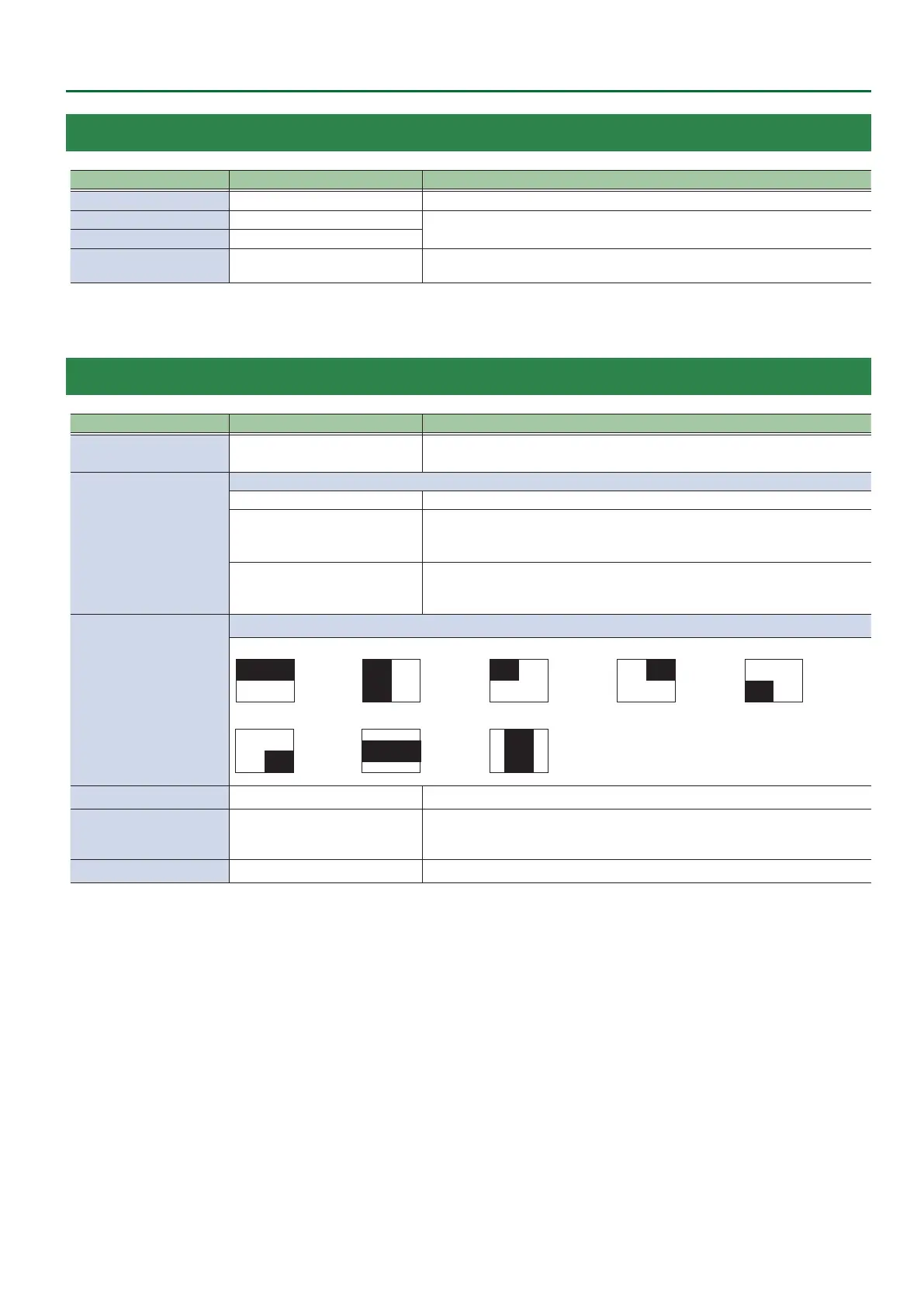
3: TRANSITION TIME
Menu item Value (Bold: default) Explanation
MIX/WIPE TIME 0.0–1.0–4.0sec Species the video transition time.
PinP 1 TIME 0.0–1.0–4.0sec
Species the fade time with which the PinP 1 or PinP 2 inset screen appears or
disappears when using Picture in Picture (PinP) compositing.
PinP 2 TIME 0.0–1.0–4.0sec
DSK TIME 0.0–1.0–4.0sec
Species the fade time with which the superimposed logo or video appears or
disappears when using DSK compositing.
4: MIX/WIPE
Menu item Value (Bold: default) Explanation
TRANSITION TYPE MIX, WIPE
Selects the mode of the transition eect.
You can also use the [TRANSITION] button to switch between MIX and WIPE.
MIX TYPE
Species the transition pattern for mix.
MIX The two pictures are blended together as the video is switched.
FAM
Video transitions are made with the luminance levels of the two video streams
maintained unchanged.
This is an abbreviation of “full additive mix.”
NAM
The two video streams are compared, and transitions are made with display
during transition starting with levels of high luminance.
This is an abbreviation of “non-additive mix.”
WIPE TYPE
Species the transition pattern for wipe.
HORIZONTAL VERTICAL UPPER LEFT UPPER RIGHT LOWER LEFT
LOWER RIGHT H-CENTER V-CENTER
WIPE DIRECTION NORMAL, REVERSE, ROUND TRIP Species the direction of wipe.
WIPE BORDER COLOR
WHITE, YELLOW, CYAN, GREEN,
MAGENTA, RED, BLUE, BLACK,
SOFT EDGE
Species the color of the border added to the edge of the wipe area.
If this is set to “SOFT EDGE,” the wipe border is blurred.
WIPE BORDER WIDTH 0–3–14 Species the width of the border added to the edge of the wipe area.


 To Next Page