84
Menu List
Menu item
Value (Bold: default)
Explanation
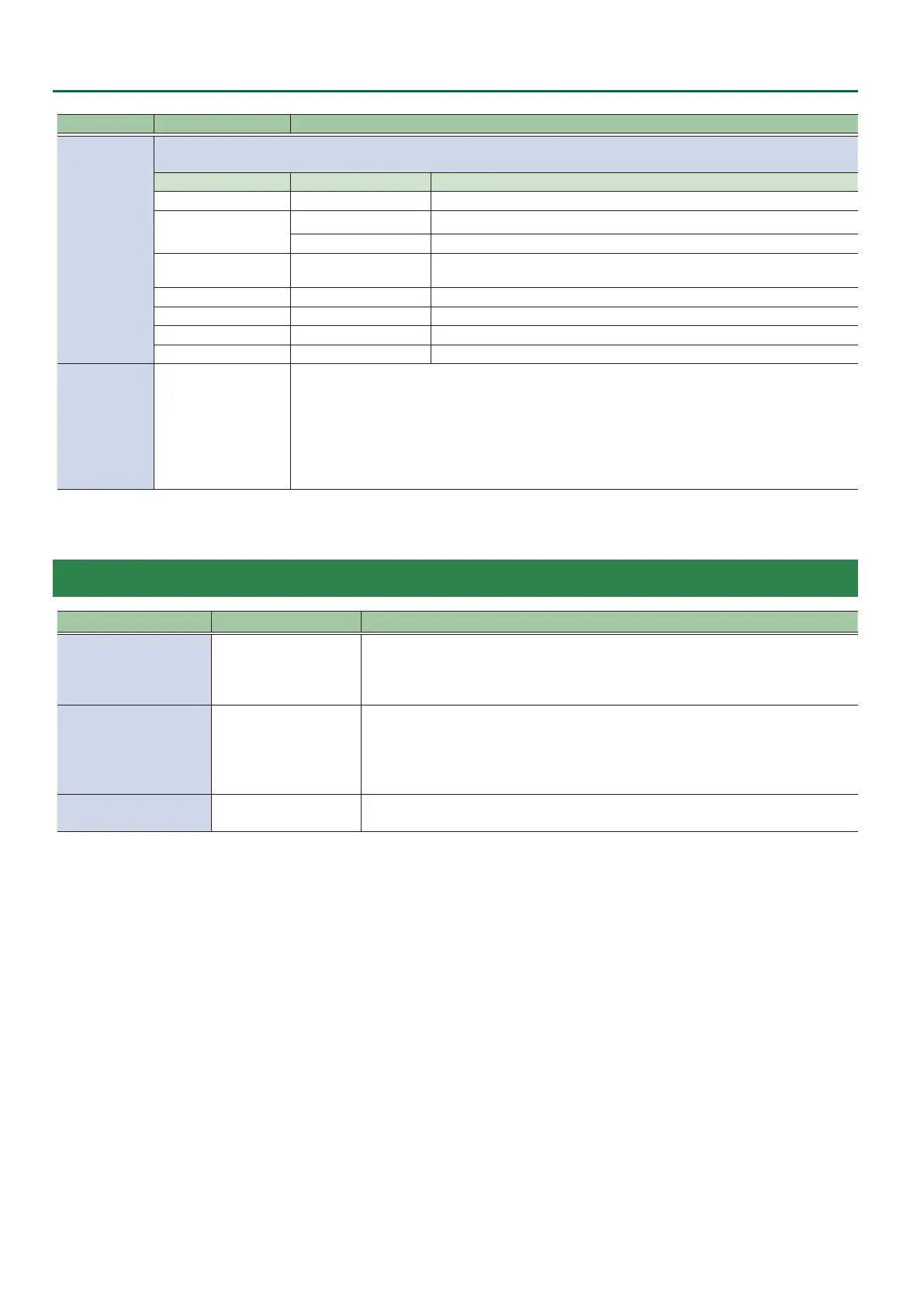
EXP
Species the function that is assigned to the expression pedal.
* This is valid when “CTL/EXP TYPE” is set to “EXP.”
CATEGORY VALUE
Explanation
N/A --- No function is assigned.
VIDEO FADER
FADE Operates the video fader.
H CUT I
Switches the video between A/PGM bus and B/PST bus as a cut.
VFX MIX LEVEL VFX A, VFX B
Adjusts the density (output level) of the video that is processed by the visual
eect A or B.
OUTPUT FADE LEFT, RIGHT The same function as turning the [OUTPUT FADE] knob to the left or right.
STILL OUTPUT STILL 1–8 Pauses the normal output, and previews or nal outputs a cut of the still image.
AUDIO INPUT LEVEL HDMI IN 1–8, AUDIO IN Adjusts the input volume.
AUDIO OUTPUT LEVEL MASTER OUTPUT, AUX Adjusts the output volume.
EXP CALIBRATE
ENTER
Displays the EXP CALIBRATE screen.
Following the direction on the screen, calibrate (adjust) the expression pedal.
The rst time you use the expression pedal, be sure to execute calibration so that the pedal will
operate optimally.
In some cases, the expression pedal might no longer be operating optimally because of the passage
of time or the conditions of use. In such cases you should also execute expression pedal calibration.
* This is valid when “CTL/EXP TYPE” is set to “EXP.”
18: USB MEMORY
Menu item Value (Bold: default) Explanation
RESTORE ALL SETTINGS ENTER
This loads settings that are in a preset memory saved on a USB ash drive.
When you press the [VALUE] knob, a list of the les in the USB ash drive appears.
When you select the le that you want to recall and press the [VALUE] knob, the contents
of this unit are overwritten.
BACKUP ALL SETTINGS ENTER
Saves the current settings as a le on the USB ash drive.
When you press the [VALUE] knob, a list of the les in the USB ash drive appears.
If you are saving as a new le, select “NEW FILE...” and enter a le name.
If you are overwriting an existing le, select that le in the list.
When you press the [VALUE] knob, the le is saved to the USB ash drive.
FORMAT EXEC
Formats the USB ash drive.
When you press the [VALUE] knob, format is executed.


 To Next Page