85
Menu List
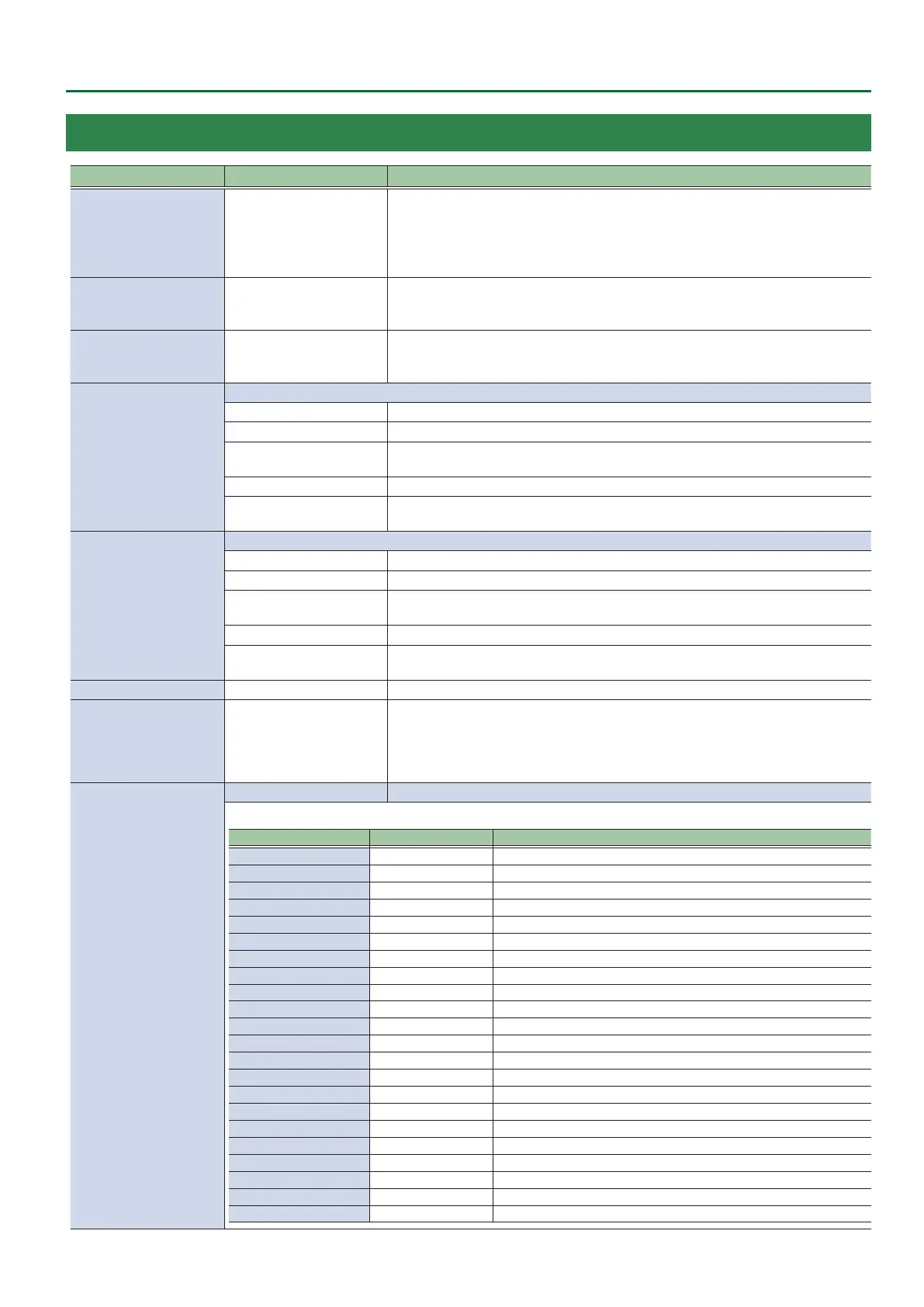
19: SYSTEM
Menu item
Value (Bold: default)
Explanation
HDCP
OFF, ON
Species whether HDCP is enabled (ON) or disabled (OFF).
When set to “ON,” copyright-protected (HDCP) video can be input.
HDCP is also added to the video that is output.
* When you change the setting, the change is not applied until you press the [VALUE]
knob to conrm.
FRAME RATE
60, 59.94, 50, 30, 29.97, 25,
24, 23.976Hz
Species the frame rate.
* A change in this setting does not take eect until you press the [VALUE] knob to
conrm, and then restart the unit.
SYSTEM FORMAT
1080p, 1080i, 720p
Species the system format for the V-8HD.
* When you change the setting, the change is not applied until you press the [VALUE]
knob to conrm.
CUT SW ASSIGN
Species the function of the [CUT] button.
H AUTO TAKE
When the video of the B/PST bus is selected, switches to the video of the A/PGM bus.
H AUTO TAKE I
Switches the video between A/PGM bus and B/PST bus.
H CUT
When the video of the B/PST bus is selected, switches to the video of the A/PGM bus as a
cut.
H CUT I
Switches the video between A/PGM bus and B/PST bus as a cut.
H TRANSFORM
Switches to the video of the A/PGM bus as a cut only while you’re holding down the
button.
AUTO SW ASSIGN
Species the function of the [AUTO] button.
AUTO TAKE I
When the video of the A/PGM bus is selected, switches to the video of the B/PST bus.
H AUTO TAKE I
Switches the video between A/PGM bus and B/PST.
CUT I
When the video of the A/PGM bus is selected, switches to the video of the B/PST bus as a
cut.
H CUT I
Switches the video between A/PGM bus and B/PST as a cut.
TRANSFORM I
Switches to the video of the B/PST bus as a cut only while you’re holding down the
button.
PANEL OPERATION
A/B, PGM/PST Species the operation mode for video transitions.
EFFECTS TRANSITION
SYNC
OFF, ON
Sets whether the PinP/DSK composites are switched on and o in tandem with the video
transitions.
When this is “ON,” the PinP/DSK composition turn on/o in tandem with the video
transitions. The composited result that is previewed is sent to nal output when
transitioning to a dierent video.
PANEL LOCK
ENTER Displays the following PANEL LOCK menu.
Enable (ON) or disable (OFF) the panel lock.
Menu item Value (Bold: default) Explanation
ALL SW & VOLUME OFF, ON Turns on/o the settings of the following buttons and knobs in a single action.
A/PGM 1–8 SW OFF, ON Cross-point A [1]–[8] buttons
B/PST 1–8 SW OFF, ON Cross-point B [1]–[8] buttons
CUT SW OFF, ON [CUT] button
AUTO SW OFF, ON [AUTO] button
MODE SW OFF, ON [MODE] button
AUX SW OFF, ON AUX [1]–[8] buttons
PinP 1 SOURCE SW OFF, ON PinP 1 [1]–[8] buttons
PinP 2 SOURCE SW OFF, ON PinP 2 [1]–[8] buttons
MEMORY SW OFF, ON MEMORY [1]–[8] buttons
MACRO SW OFF, ON AUX / PinP SOURCE / MEMORY [1]–[8] buttons
TRANSITION SW OFF, ON [TRANSITION] button
VIDEO FADER OFF, ON Video fader
SPLIT/VFX A BLOCK OFF, ON SPLIT/VFX [A] knob/button
SPLIT/VFX B BLOCK OFF, ON SPLIT/VFX [B] knob/button
PinP 1 BLOCK OFF, ON PinP 1’s [POSITION H] knob, [POSITION V] knob, [PVW] button, [ON] button
PinP 2 BLOCK OFF, ON PinP 2’s [POSITION H] knob, [POSITION V] knob, [PVW] button, [ON] button
DSK BLOCK OFF, ON DSK’s [LEVEL] knob, [GAIN] knob, [PVW] button, [ON] button
USER 1 SW OFF, ON USER [1] button
USER 2 SW OFF, ON USER [2] button
CAPTURE IMAGE SW OFF, ON [CAPTURE IMAGE] button
OUTPUT FADE OFF, ON [OUTPUT FADE] knob



 To Next Page