86
Menu List
Menu item
Value (Bold: default)
Explanation
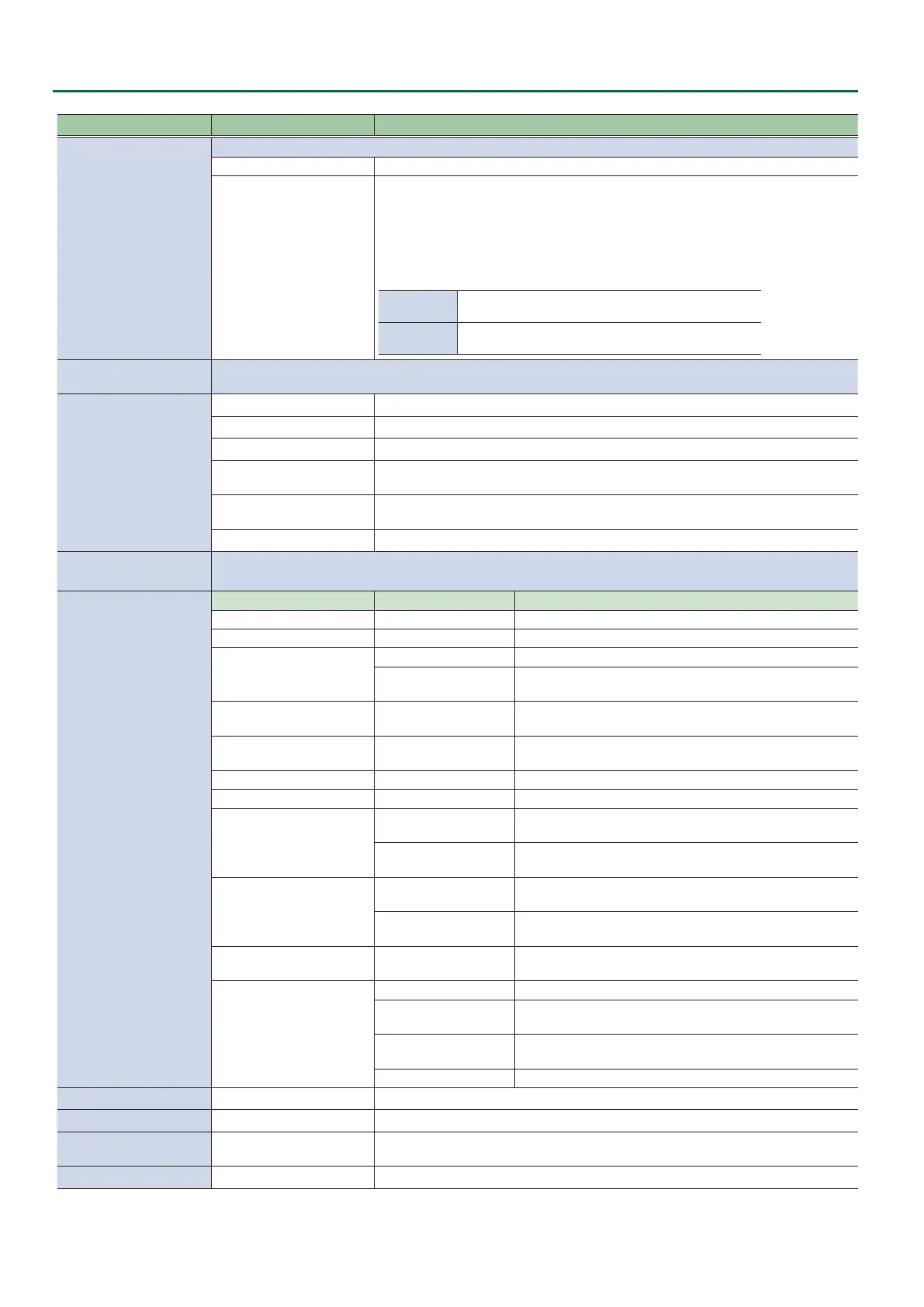
AUX LINKED PGM
Species whether the same video as the PGM bus is sent to the AUX bus (AUX link).
OFF Use the AUX [1]–[8] buttons to select the video of the AUX bus.
AUTO LINK
MANUAL LINK
AUX link is enabled, and the same video as the PGM bus is sent to the AUX bus.
Temporarily disabling AUX link
When you press an AUX [1]–[8] button, the selection of the AUX [1]–[8] button is
enabled (lit green).
Re-enabling AUX link
AUTO LINK
When you operate the [AUTO] button etc. to switch the video of
the PGM bus, AUX link is automatically enabled.
MANUAL LINK
When you press the AUX [1]–[8] button that is currently selected
(lit green), AUX link is enabled.
OUTPUT FADE ASSIGN
Species the functions that occur when you turn the [OUTPUT FADE] knob to the left (TURN LEFT) or to the right
(TURN RIGHT).
TURN LEFT
TURN RIGHT
BLACK Fade out to black.
WHITE Fade out to white.
AUDIO Adjust the volume of the output audio.
BLACK&AUDIO
(TURN LEFT)
Simultaneously apply the fade-to-black and the output audio volume adjustment
functions.
WHITE&AUDIO
(TURN RIGHT)
Simultaneously apply the fade-to-white and the output audio volume adjustment
functions.
STILL 1–8 OUTPUT Outputs the specied still image.
USER 1 SW
USER 2 SW
Species the function of the USER [1] [2] buttons.
ASSIGN
CATEGORY VALUE
Explanation
N/A --- No function is assigned.
FREEZE
(USER 1) --- Turns the freeze function on/o.
AUTO SWITCHING
(USER 2)
AUTO SWITCHING SW Turns the auto switching function on/o.
BPM TAP
If AUTO SWITCHING is “BPM SYNC,” you can set the BPM
according to the tempo at which you press the button.
INPUT ASSIGN INPUT 1–8
Each time you press a button, the video source of the
specied input channel switches.
STILL OUTPUT STILL 1–8
Pauses the normal output, and preview/nal outputs a cut of
the still image.
AUDIO INPUT MUTE HDMI 1–8, AUDIO IN Turns the mute function on/o for the input audio.
AUDIO OUTPUT MUTE MASTER OUTPUT, AUX Turns the mute function on/o for the output audio.
INPUT SCAN
NORMAL
Each time you press a button, the nal output switches from
INPUT 1–8 in sequential order.
REVERSE
Each time you press a button, the nal output switches from
INPUT 1–8 in reverse order.
MEMORY SCAN N
NORMAL
Each time you press a button, preset memories 1–24 are
recalled in sequential order.
REVERSE
Each time you press a button, preset memories are recalled
in reverse order from 24 through 1.
REC CONTROL ---
Controls the recorder’s video record start/stop if a recorder
that supports HDMI REC TRIGGER functionality is connected.
SEQUENCER
MODE ON/OFF Turns sequencer function on/o.
NEXT
When the sequencer function is on, the same operation as
when you press the [AUTO] button.
PREVIOUS
When the sequencer function is on, the same operation as
when you press the [CUT] button.
AUTO SEQUENCE Turns the auto sequence function on/o.
LED DIMMER
1–8 Adjusts the brightness when the buttons or indicators are lit.
LCD DIMMER
1–8 Adjusts the brightness of this unit’s display.
ON SCREEN MENU
UPPER LEFT, UPPER RIGHT,
LOWER LEFT, LOWER RIGHT
Species the location of the OSD menu displayed on the multi-view monitor.
TALLY FRAME
OFF, ON Species whether the tally frame is visible (ON) or hidden (OFF) in the multi-view monitor.



 To Next Page