87
Menu List
Menu item
Value (Bold: default)
Explanation
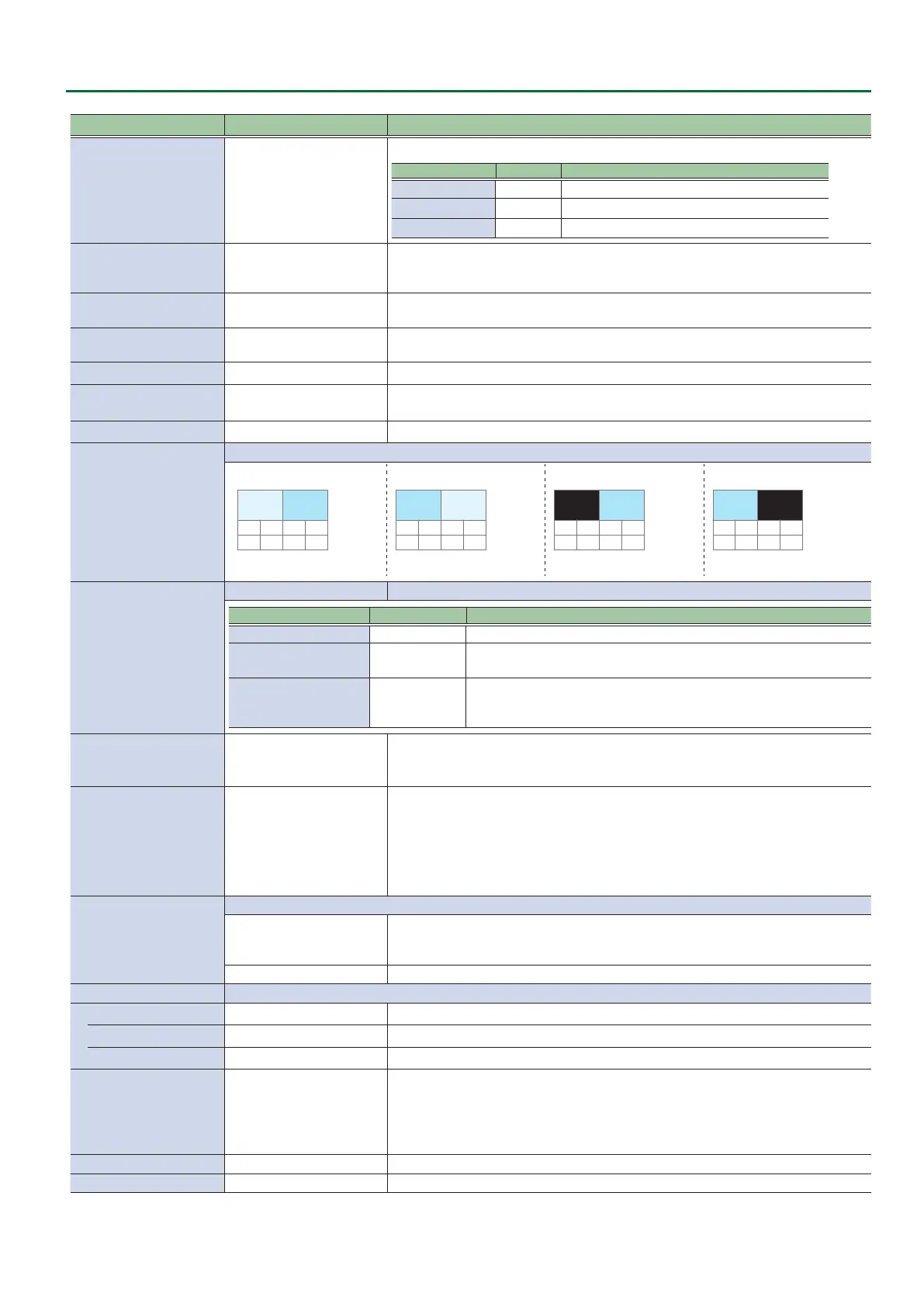
AUX/PinP INDICATOR
OFF, ON
If this is “ON,” a symbol is shown in the CH 1–8 section of the multi-view monitor.
[MODE] button Mark color Explanation
AUX Green Input channel being sent to the AUX bus
PinP 1 SOURCE Yellow Input channel specied as the PinP 1 source image
PinP 2 SOURCE Magenta Input channel specied as the PinP 2 source image
REC INDICATOR
OFF, ON
Species whether a REC indicator is shown (ON) or not shown (OFF) to indicate that
the REC button has been pressed on a connected camera that supports the HDMI REC
TRIGGER function.
AUDIO LEVEL METER
OFF, ON
Species whether the audio level meter is shown (ON) or not shown (OFF) in the multi-
view monitor.
AUDIO IN
OFF, LOWER, UPPER
Species whether the AUDIO IN audio level meter is shown (LOWER or UPPER) or not
shown (OFF).
MULTI-VIEW LABEL
OFF, ON Species whether the label is shown (ON) or not shown (OFF) in the multi-view monitor.
MULTI-VIEW LABEL EDIT
HDMI 1–8, STILL 1–8,
PROGRAM, PREVIEW, AUX
Edit the label name shown in the multi-view monitor.
Press the [VALUE] knob to access the MULTI-VIEW LABEL EDIT screen.
MULTI-VIEW LABEL SIZE
SMALL, NORMAL Species the text size of the label shown in the multi-view monitor.
MULTI-VIEW LAYOUT
Species the screen layout of the PVW section and PGM section shown in the multi-view monitor.
PVW.PGM PGM.PVW BLACK.PGM PGM.BLACK
PVW PGM PGM PVW
PGM
The PVW section is not shown.
PGM
The PVW section is not shown.
OUTPUT 3 OSD
ENTER Displays the following OUTPUT 3 OSD menu.
Menu item Value (Bold: default) Explanation
ON SCREEN MENU OFF, ON Species whether the menu is shown (ON) or not shown (OFF).
TALLY FRAME OFF, ON
Species whether the tally frame is visible (ON) or hidden (OFF) in the multi-view monitor.
* This is valid when “OUTPUT ASSIGN” is set to “MULTI-VIEW.”
LABEL/LEVEL METER/MARK OFF, ON
Species whether the “label,” “audio level meter,” “AUX indicator,” and “REC indicator” of the
multi-view monitor are shown (ON) or not shown (OFF).
* This is valid when “OUTPUT ASSIGN” is set to “MULTI-VIEW.”
AUTO INPUT DETECT OFF, ON
Turns the auto input detect function on/o.
If this is “ON,” and the video that is being output as the program disappears, the
program automatically switches to another input video.
AUTO OFF OFF, ON
Turns the Auto O function on/o.
If this is “ON,” the power to the V-8HD turns o automatically when all of the following
states persist for 240 minutes.
5 No operation performed on the V-8HD
5 No audio or video input
5 No equipment is connected to the OUTPUT connectors
TEST PATTERN
Species the test pattern.
OFF, 75% COLOR BAR,
100% COLOR BAR, RAMP,
STEP, HATCH
Selects the test pattern to display.
DISABLE, SLOW, FAST Species the scroll speed of the test pattern.
TEST TONE Species the test tone.
LEVEL
OFF, -20dB, -10dB, 0dB Species the volume level of the test tone.
FREQUENCY L
400Hz, 1kHz, 2kHz Species the frequency of the test tone for the L-channel.
FREQUENCY R
400Hz, 1kHz, 2kHz Species the frequency of the test tone for the R-channel.
VIDEO FADER CALIBRATE ENTER
Displays the VIDEO FADER SET screen.
Following the instructions on the screen, calibrate (adjust) the video fader.
In some cases, because of continued use or transport, the video output might not
reach 100% even if you slide the video fader all the way to the top or bottom. Execute
video fader calibration in this case as well.
FACTORY RESET EXEC Returns the unit to its factory defaults.
VERSION — Displays the version of the system program.



 To Next Page