82
Menu List
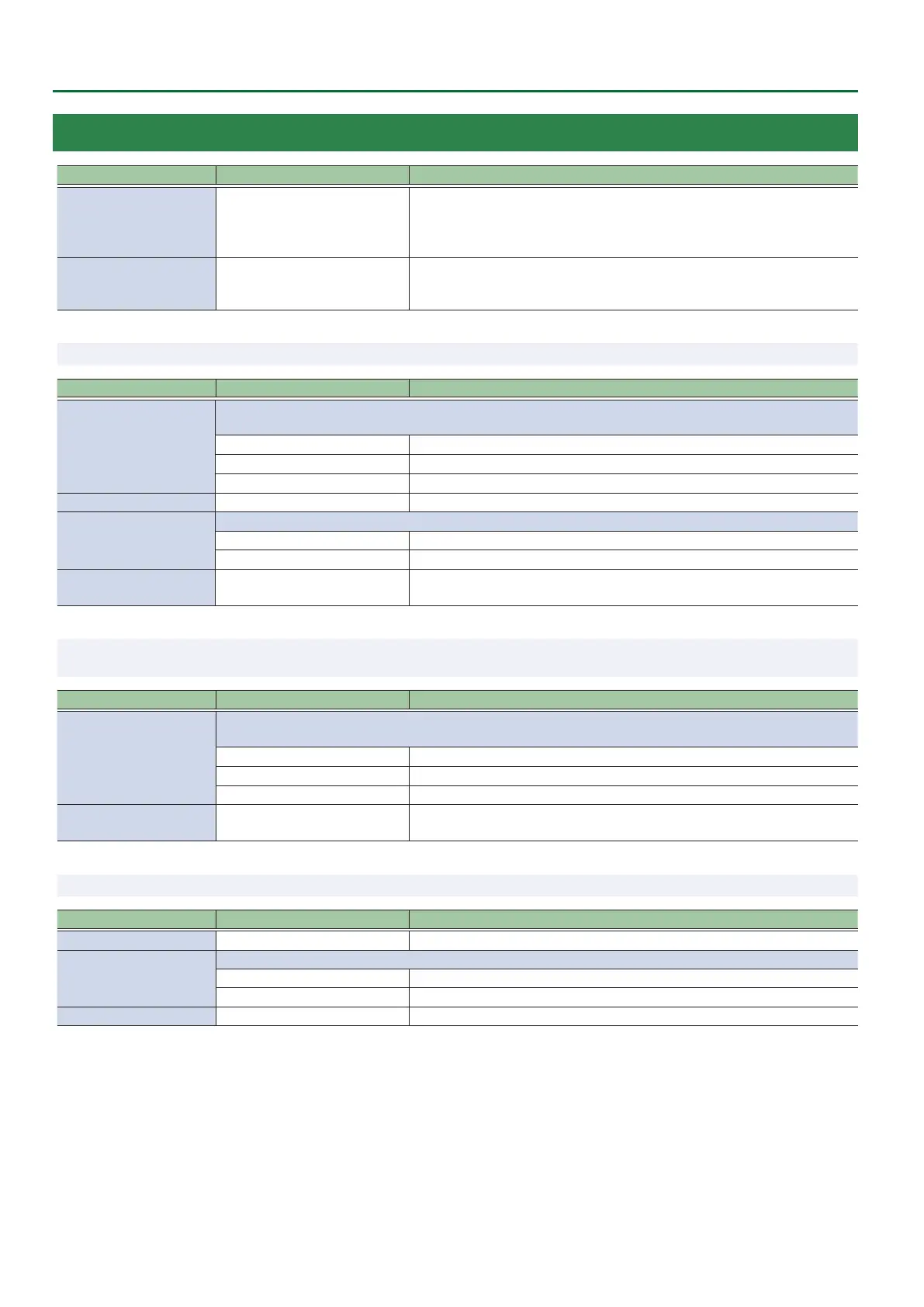
16: AUTO SWITCHING
Menu item Value (Bold: default) Explanation
AUTO SWITCHING OFF, ON
Turns the auto switching function on/o.
If this is “ON,” the INPUT 1–8 video or preset memory are switched automatically.
If “AUTO SWITCHING” is assigned to the USER [1] or [2] button, you can also
switch this by pressing the button.
TYPE
INPUT SCAN
PRESET MEMORY SCAN
BPM SYNC
Species the type of auto switching function.
* The menu items dier for each type.
9 TYPE: INPUT SCAN Automatically switches to the video of INPUT 1–8 when the specied time elapses.
Menu item
Value (Bold: default)
Explanation
SCAN SEQUENCE
Species the order in which video signals are shown.
Channels that have no video input are skipped.
NORMAL
Switches in the order of INPUT 108.
REVERSE
Switches in the order of INPUT 801.
RANDOM Switches randomly.
SCAN TRANSITION TIME 0.0–1.0–4.0sec Species the video transition time.
SCAN TARGET
Species the video bus in which video transition.
A/B Switches between A/PGM bus and B/PST bus.
PinP 1, PinP 2 Switches the video you want to make the inset screen of the PinP 1 or PinP 2.
INPUT 1–8 TIME OFF, 1–5–120sec
Species the time that the video is shown.
If this is “OFF,” video switching does not aect the input.
9 TYPE: PRESET MEMORY SCAN
This automatically switches between preset memories 1–8. The video and audio
are switched according to the settings that are saved in each preset memory.
Menu item Value (Bold: default) Explanation
SCAN SEQUENCE
Species the order in which preset memories are switched.
* Preset memories in which no settings have been saved are skipped.
NORMAL
Switches in the order of preset memory 1024.
REVERSE
Switches in the order of preset memory 2401.
RANDOM Switches randomly.
MEMORY 1–24 TIME OFF, 1–5–120sec
Species the time that the video is shown.
If this is “OFF,” video switching does not aect the input.
9 TYPE: BPM SYNC This automatically switches the video at specied BPM intervals.
Menu item Value (Bold: default) Explanation
BPM 20–120–250 Species the BPM.
MODE
Species how the picture is switched.
TRANSITION The picture switches using the currently selected transition eect (mix or wipe).
CUT The picture switches instantly.
SPEED x1/4, x1/2, x1, x2 Species the picture switching speed as a multiple of the specied BPM.


 To Next Page