79
Menu List
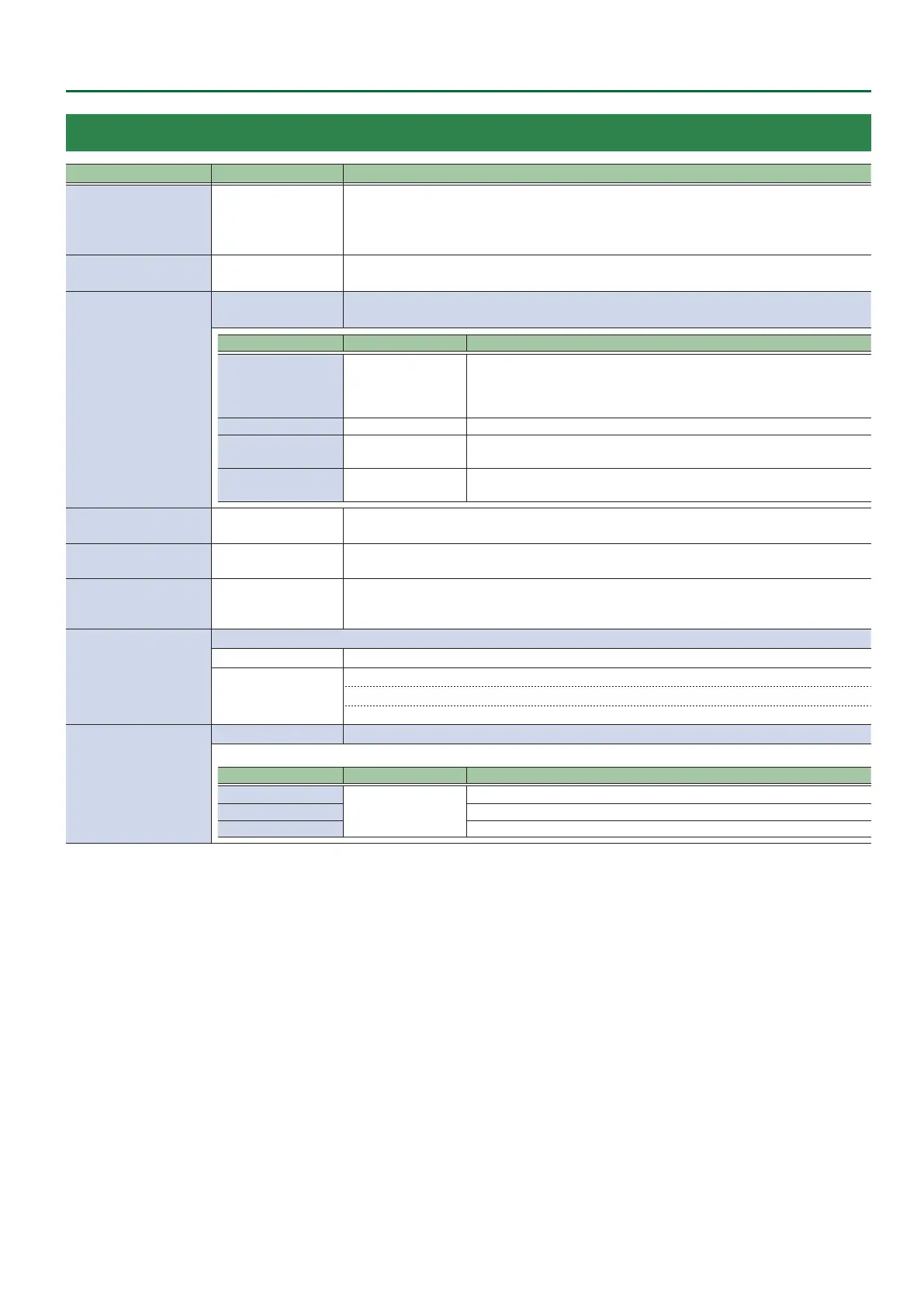
12: MACRO
Menu item Value (Bold: default) Explanation
EXECUTE
1: DEMO 1–
100: MACRO100 (*6)
Select a macro (a series of recorded operations) to execute.
Press the [VALUE] knob to execute the macro.
If MODE is macro (the [MODE] button is lit orange), you can use the AUX / PinP SOURCE /
MEMORY [1]–[8] buttons to execute macros 1–8.
INITIALIZE
ALL, 1: DEMO 1–
100: MACRO100 (*6)
Selects the macro to be initialized.
Press the [VALUE] knob to initialize the macro.
LIST EDIT
1: DEMO 1–
100: MACRO100 (*6)
Selects the macro to edit.
Press the [VALUE] knob to show the operations recorded in the macro.
Menu item Value Explanation
1: (operation name)–
10: (operation name)
—
Shows the list of operations recorded in the macro.
“----------” is shown if no operations are recorded.
Select an operation or “ADD NEW FUNCTION” and press the [VALUE] knob to display the
FUNCTION EDIT menu (p. 80) for editing the operation.
PREVIEW EXEC Previews the macro.
COPY MACRO TO
1: DEMO 1–
100: MACRO100 (*6)
Species the macro copy source.
Press the [VALUE] knob to copy the macro.
SWAP MACRO WITH
1: DEMO 1–
100: MACRO100 (*6)
Species the macro swap destination.
Press the [VALUE] knob to swap the macro.
NAME EDIT
1: DEMO 1–
100: MACRO100 (*6)
Selects the macro to be renamed.
Press the [VALUE] knob to access the screen for editing the name.
LOAD FROM USB
MEMORY
ENTER
Shows a list of the macro setting les (.RMF) that are on the USB ash drive.
You can select a macro setting le and load the macro (1–100) into the unit.
SAVE TO USB MEMORY ENTER
Shows a list of the macro setting les (.RMF) that are on the USB ash drive.
You can select the macro settings le used to overwrite the macro (1–100) to the USB ash
drive. If you selected “NEW FILE...,” a new macro settings le is saved.
NUMBER OF MACRO SW
When “MACRO” is selected on the [MODE] button, this sets how many buttons function as macro selection buttons.
8 Macro 1–8: AUX / PinP SOURCE / MEMORY [1]–[8] buttons
24
Macro 1–8: AUX / PinP SOURCE / MEMORY [1]–[8] buttons
Macro 9–16: Cross-point A [1]–[8] buttons,
Macro 17–24: Cross-point B [1]–[8] buttons
SW ASSIGN
ENTER Displays the following SW ASSIGN menu.
Species the macro assigned to each button.
Menu item Value Explanation
MACRO 1–8
1: DEMO 1–
100: MACRO100 (*6)
AUX / PinP SOURCE / MEMORY [1]–[8] buttons
PGM/A 1–8 (*7) Cross-point A [1]–[8] buttons
PST/B 1–8 (*7) Cross-point B [1]–[8] buttons
(*6) If you edited a macro’s name using “NAME EDIT,” the edited name is shown.
(*7) This can be set if “NUMBER OF MACRO SW” is “24.”



 To Next Page