83
Menu List
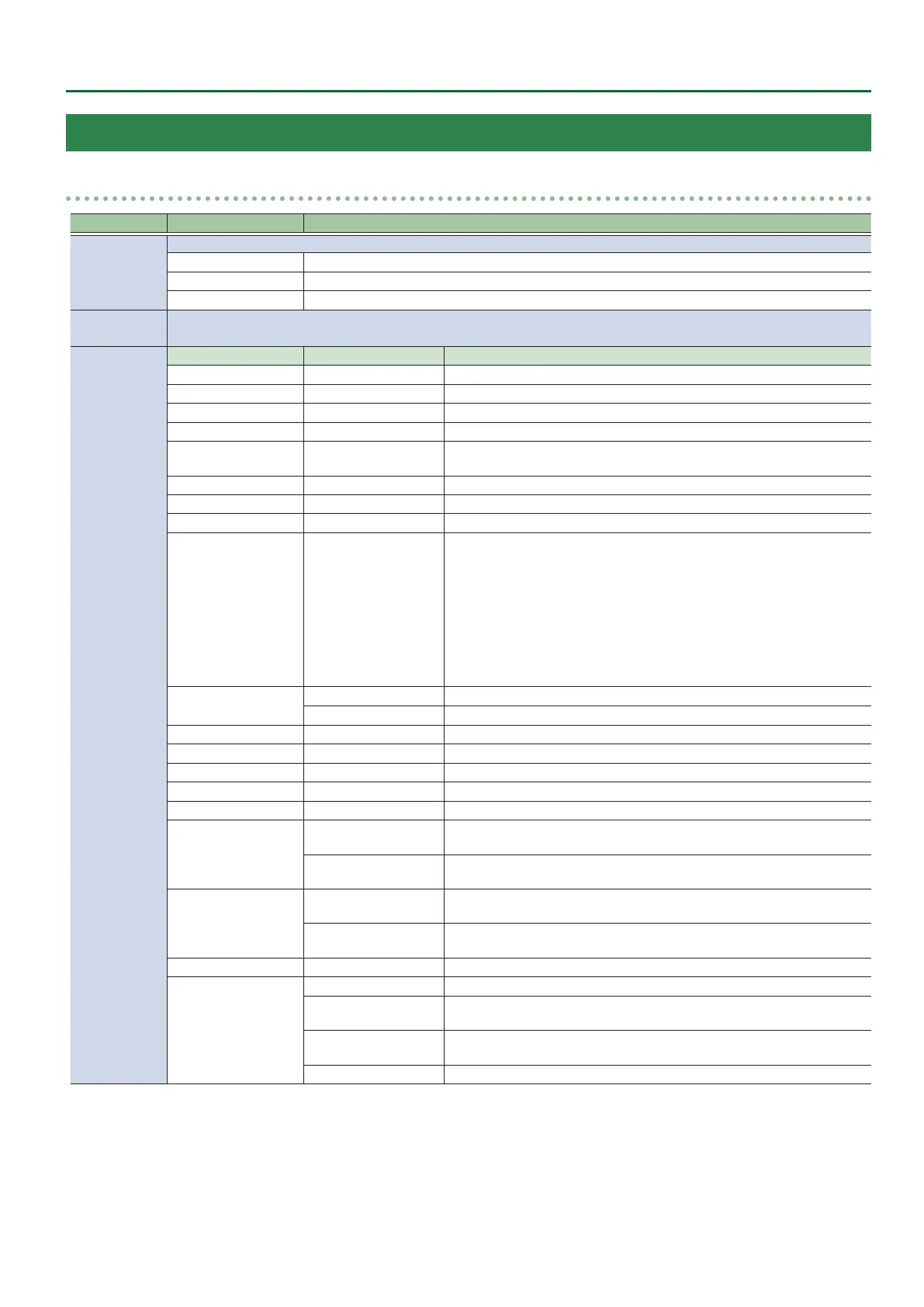
17: CTL/EXP
CTL/EXP 1, 2
Menu item
Value (Bold: default)
Explanation
CTL/EXP TYPE
Species the device (footswitch, expression pedal) that is connected to the CTL/EXP jack.
OFF Disables the CTL/EXP jack.
CTL A & CTL B Choose this if a footswitch is connected.
EXP Choose this if an expression pedal is connected.
ASSIGN
Species the functions that are assigned to CTL A and CTL B of the footswitch.
* This is valid when “CTL/EXP TYPE” is set to “CTL A & CTL B.”
CTL A
CTL B
CATEGORY VALUE
Explanation
N/A --- No function is assigned.
A/PGM CH SELECT INPUT 1–8 Switches the video sent to the A/PGM bus.
B/PST CH SELECT INPUT 1–8 Switches the video sent to the B/PST bus.
AUX CH SELECT INPUT 1–8 Switches the video sent to the AUX bus.
INPUT ASSIGN INPUT 1–8
Each time you press the footswitch, the video source of the specied input
channel switches.
STILL OUTPUT STILL 1–8 Pauses the normal output, and preview/nal outputs a cut of the still image.
PinP 1, 2 SOURCE HDMI 1–8, STILL 1–8 Switches the video shown in the PinP 1 or PinP 2 inset screen.
DSK SOURCE HDMI 1–8, STILL 1–8 Switches the DSK video source.
SW CONTROL
CUT SW, AUTO SW
TRANSITION SW
MODE SW
SPLIT/VFX A, B SW
PinP 1, 2 PVW SW
PinP 1, 2 ON SW
DSK PVW SW
DSK ON SW
USER 1, 2 SW
This works the same as when you press the button selected in “VALUE.”
TAKE
H AUTO TAKE I
Automatically switches the A/ PGM/ bus and B/PST bus videos.
H CUT I
Switches the video between PGM/A bus and PST/B bus as a cut.
AUDIO INPUT MUTE HDMI IN 1–8, AUDIO IN Turns the mute function on/o for the input audio.
AUDIO OUTPUT MUTE MASTER OUTPUT, AUX Turns the mute function on/o for the output audio.
AUDIO INPUT SOLO HDMI IN 1–8, AUDIO IN Turns the solo function on/o for the input audio.
OUTPUT FADE LEFT, RIGHT The same function as turning the [OUTPUT FADE] knob to the left or right.
LOAD MEMORY MEMORY 1–24 Recalls a preset memory.
INPUT SCAN
NORMAL
Each time you press the footswitch, the nal output switches from INPUT
1–8 in sequential order.
REVERSE
Each time you press the footswitch, the nal output switches from INPUT
1–8 in reverse order.
MEMORY SCAN
NORMAL
Each time you press the footswitch, preset memories 1–24 are recalled in
sequential order.
REVERSE
Each time you press the footswitch, preset memories are recalled in reverse
order from 24 through 1.
MACRO EXECUTE MACRO 1–100 Executes a macro (a series of recorded operations).
SEQUENCER
MODE ON/OFF Turns sequencer function on/o.
NEXT
When the sequencer function is on, the same operation as when you press
the [AUTO] button.
PREVIOUS
When the sequencer function is on, the same operation as when you press
the [CUT] button.
AUTO SEQUENCE Turns the auto sequence function on/o.



 To Next Page