5
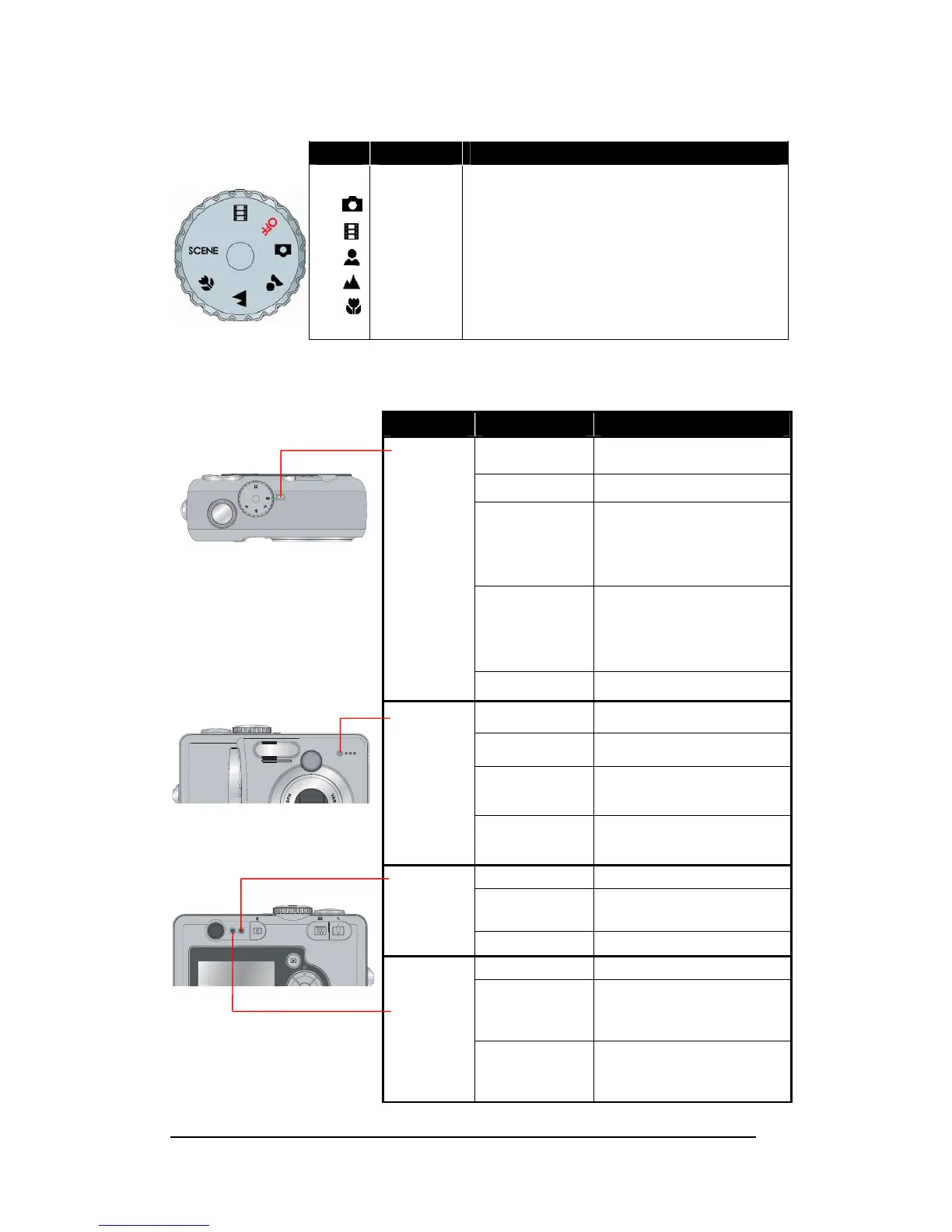
Mode Dial Selector
Icon Mode Function
Off
SCENE
Off
Full Auto
Movie
Portrait
Landscape
Close-up
Scene
Camera power off.
Capture- Full Auto Mode
Capture- Movie mode.
Capture -Portrait mode.
Capture -Landscape mode.
Capture –Macro mode.
More Scene modes available for Capture.
(Refer to P. 9 to 11 for details.)
LED Status
LED Type LED Status Camera Status
Off
Power OFF
Green Steady
Ready for taking pictures
Green Blinking
Busy mode when camera in
-Processing of image
reproduction
-PC link
Red Steady
Camera in error modes:
-Card/memory full
-Card corrupted
-Card protected
OFFOFF
SCENESCENE
Power
LED
Red Blinking
Insufficient battery
Off
Self-timer off.
Red Steady
Video is recording.
Red Blinking
Slow
Self-timer countdown for the
first 8 seconds
Self-timer
LED
Red Blinking
Fast
Self-timer countdown for the
last 2 seconds
Off
Flash off
Red Steady
Flash will fire at next
shooting.
Flash LED
Red Blinking
Flash is charging.
Off
Shutter at released position
Green Steady







 To Next Page