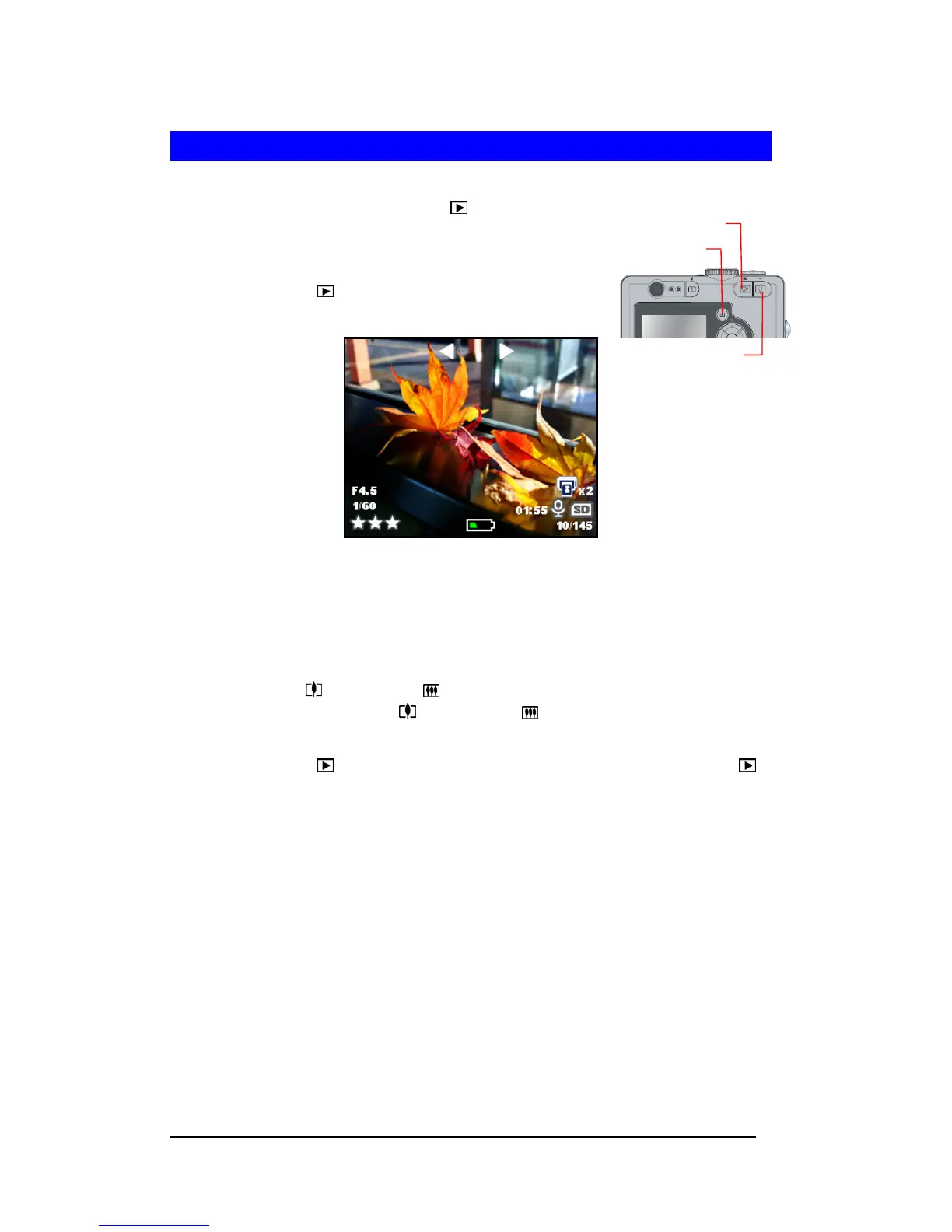
Playback Button
Zoom-out Button
Zoom-in Button
Playback Still Images
Playback a Still Image
1 Turn on camera and press Playback ( ) button.
2 Press Left-arrow (e)or Right-arrow (f) button to
navigate images.
3 Press Playback ( ) button again to return Capture
mode.
Magnifying a Still Image
The playback image can be magnified up to 6 times of its original size at an increment of 0.5
per step.
1 Follow Step 1-2 of “Playback a Still Image”.
2 Press Zoom-In ( ) or Zoom-Out ( ) button to magnify or shrink the image. You may
press and hold the Zoom-In
( ) or Zoom-out ( ) button to swiftly magnify image up
to its maximum size or back to its original size.
3 Press Playback ( ) button, camera will back to the original size. Press Playback ( )
button again to return Capture mode.







 To Next Page