20
OKOK
LCD
ON/OFF
LCD
ON/OFF
AFAF FLASHFLASH
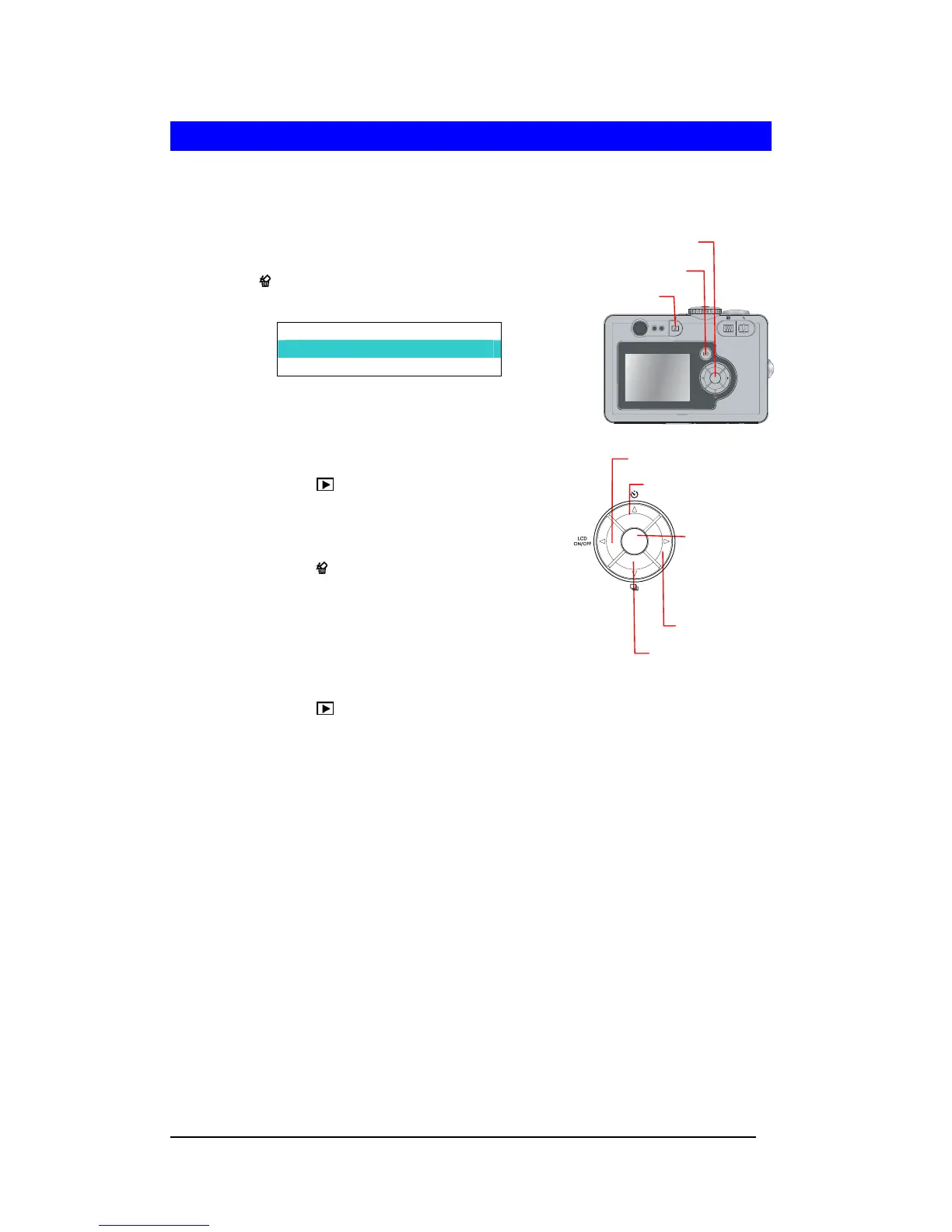
Playback Button
Menu/OK Button
Delete Button
Deleting Images
Deleting Single Image in QuickView
1 After a picture is taken, the image will have a
QuickView. While the image is on display, press the
Delete (
) button and a confirmation screen will pop
out.
DELETE?
No
Yes
2 Press Down-arrow (d) to select “Yes” and press
<Menu/OK> button to delete image.
Deleting Single Image in Playback
1 Press Playback ( ) button.
2 Press Left-arrow (e) or Right-arrow (f) to select the
image to be deleted.
3 Press DELETE ( ) button and a delete confirmation
screen will pop out. Press Down-arrow (d) or
Up-arrow (c) to select “Yes” and press <Menu/OK>
button to delete.
Deleting All Images
1 Press Playback ( ) button.
2 Press <Menu/OK> button. Press Down-arrow (d) or Up-arrow (c) to select
“DELETE “and press <Menu/OK> button to enter the DELETE submenu.
3 Select “All Images in the Memory”. Or select “All images in the Card”, if a SD/MMC card
is installed. Press the Menu/OK button to delete all images.
Up-Arrow Button
Left-Arrow Button
Right-Arrow Button
Down-Arrow Button
Menu/OK Button
OKOK







 To Next Page