24
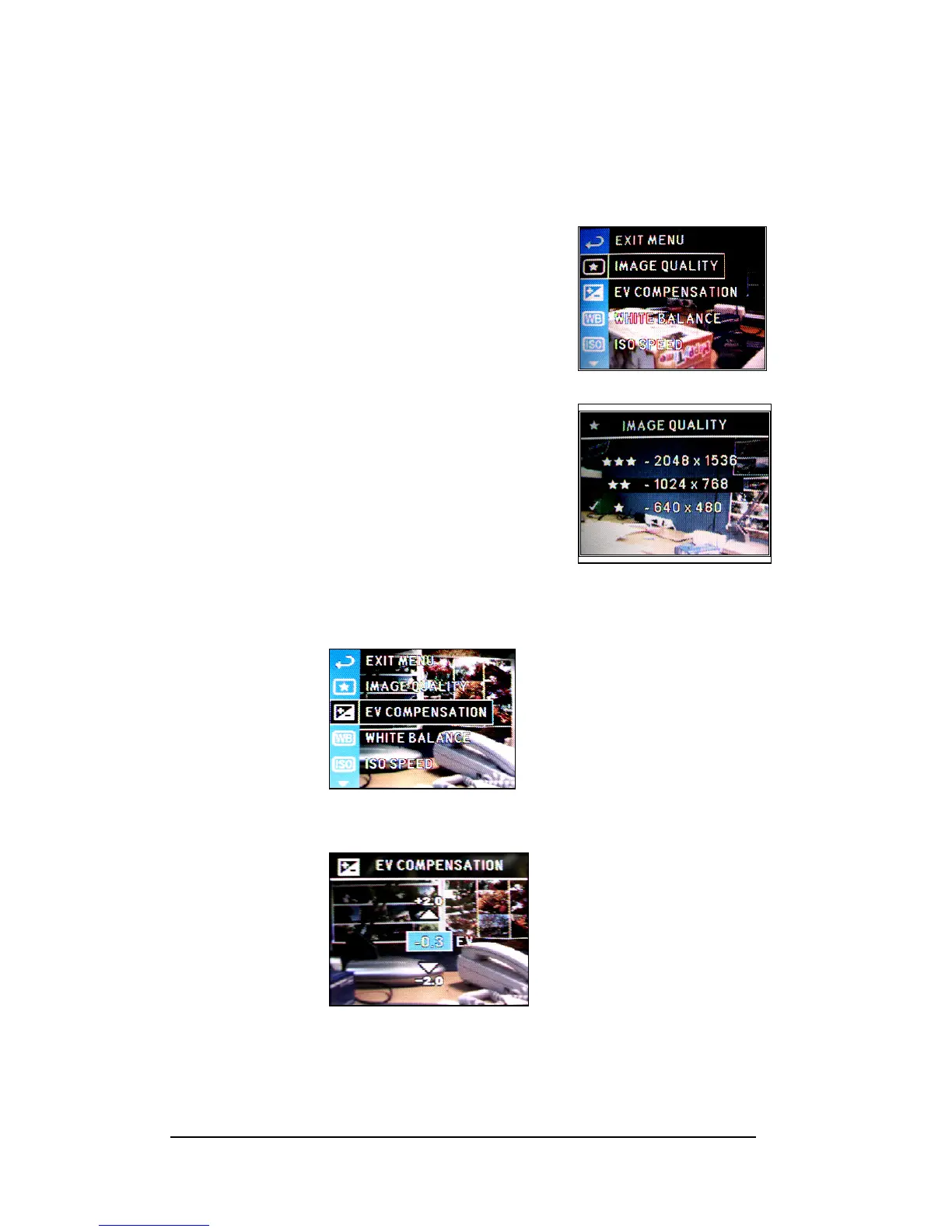
Setting Image Resolution
This camera provides Best (2048 x 1536 pixels), Better (1024 x 768 pixels) and Good (640
x 480 pixels ) image quality for selection.
1 Press <Menu/OK> button.
2 Press Down-arrow (d) or Up-arrow (c) to select
“IMAGE QUALITY”.
3 Press <Menu/OK> button to enter the submenu.
4 Press Up-arrow (c) or Down-arrow (d) button to
select.
5 Press <Menu/OK> button to apply the setting.
Setting Exposure Compensation
1 Press the <Menu/OK> button.
2 Press Up-arrow (c) or Down-arrow (d) button to select “EV COMPENSATION”.
3 Press the <Menu/OK> button.
4 Press Up-arrow (c) or Down-arrow (d) button to setup the EV value.
5 Press <Menu/OK> button to setup.







 To Next Page