23
Setting Flash Mode
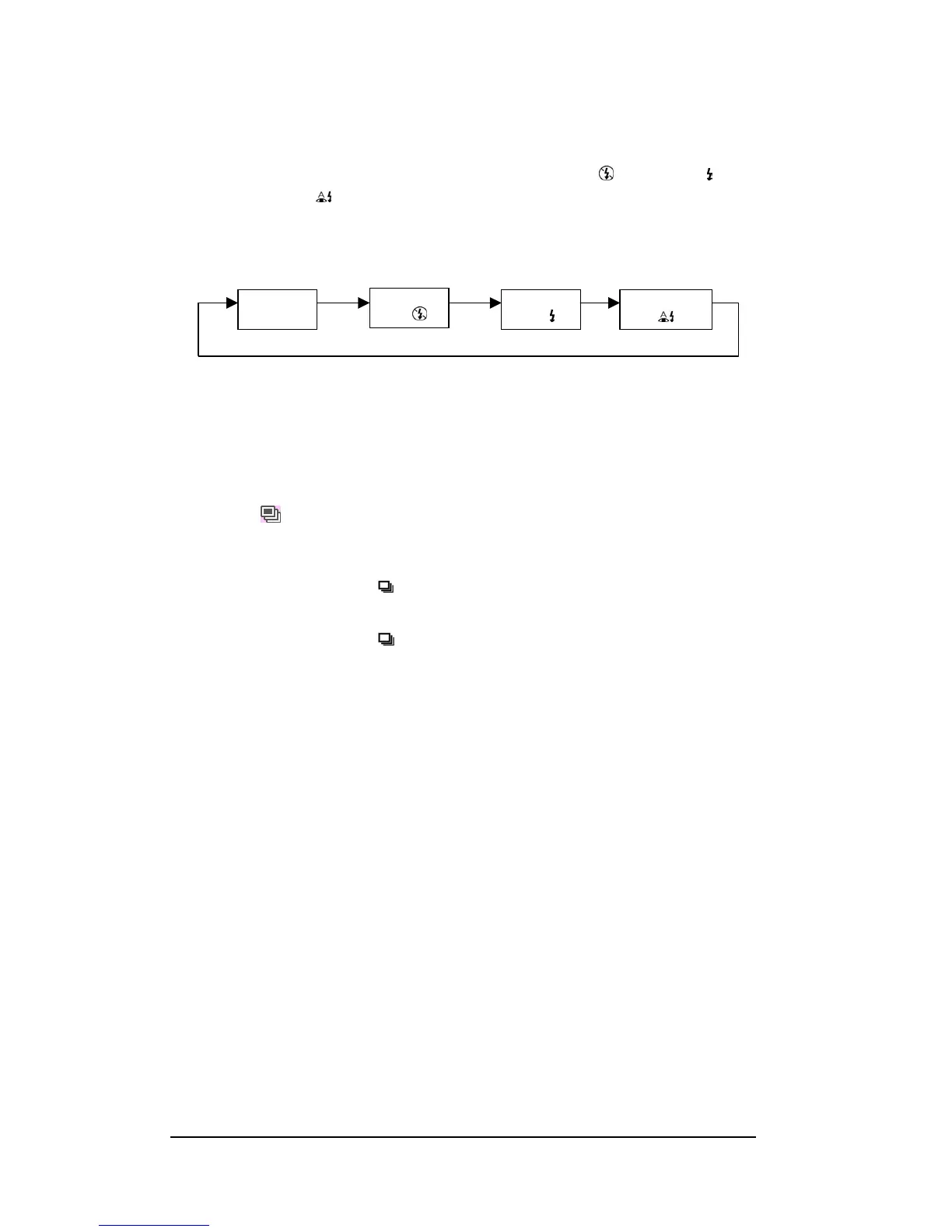
The camera offers four Flash modes - Auto (no icon), Flash Off < >, Flash On < > and
Red-eye Reduction <
>.
To select the Flash mode, repeatedly press the Flash button under Capture mode. The
following diagram shows the Flash mode cycle:
Setting Drive Mode
The camera provides Burst Mode to capture the image with two shots when the Shutter
button is pressed.
Single Frame Mode: Only one shot is taken.
Burst Mode<
>: Two shots are taken when you press the Shutter button. When Burst
mode is set, the Self-timer and the Flash are disabled. Burst mode is cleared
at power off.
1 Press Burst mode button ( ) in Capture mode, the LCD will display the Burst mode for
4 seconds.
2 Press Burst mode button ( ) to return to Single Frame mode.
Auto Flash
(no icon)
Flash Always
Off
< >
Flash Always
On
< >
Red-eye Redu
< >








 To Next Page