User Manual - 8/32
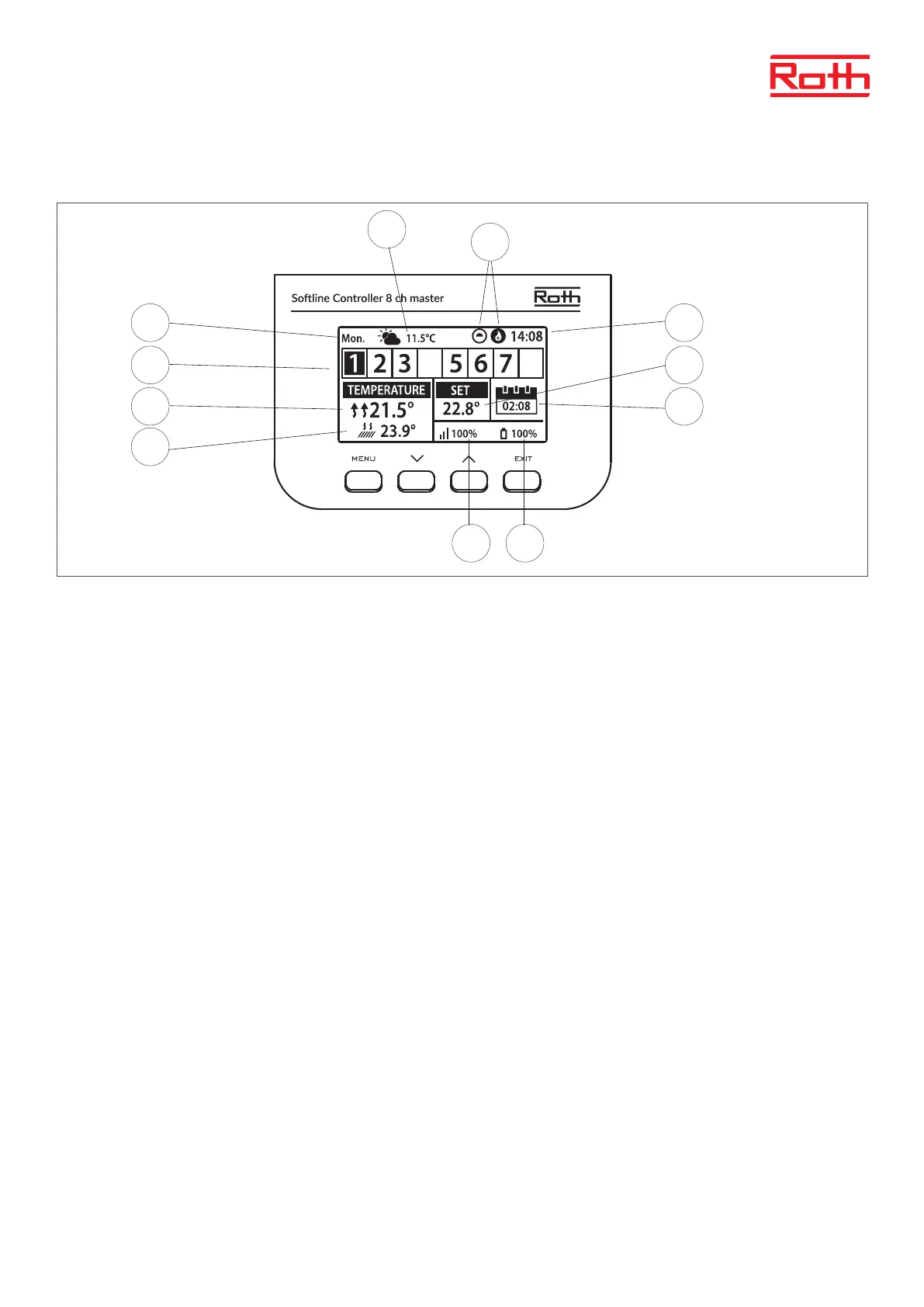
III. MAIN SCREEN DESCRIPTION
1. Day of the week
2. Current time
3. Overview of zones. If a zone is highlighted (here it’s ch 1) you can view the informations for this zone in the display. If no number is shown,
no sensors are connected (here at ch 4 and ch 8). If the zone digit is ashing, heating/cooling is on. In the event of a zone alarm, an
exclamation mark (!) is displayed instead of the digit.
4. Showing actual temperature in the room.
5. Showing actual oor temperature if a oor sensor is connected.
6. Showing SET temperature in the room.
7. Shows actual mode for the zone:
“CON” means constant SET temperature.
“00:56” means that a dierent SET temperature is set with time limitation for another 56 minutes, aer that the setting will return to
previous setting (CON or schedule).
“G1 to G5” means the zone is running on a global time schedule. Time schedule can be viewed and changed on the Controller or in the
App. Current Set temperature (according to schedule) for the whole system is shown to the le.
“L” means the zone is running on a local time schedule. Time schedule can be viewed and changed on the Controller or in
the App. Current Set temperature (according to schedule) for the whole system is shown to the le.
“Holiday” (Icon) means the complete system is set in holiday mode. Set temperature for the whole system is shown to the le.
“Economy” (Icon) means the complete system is set in economy mode. Set temperature for the whole system is shown to the le.
“Comfort” (Icon) means the system is set in Comfort mode. Set temperature for the whole system is shown to the le.
8. These two icons are shown when pump and heatsource is active = running.
9. Shows the signal strenght of the connection between the controller and the thermostat. Must be at least 10%!
10. Shows the battery level of the thermostat in the zone.
11. Shows the outdooor temperature if an outdoor sensor is connected
11
9 10
1 2
3 6
4 7
5
8



 To Next Page