Page 44 of 52
14 Register devices on RTX VoIP system.
The following section provides a step-by-step guide on how to register the RTX745x base station and RTX725x
headsets to the RTX DECT system.
IMPORTANT: Both the RTX745x base and the RTX725x headsets can be SIP registered to the VoIP System.
However, depending on which device is SIP registered, the headset has a different behavior. If a headset base
is registered to a SIP account (see step 3), then the related headsets can be used in multiple environments –
both in VoIP System and normal network. This means that a user can receive VoIP calls and at the same time
use the headset for various PC applications, such as listening to music or talking via a softphone (Microsoft
Teams). Moreover, these functionalities are available while moving around the VoIP system. However, if a
headset is SIP registered as a standalone device (without the headset base), then it can be used only for VoIP
calls on the system.
14.1 Register RTX745x headset base.
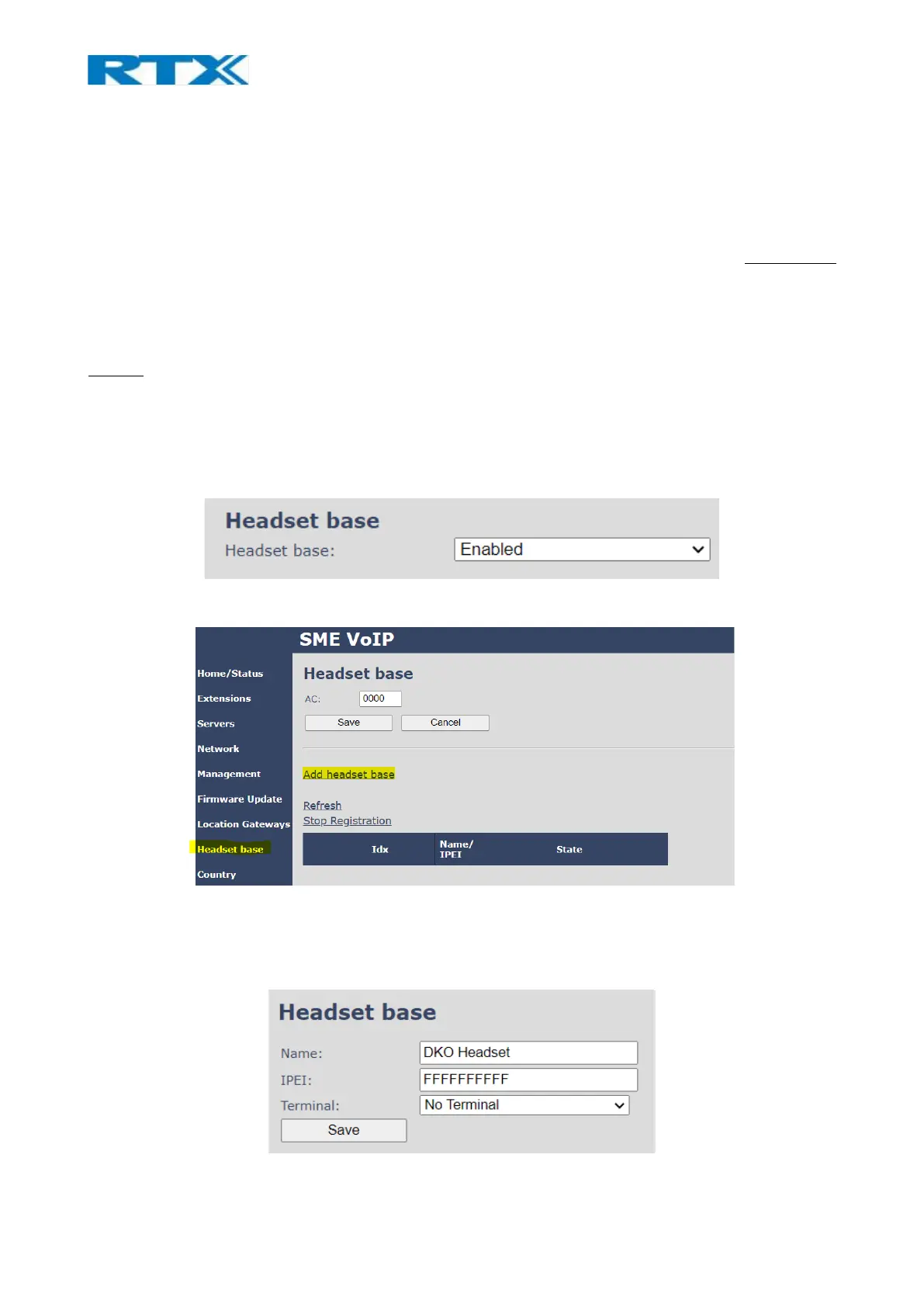
Step 1 Enter the Management page of an RTX VoIP base station and enable the Headset base
setting. By doing so, a new menu on the left-handed navigation panel will be added (Headset base)
Step 2 Navigate to the Headset base page and select the Add headset base option.
Step 3 A separate editor menu will open for configuration. Fill in the fields and press Save. The
available settings are explained in the table below.



 To Next Page