Chapter 1 Operation Procedures
Operation Edition - 2
2. Plate Making
If
the image position is incorrect, more time and work will be required for the vertical and
diagonal image adjustment before printing. Use the RP520-220F to assure efficient registration
operation, and to reproduce the image accurately.
1) Do the plate making.
Standard line
(lateral
direction)
Tail edge
.--------,
-Plate
Leading edge
Center
Plate
2) Punch the first plate.
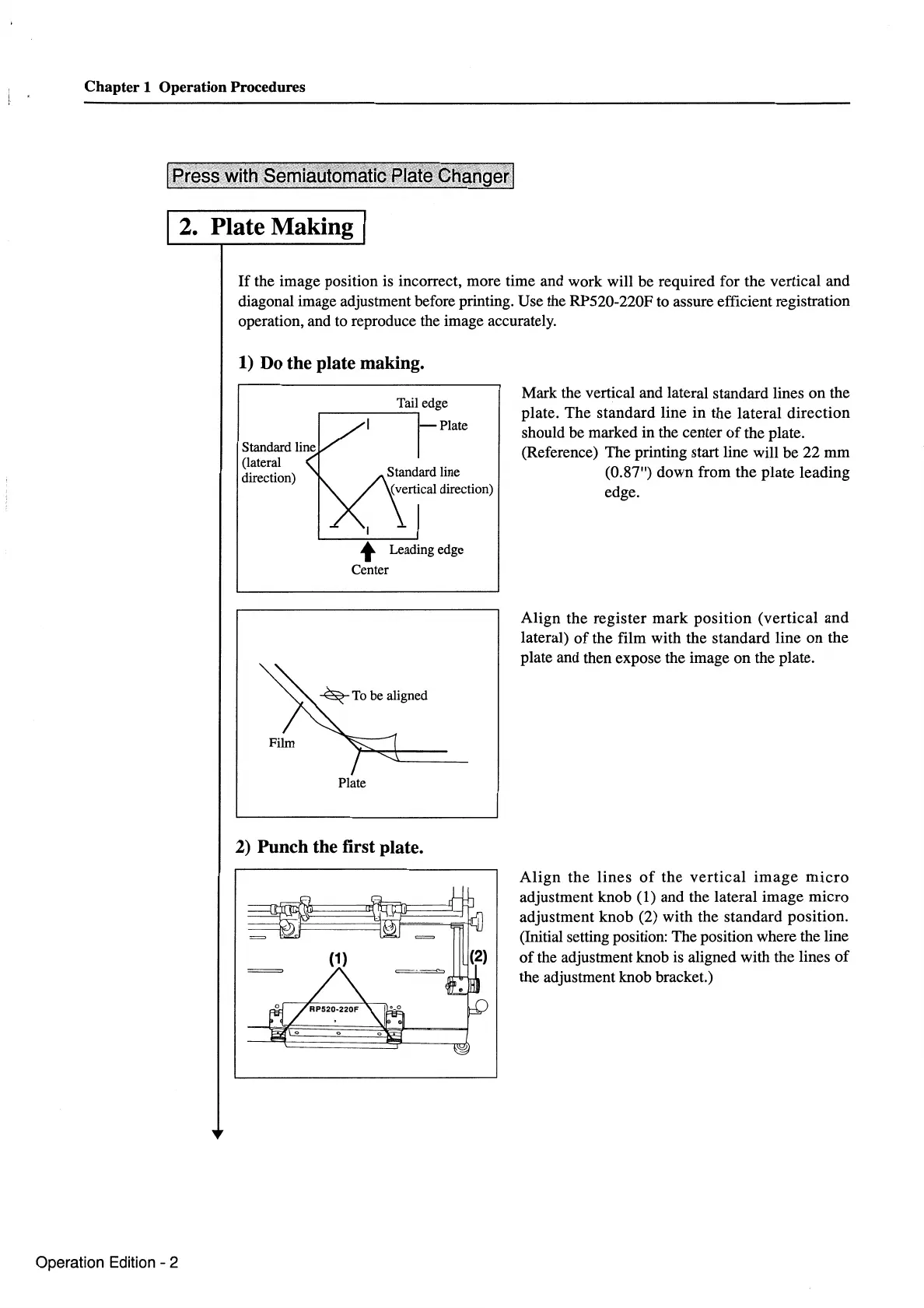
Mark the vertical and lateral standard lines on the
plate. The standard line in the lateral direction
should be marked in the center
of
the plate.
(Reference) The printing start line will be 22
mm
(0.87") down from the plate leading
edge.
Align
the
register
mark
position
(vertical
and
lateral)
of
the film with the standard line
on
the
plate and then expose the image on the plate.
Align
the
lines
of
the
vertical
image
micro
adjustment knob (1) and the lateral image micro
adjustment knob (2) with the standard position.
(Initial setting position: The position where the line
of
the adjustment knob is aligned with the lines
of
the adjustment knob bracket.)



 To Next Page