AirConditioningandAudioSystems
ManualControlledAirconditioning
*
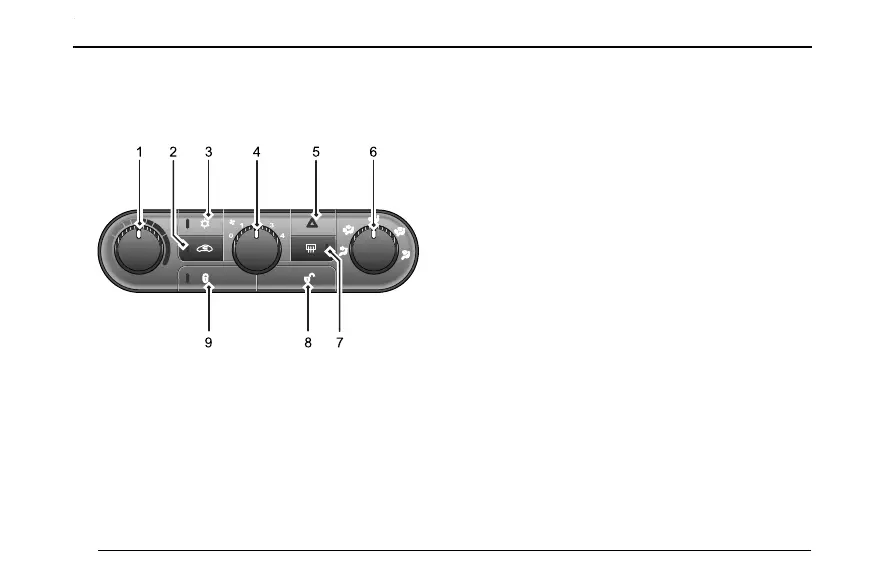
ControlPanel
1
T emperatureControl6AirDistributionMode
2RecirculationControl
7HeatedRearWindow
3A/COn/Off8CentralLockUnlocking
4AirVolumeAdjustment9CentralLockLocking
5WarningLightButton
AirVolumeAdjustment
T urntheairvolumeadjustmentknobclockwise,and
thentheairvolumewillincrease;turntheairvolume
adjustmentknobcounterclockwise,andthentheair
volumewilldecrease.Whentheairvolumeis0level,the
blowerwillbeclosed,andtheairvolumewillincrease
from1to4levelgradually.
Note:Adjusttheairvolumetolevel0toswitchoffair
conditioningsystem.
T emperatureControl
T urnthetemperaturecontrolknobclockwisetoincrease
theventstemperatureandturncounterclockwiseto
decrease.
A/COn/OffButton
PressA/COn/Offbuttontoswitchtheairconditioning.
Theindicatorlightonthebuttonwillilluminate.PressA/C
On/Offbuttontoclosetheairconditioningagain,andthe
indicatorlightonthebuttonwillgoout.
Note:Whentheengineisrunning,A/Cwillonlystart
whentheairvolumeislevel1orabove.
42



 To Next Page