AirConditioningandAudioSystems
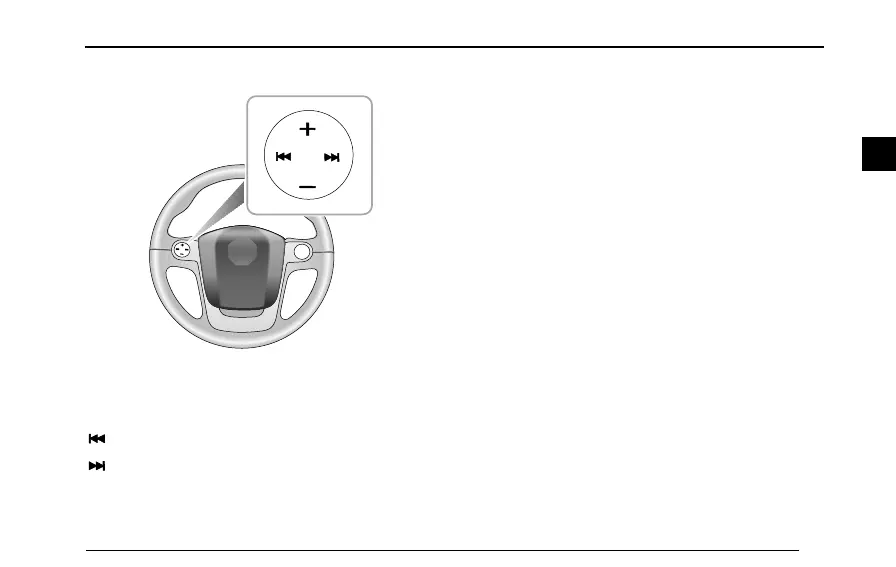
SteeringWheelControlButton
‘+’button:volumeup
‘-’button:volumedown
‘’buttonforwardsearch
‘
’button:backwardsearch
BasicOperation
On/OffPower
Pressthe[On/Off]tostarttheplayer,andthenholdthis
buttontoturnoffthesystem.
30MinutesPlayFunction
Whentheignitionisswitchedoff,pressthe[On/Off]
buttontooperatetheplayerforupto30minutes,after
30minutestheplayerwillswitchoff.T oswitchonagain,
pressthe[On/Off]button.
Mute/Pause
Press[Mute/Pause]buttontomutethesoundfromthe
radiosystem.Pressagaintoresumeradiosound.
IfinCD/MP3/USBplay,the[Mute/Pause]buttonpauses
CD/MP3/USBplay.
SelectMode
Repeatedlypress[SRC]buttontochangethesourceofthe
output.Theplayerwillcyclethroughthefollowingoptions:
59
2



 To Next Page