59
Set temperature setpoint by
or
buttons. Conrm by
button.
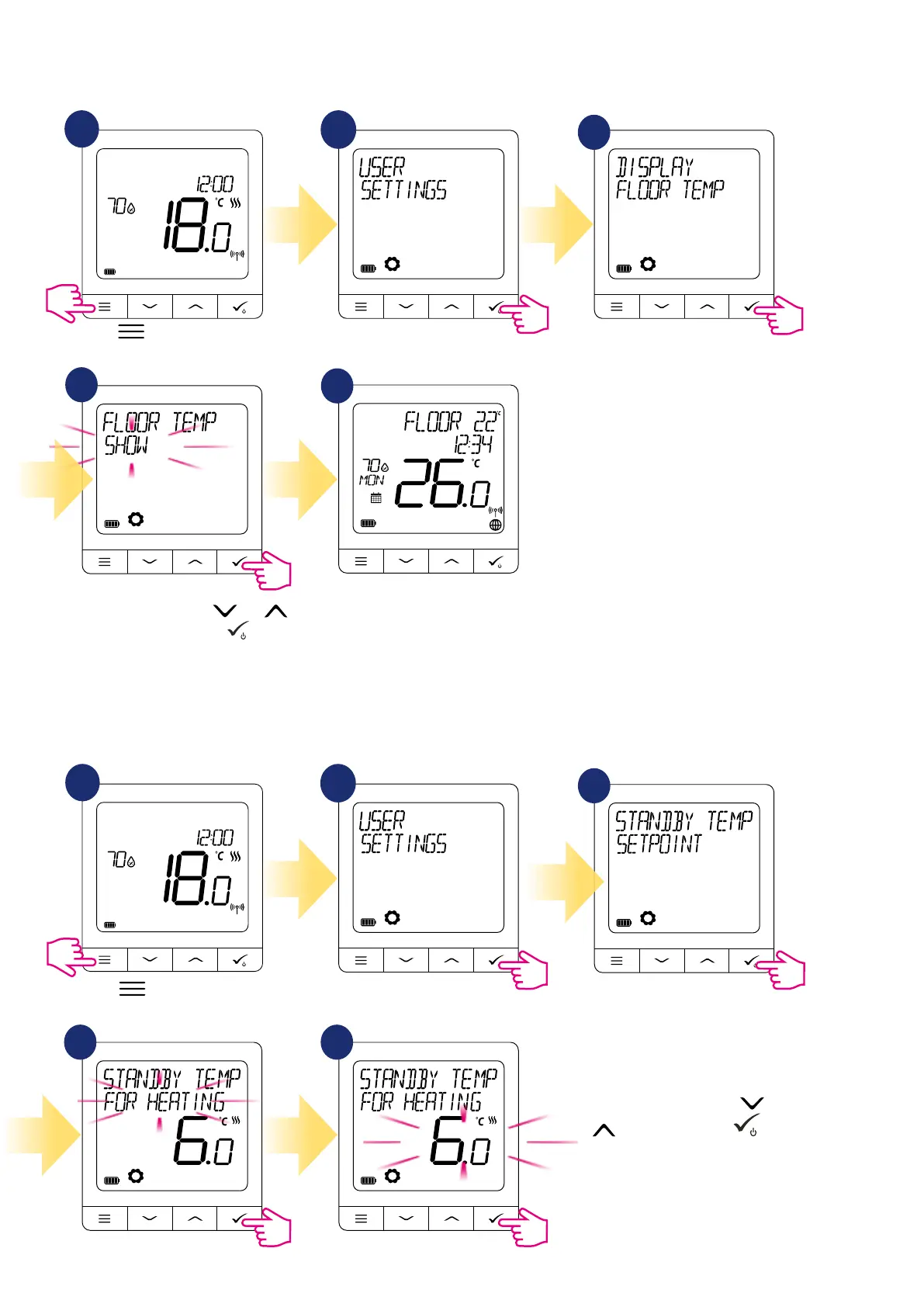
8.6.5 Display oor temp
Display oor temperature is a function which is available only when thermostat works with external oor temperature sensor.
To show/hide oor temperature value please follow steps below:
1
2
3
4
5
Floor temperature value is
displayed with one degree
accuracy.
8.6.6 Standby temp setpoint
There are two standby temperature setpoints - for heating and for cooling mode. Standby setpoint range for heating mode is from
5 ° C to 35 ° C. Standby setpoint range for cooling mode is from 5 ° C to 40 ° C. To set it on please follow steps below:
NOTE: If paired with TRV radiator heads or RX10RF receiver, then standby for cooling is not available.
1
2
3
4 5
Go to the user settings.
Press
button to enter the
main menu.
Choose display oor temp option.
Choose standby temp setpoint option.
Select for heating or cooling option.
Select SHOW or HIDE using
and
buttons. Conrm selection by button.
Go to the user settings.
Press
button to enter the
main menu.



 To Next Page