EasyManua.ls Logo

Samlexpower Evolution Series - User Manual

Samlexpower Evolution Series
132 pages
Print Icon
To Next Page IconTo Next Page
Loading...
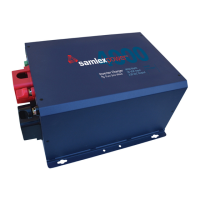
Evolution
TM
Series
Inverter/Charger
Pure Sine Wave
Models:
EVO-1212F
EVO-1212F-HW
EVO-1224F
EVO-1224F-HW
Please read this
manual BEFORE
operating.
Firmware:
Rev 0.78
Owner's
Manual

Other manuals for Samlexpower Evolution Series

Questions and Answers

  • S
    sheilawalkerAug 18, 2025
    What to do if my Samlexpower Remote Control says 'Battery low voltage!'?
    • Z
      Zachary CarpenterAug 18, 2025
      If the Samlexpower Remote Control displays 'Battery low voltage!' and the battery voltage remains at or below the set threshold for the duration specified by 'LV DETECT TIME', the Inverter Section will be switched OFF. If the batteries are charged by an external charger and the voltage recovers to the set 'RESET VOLTAGE' before the 'LV CUT OFF TIME' expires, the Inverter Section will restart and the fault condition will clear. Additionally, if AC input becomes available before the 'LV CUT OFF TIME' expires while in the 'Battery low voltage!' fault condition, the fault will also be cleared.
  • P
    perezthomasAug 21, 2025
    What to do if Samlexpower Remote Control shows 'Output over current!'?
    • C
      Christopher BlackwellAug 21, 2025
      The EVOTM Inverter/Charger will be latched in OFF condition and requires a manual reset. Power OFF the unit, wait for 1 minute, and then power it ON again. Additionally, ensure that the maximum instantaneous surge current of the load does not exceed 300% of the rated current of the EVOTM Inverter/Charger for 1 millisecond.
  • E
    Eric ArnoldAug 23, 2025
    What to do if my Samlexpower Remote Control displays 'Input over current!'?
    • I
      Isaac GarciaAug 23, 2025
      The EVOTM Inverter/Charger will be latched in OFF condition and requires a manual reset. Power OFF the unit, wait for 1 minute, and then power it ON again. Also, the set threshold of 'GRID MAX CURRENT' / 'GEN MAX CURRENT' should match the breaker capacity of the AC input source / AC input Branch Circuit.
  • E
    Ethan BellAug 26, 2025
    What to do if Samlexpower Remote Control shows 'Output short circuit!'?
    • D
      Dustin MoralesAug 26, 2025
      The EVOTM Inverter/Charger will be latched in OFF condition and requires a manual reset. To resolve this, power OFF the unit, wait for 1 minute, and then power it ON again.
  • C
    carolblairAug 27, 2025
    How to fix 'Transformer over heat!' on my Samlexpower Remote Control?
    • S
      Shannon WhiteAug 28, 2025
      To resolve a 'Transformer over heat!' issue on your Samlexpower Remote Control, check that the fans are working properly, ensure there is no blockage of air suction and discharge vents, verify adequate cool replacement air is available, and confirm the ambient temperature is within limits. Additionally, reduce the load / 'BULK CURRENT'.
  • M
    Martin GrahamAug 30, 2025
    How to resolve 'Heat sink over heat!' on my Samlexpower Remote Control?
    • K
      karen88Aug 30, 2025
      To resolve a 'Heat sink over heat!' message on your Samlexpower Remote Control, check that the fans are working properly, ensure there is no blockage of air suction and discharge vents, verify adequate cool replacement air is available, and confirm the ambient temperature is within limits. Reduce the load and 'BULK CURRENT'.
  • A
    Andrew PriceSep 1, 2025
    How to clear 'Battery over voltage!' on Samlexpower Remote Control?
    • G
      Gerald PerezSep 1, 2025
      The fault will automatically clear when the battery voltage drops to 0.5V below the set upper threshold of 'BATT OVER VOLTAGE'.
  • M
    Michael EvansSep 4, 2025
    What to do for 'Output failure!' on Samlexpower Remote Control?
    • M
      mellisSep 4, 2025
      Check the connection. If there is 10V over at the output terminal, remove the connection and connect to the input terminals.
  • C
    Catherine DavisSep 6, 2025
    How to fix 'SD card unusable!' on Samlexpower Remote Control?
    • J
      johnsonalexSep 6, 2025
      Make sure the SD card format is FAT16/FAT32 and that its capacity is less than 16 GB. Try reformatting the card.
  • J
    Jordan BraySep 8, 2025
    What to do if Samlexpower Remote Control displays 'SD card read error!'?
    • K
      Kathryn WilsonSep 8, 2025
      Remove and re-insert the card.

Summary

Safety Instructions

Important Safety Instructions

Manual contains critical safety instructions for installation and maintenance.

General Information - Battery Related

State of Discharge of a Loaded Battery - Low Battery; DC Input Voltage Alarm and Shutdown in Inverters

Discusses how inverter estimates discharge and triggers low voltage alarms.

Sizing the Inverter Battery Bank

Provides formulas and rules for determining the correct inverter battery bank size.

Installation

Safety of Installation

Emphasizes adherence to safety instructions before starting installation.

Mounting of the Unit

Details requirements for safe and proper mounting of the inverter/charger.

Installing Batteries - Series and Parallel Connection

Explains how to connect batteries in series and parallel for desired voltage/capacity.

DC Side Connections

Details the connections required for the DC side of the unit.

Sizing of Wiring and Breakers - AC Input Side

Provides guidance on selecting appropriate wiring and breakers for AC input.

Sizing of AC Output Wiring and Breakers

Provides guidance on selecting appropriate wiring and breakers for AC output.

General Description & Principles of Operation

Inverter Section

Details the heavy-duty, continuous rated inverter generating pure sine wave output.

Battery Charger Section

Explains the operation and features of the internal battery charger.

Battery Charging in Evolution Series

Charging Lithium Ion Batteries

Covers specific charging considerations and BMS integration for lithium-ion batteries.

Operation, Protections and Troubleshooting

Powering On; Powering Off Using Front Panel ON;OFF Button (11, FIG 2.1)

Details the procedure for powering the unit ON and OFF using the front panel button.

Protections, Fault Messages and Troubleshooting Guide

Details unit protections, fault messages, and troubleshooting guidance.

Powering Off the Unit in Fault Mode

Explains how to power off the unit when it is in a fault condition.

Specifications

Cooling, Protections and Alarms

Outlines cooling methods, built-in protections, and alarm indicators.

Samlexpower Evolution Series Specifications

General IconGeneral
Output WaveformPure Sine Wave
EfficiencyUp to 90%
THD< 3%
DimensionsVaries by model
WeightVaries by model
Input Voltage12V, 24V, or 48V DC
Output Voltage120V AC
Continuous Power3000W (depending on model)
Surge Power2x Continuous Power
Operating Temperature-20°C
Remote ControlOptional
ProtectionsOverload, Over Temperature, Short Circuit
ModelEVO-1212, EVO-1224
Output Frequency60Hz or 50Hz

Related product manuals