Advanced
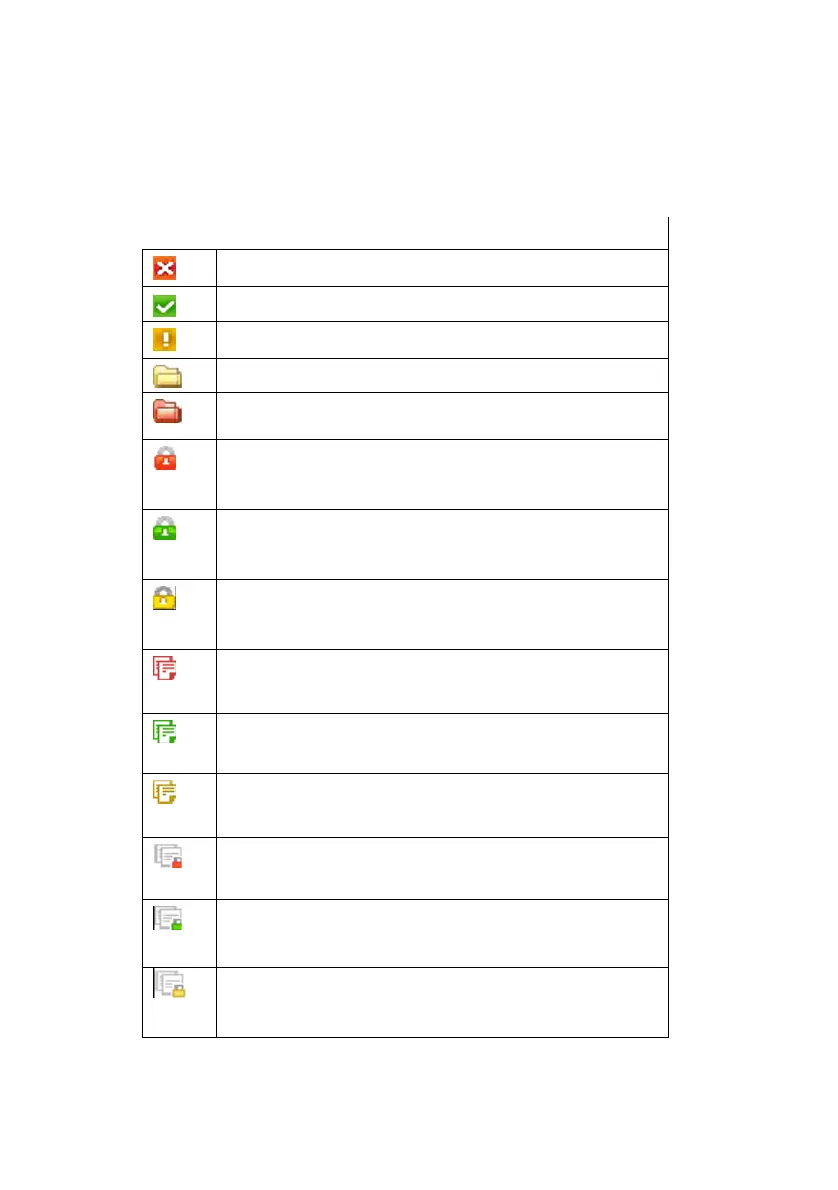
The backed up list uses icons to show the location of
the files and their status. The following table shows
the meaning of each icon.
Table 7.1: Backup file status Icons
The backup file exists, but the source file does not.
The backup file is the same as the source file.
The backup file is different from the source file.
The backup folder is the same as the source folder.
The backup folder exists, but the source folder
doesn’t.
The file has been backed up using
compression/password, and the source file doesn’t
exist.
The file has been backed up using
compression/password, and it is the same as the
source file.
The file has been backed up using
compression/password, and it is different from the
source file.
The file has been backed up with backup history, and
the source file doesn’t exist.
The file has been backed up with backup history, and
it is the same as the source file.
The file has been backed up with backup history, and
it is different from the source file.
The file has been compressed and backed up with
backup history, and the source file doesn’t exist.
The file has been compressed and backed up with
backup history, and it is the same as the source file.
The file has been compressed and backed up with
backup history, and it is different from the source
file.
Samsung Auto Backup User Manual Ver 2.0
63



 To Next Page