6. Electronic expansion valve kit
26
. Installation
Λ
Λ
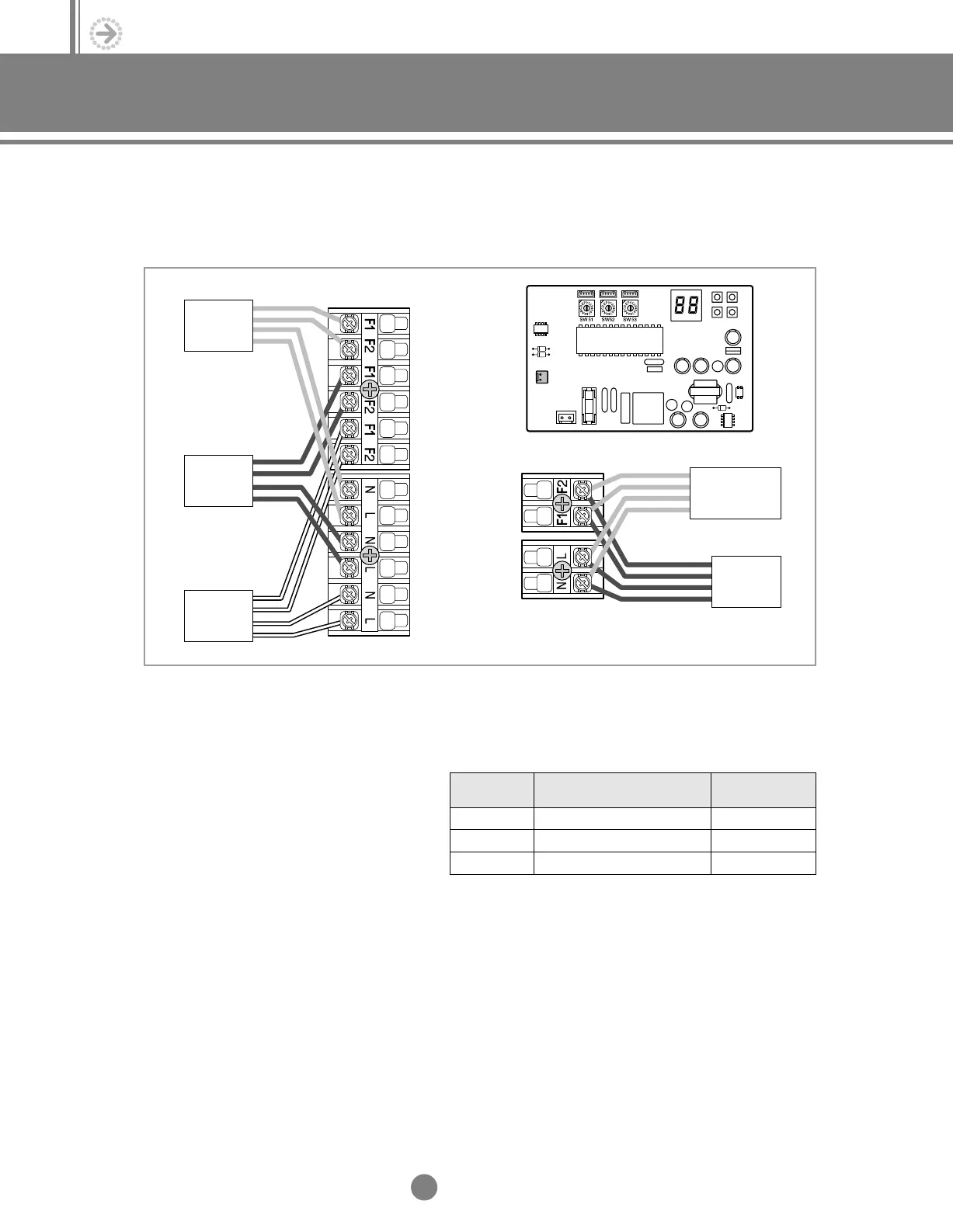
2) Wiring & Assigning address
① Connect the AC power cable and communication cable from the outdoor unit to terminal,
then connect the cable to another electronic expansion valve kit.
② Connect the AC power cable and communication cable to each indoor unit (A, B and C).
③ Align the SW51, SW52 and SW53’s
addresses with A, B and C indoor
units’.
Room A
Room B
Outdoor
unit
Another
distributor kit
Room C
SW51
SW52
SW53
A
B
C
CN63(Yellow)
CN62(Blue)
CN61(White)
Switch No.
Appropriate indoor unit
(Electronic expansion valve)
Connector No.
5-1.Installation_TM_E_06890 2/27/03 10:15 AM Page 26




 To Next Page