82
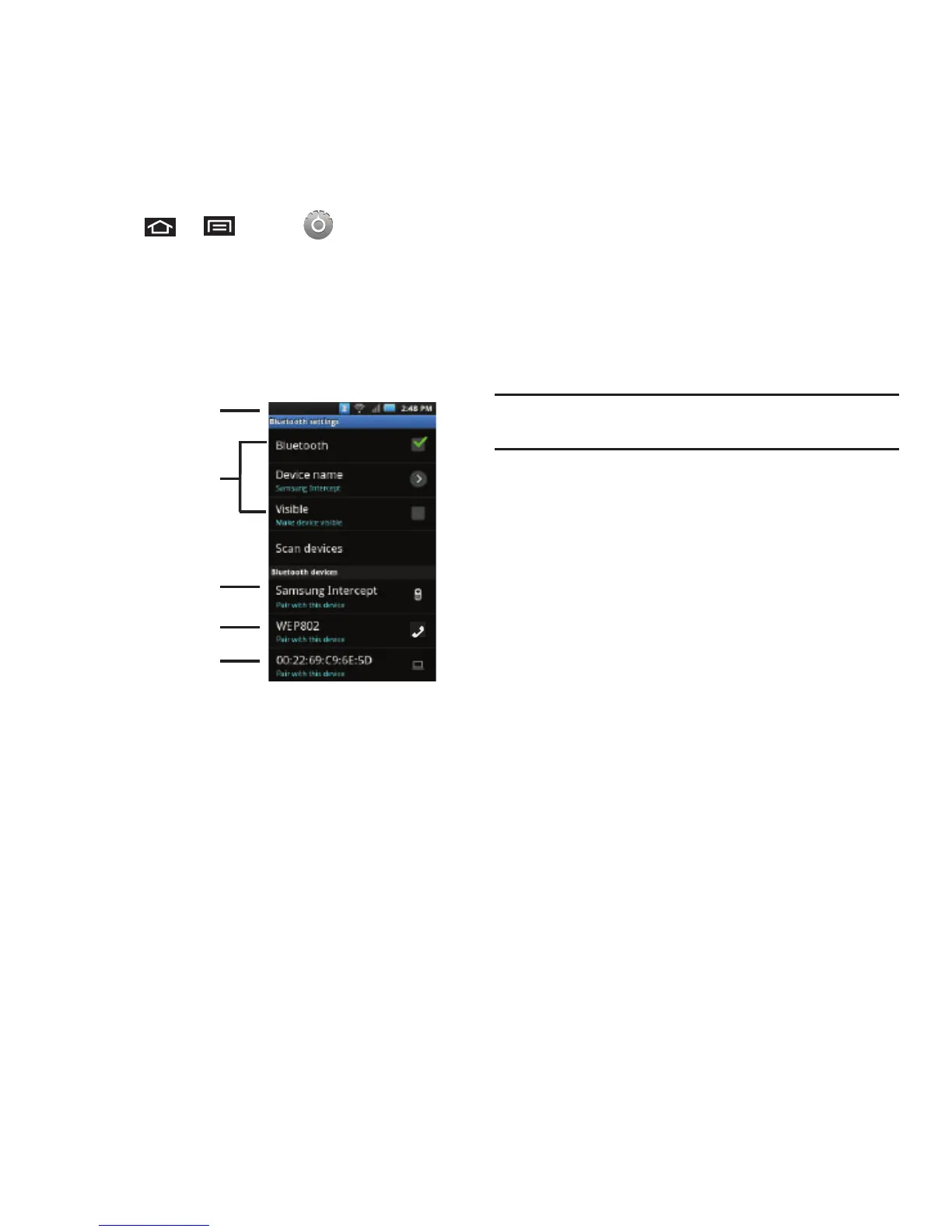
To access the Bluetooth Settings menu:
1. Press ➔ and tap
➔
Wireless &
networks
➔
Bluetooth settings
.
2. Set your Bluetooth options:
Device name
,
Discoverable
, and
Scan devices
.
To change your Bluetooth name:
1. Verify your Bluetooth is active.
2. From the Bluetooth settings page, tap
Device
name
.
3. Tap the
Device name
field, enter a new name.
4. Tap
OK
to complete the rename process.
To make your device visible:
1. Verify your Bluetooth is active.
2. From the Bluetooth settings page, tap
Visible
Making your device discoverable allows it to be
detected by other devices for pairing and
communication.
Note:
Your device is visible for up to 120 seconds (2 minutes).
This value appears as a countdown within this field.
To scan for Bluetooth devices:
1. Verify your Bluetooth is active.
2. From the Bluetooth settings page, tap
Scan
devices
to search for visible external Bluetooth-
compatible devices such as Headsets, devices,
printers, and computers.
Pairing Bluetooth Devices
Paired Devices
The Bluetooth pairing process allows you to establish
trusted connections between your device and another
Bluetooth device. When you pair devices, they share a
passkey, allowing for fast, secure connections while
bypassing the discovery and authentication process.













 To Next Page