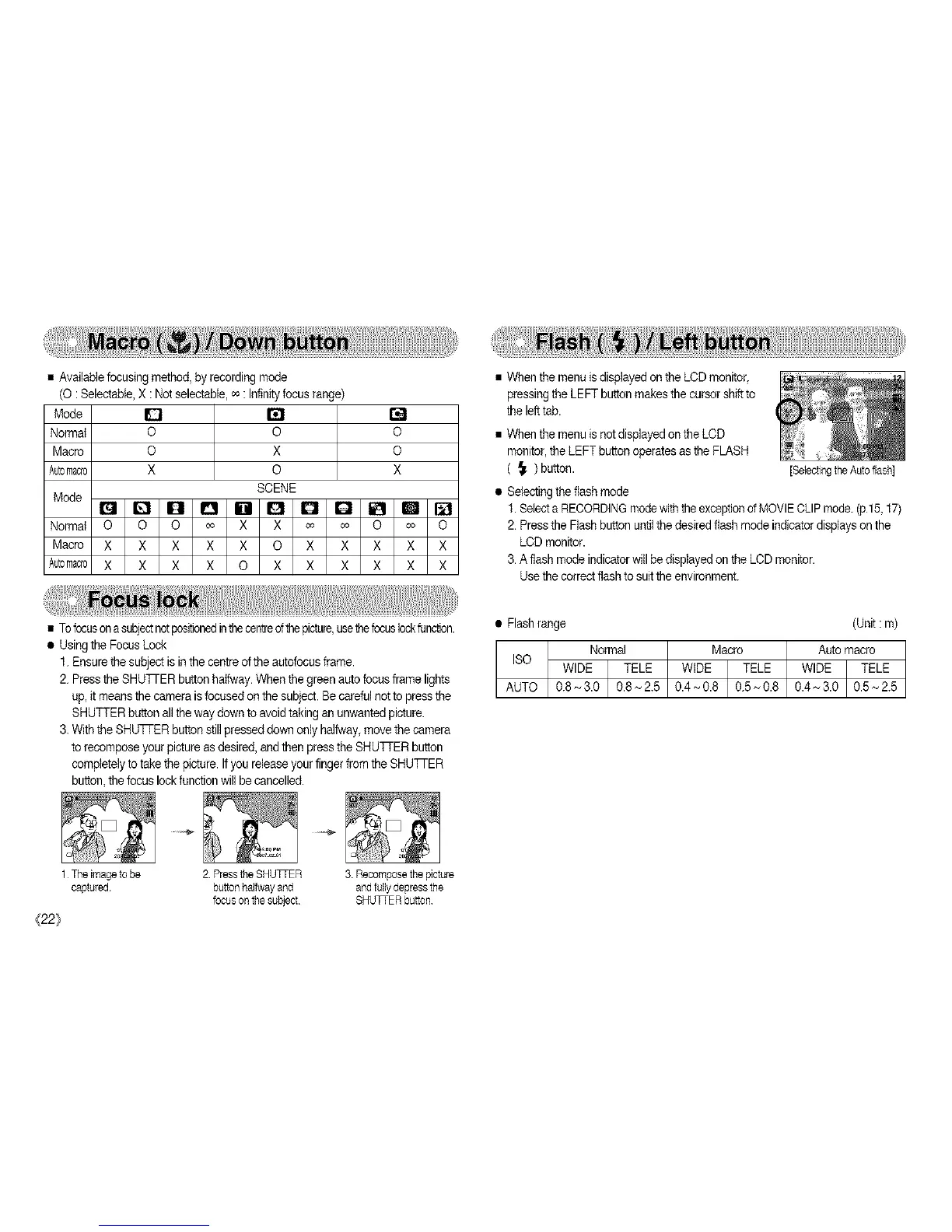
• Availablefocusing method, by recordingmode
(O :Selectabte,X : Not selectable,o_: Infinityfocus range)
Mode D
Normal O O
Macro O X
Automacro X O
SCENE
Mode
It_l Q O O IBI G
Normal O O O co X X
Macro X X X X X O
Automacro X X X X O X
O
O
X
co co O co O
X X X X X
X X X X X
• Tofocuson asubjectnotpositionedinthecentreofthepicture,usethefocuslockfunction.
• Using the Focus Lock
1.Ensurethe subjectis in the centre ofthe autofocusframe.
2. Pressthe SHUTrER buttonhalfway.When the green autofocus frame lights
up, itmeansthe camera isfocused on the subject. Be carefulnotto press the
SHUTTER button allthe way down toavoid taking an unwantedpicture.
3. Withthe SHUTTER button still presseddown only halfway,move the camera
torecompose your picture asdesired, andthen press the SHUTTER button
completelyto take the picture. Ifyou release your finger fromthe SHU]qER
button,the focus lock functionwill be cancelled.
1 The image to be 2 Press the SHUTTER 3 Recompose the picture
captured button halfway and and fully depress the
focus on the subject SHU_ER button
{22}
• When the menu isdisplayed on the LCD monitor,
pressing the LEFT button makes the cursor shiftto
the lefttab.
• When the menu is netdisplayed on the LCD
monitor, the LEFT button operates asthe FLASH
( _. )button.
• Selecting the flash mode
1.Selecta RECORDINGmodewith theexceptiond MOVIECLIP mode.(pl 5,17)
2.Pressthe Flash button untilthedesired flash mode indicator displays on the
LCD monitor.
3. Aflash modeindicator willbe displayed on the LCD monitor.
Use the correctflash to suitthe environment.
[Se{ectlngthe Autoflash]
• Flashrange (Unit : m)
ISO
AUTO 0_ ~ 0.8 0.5,,_0.8 0.4 ~ 3.0 0.5 ~ 2.5 I



 To Next Page