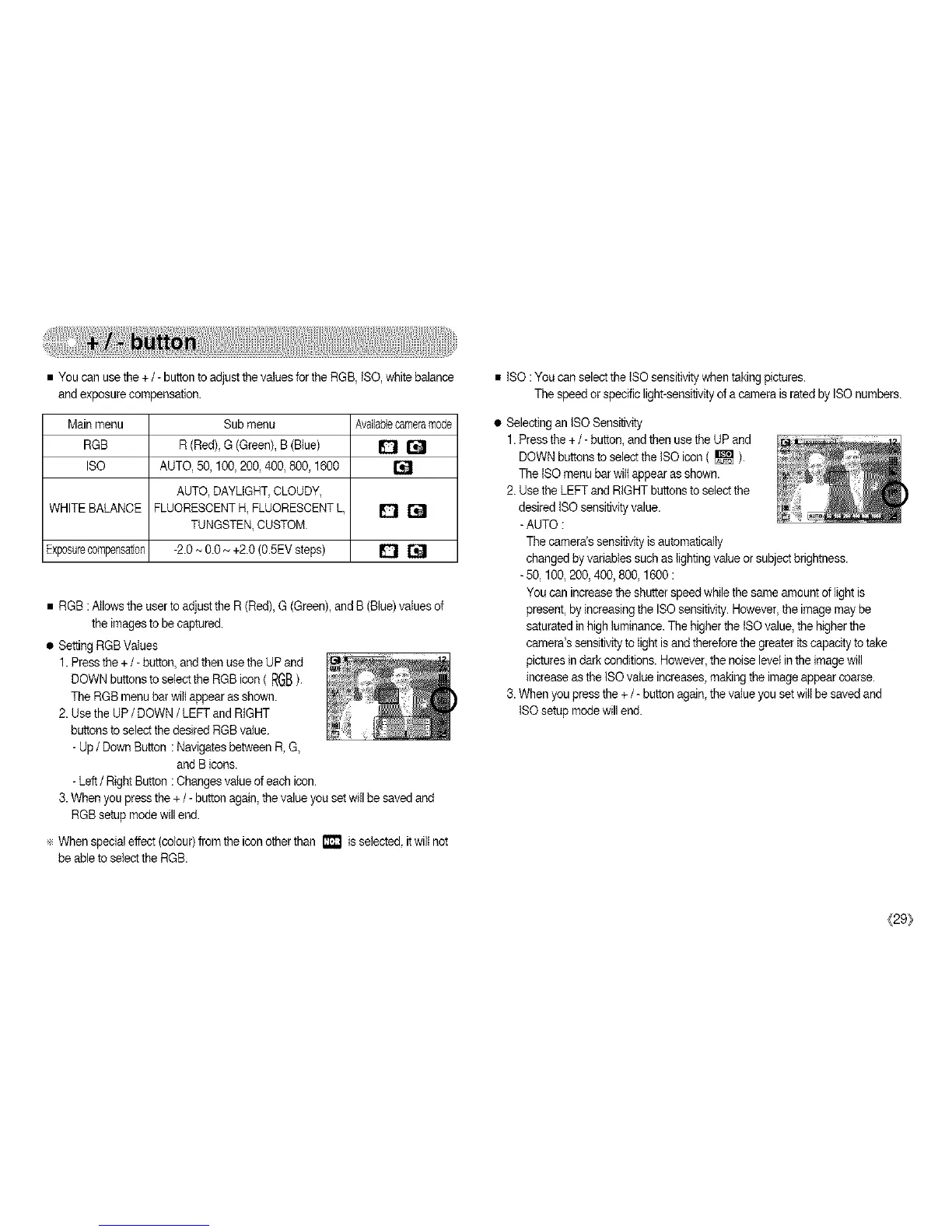
• You can use the + / - button toadjust the values for the RGB, ISO, white balance
andexposure compensation.
Mainmenu Sub menu Availablecameramade
RGB R (Red), G (Green), B(Blue) _ []
ISO AUTO, 50, 100, 200, 400, 800,1600 []
AUTO, DAYLIGHT,CLOUDY,
WHITE BALANCE FLUORESCENTH,FLUORESCENTL _ []
TUNGSTEN,CUSTOM
Exposurecompensation -2.0- 0.0~ +2.0 (0.5EVsteps) _ []
• RGB :Allows the user to adjustthe R (Red), G (Green),and B (Blue)valuesof
the imagesto be captured.
• Setting RGBValues
1. Pressthe +/- button and then use the UP and
DOWNbuttons to selectthe RGBicon ( RGB).
The RGB menubar wiltappear as shown.
2. Usethe UP/ DOWN/ LEFT andRIGHT
buttons to select thedesired RGBvalue.
- Up/ Down Button : Navigatesbetween R,G,
and B icons.
- Left/ Right Button :Changes value ofeach icon.
3.When you press the + / - button again, the value you set will be savedand
RGBsetup modewill end.
÷ When special effect (colour)from the icon other than i_ isselected, it will not
be ableto select the RGB.
• ISO : You can select the tSO sensitivitywhen takingpictures.
The speedor specific light-sensitivityofa camera is rated by ISOnumbers.
• Selecting an ISO Sensitivity
1. Pressthe +/- button,and then use the UP and
DOWNbuttons to selectthe ISOicon ( [] ).
The ISOmenu bar wilt appear as shown.
2. Use the LEFT and RIGHT buttonsto select the
desired ISOsensitivityvalue.
-AUTO :
The camera's sensitivity isautomatically
changed by variablessuch as lightingvalue or subjectbrightness.
-50, 100,200, 400, 800, 1600 :
You can increase the shutterspeed while the same amountof lightis
present, by increasingthe ISOsensitivity. However,the image may be
saturated in high luminance.The higher the ISOvalue,the higherthe
camera's sensitivity to light isand thereforethe greateritscapacity totake
pictures in dark conditions. However,the noise level inthe image will
increase as the ISO value increases,making the imageappear coarse.
3.When you press the +/- button again,the value you setwill be saved and
ISOsetup modewill end.
(29/



 To Next Page