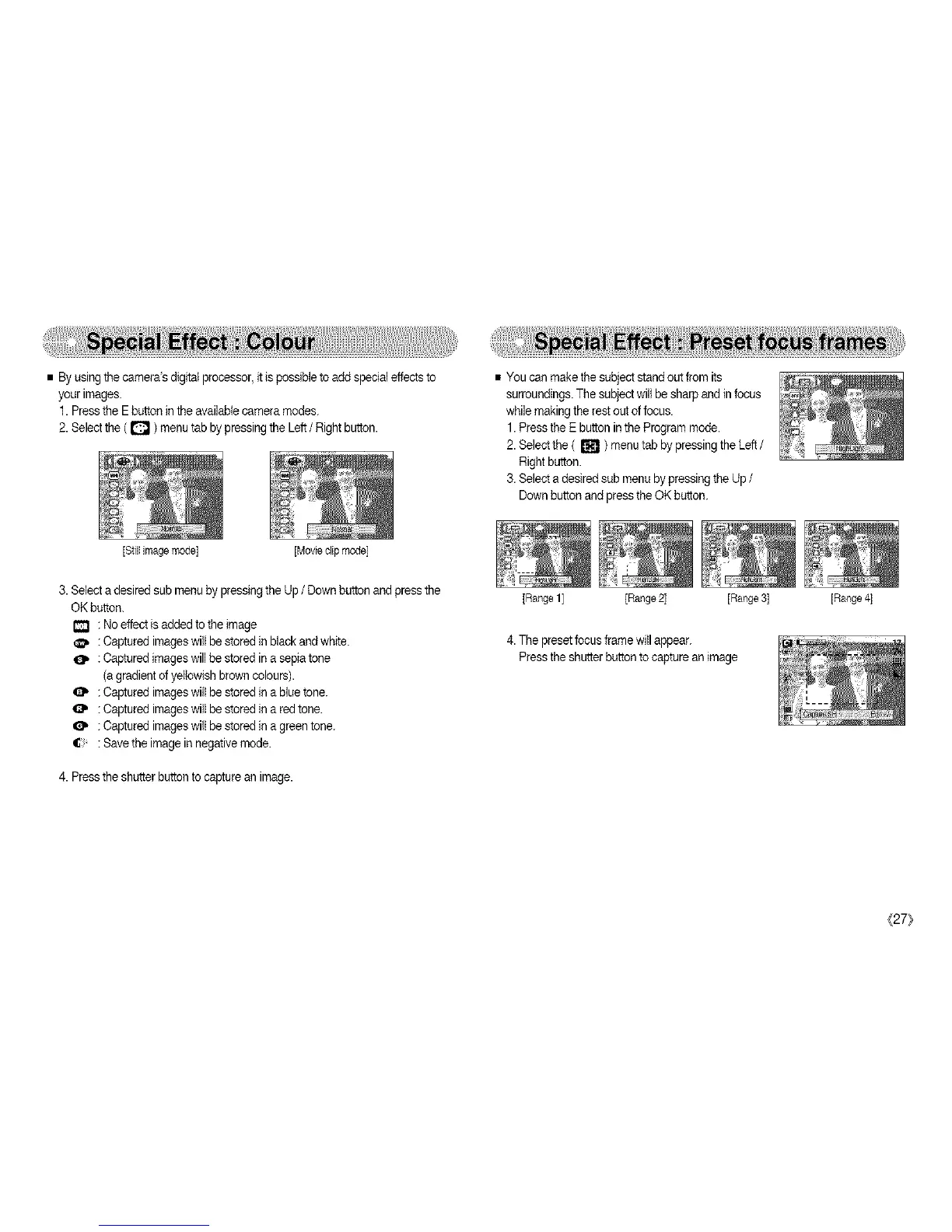
• Byusing the camera'sdigital processor,it ispossib(eto add specialeffects to
your images.
1. Pressthe Ebutton inthe availab(ecamera modes.
2. Selectthe ( D ) menutab by pressing the Left/ Right button.
[Still image mode] [Movte dip mode]
• You can make the subjectstand out from its
surroundings.The subjectwill be sharpand in focus
while makingthe rest outof focus.
1. Pressthe E button in the Programmode.
2.Select the ( _ ) menu tab by pressingthe Left /
Rightbutton.
3.Se(ect adesired sub menuby pressing the Up /
Downbutton andpress the OK button.
3. Selecta desired sub menuby pressing the Up / Down button andpress the
OK button.
: No effect isadded to the )mage
_, : Captured imageswi((be stored )nblack and white.
: Captured(mageswill be stored in a sepiatone
(agradient of yellowishbrown colours).
: Captured imageswil)be stored in a blue tone.
: Captured imageswil)be stored in a red tone.
: Captured imageswi((be stored in a green tone.
: Savethe imagein negative mode.
4. Pressthe shutter buttonto capturean image.
[Range 1] [Range 2] [Range 3] [Range 4)
4.The presetfocus frame willappear.
Pressthe shutterbutton to capturean image
_[27}



 To Next Page