EasyManua.ls Logo

Samsung L700 - Playback Function Settings

Samsung L700
77 pages
Print Icon
To Next Page IconTo Next Page
To Previous Page IconTo Previous Page
Loading...
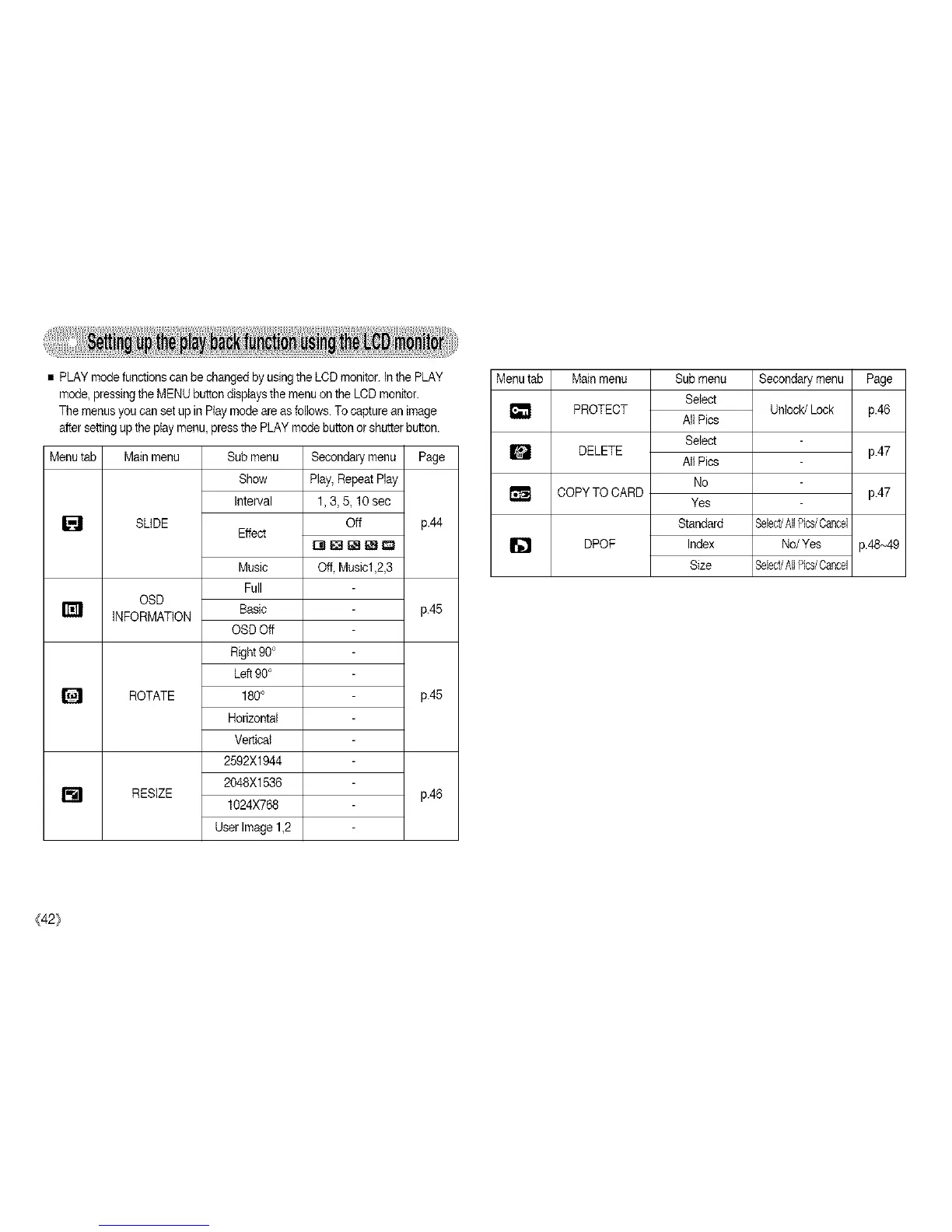
PLAY modefunctions can be changed byusing the LOD monitor. Inthe PLAY
mode, pressing the MENU button displays the menuon the LCDmonitor.
The menusyou can setup in Play modeare as follows.To capturean image
aftersetting up the play menu, press the PLAY modebutton or shutterbutton.
Menutab Mainmenu
SLIDE
OSD
INFORMATION
ROTATE
[] RESlZE
Sub menu
Show
interval
Effect
Music
Full
Basic
OSDOff
Right90°
Left90°
180°
Horizontal
Vertical
2592X1944
2048X1536
1024X768
User Image 1,2
Secondary menu Page
Play,Repeat Play
1,3,& 10sec
Off p.44
Off Music1,2,3
p.45
p.45
pA6
Menutab Mainmenu
[] PROTECT
m DELETE
COPYTO CARD
DPOF
Sub menu
Select
All Pics
Select
All Pics
No
Yes
Standard
Index
Size
Secondary menu Page
Unlock/Lock p.46
p.47
p.47
SelectJAll%s/Cancel
No/Yes p.48~49
Select/All%s/Cancel
{42}

Table of Contents