OfficeServ 7400 INSTALLATION
TECHNICAL MANUAL PART 7 JANUARY 2011
7.39
2. Client Application: The client application can be used on OfficeServ 7000 series systems
using software version 4.51 and lower.
LAUNCHING DEVICE MANAGER
Before you can successfully access an OfficeServ System using the embedded Device
Manager via a web browser, there are a few things that need to be set or verified.
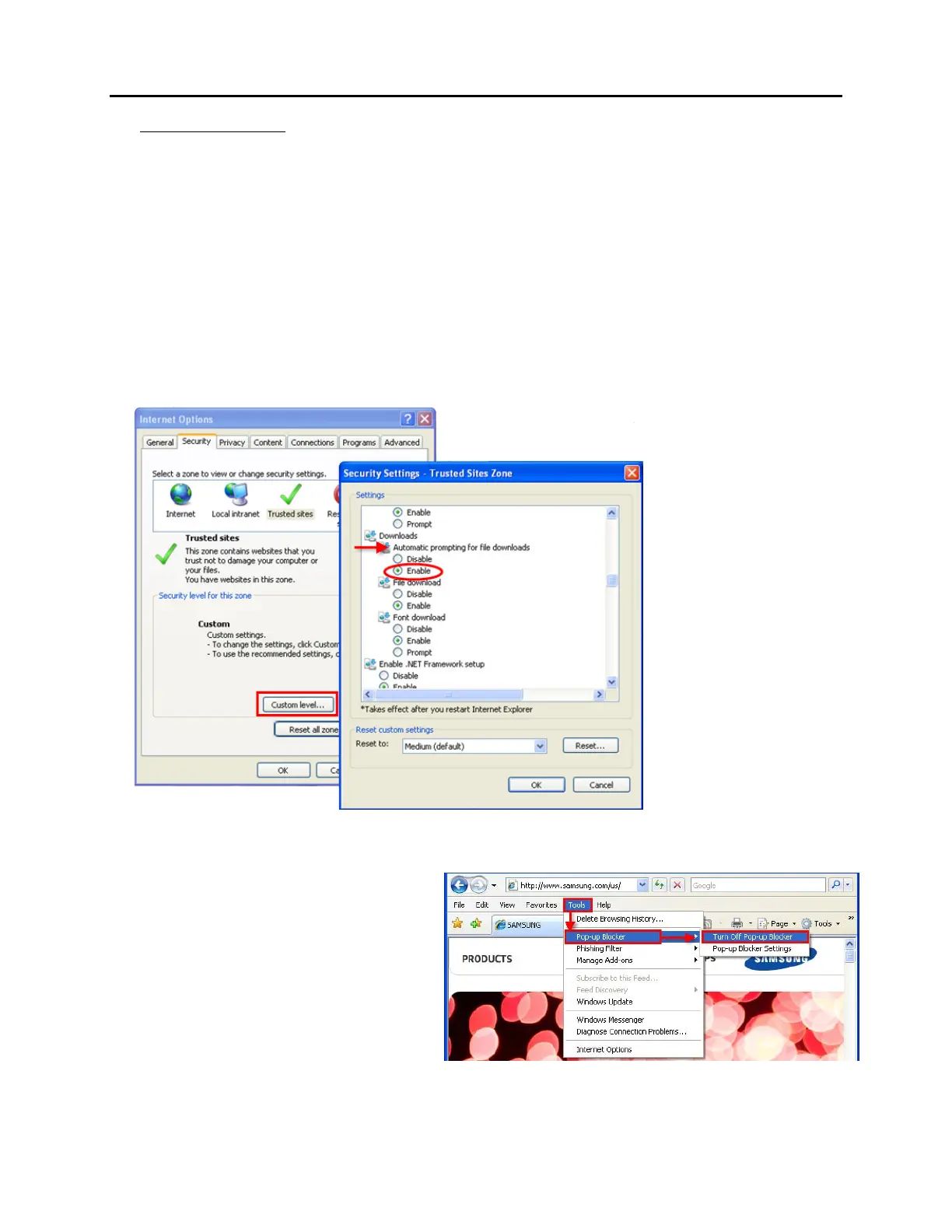
1. Enable the Downloads/File Download option in Internet Security Settings
This setting can be found under the Tools/Internet Options menu in Internet Explorer.
Select the Security tab and then the Custom Level button.
Figure 7.34 Security Settings to Enable Downloads
2. Enable Popups
Device Manager will be launched in
a pop-up window, therefore the
pop-up blocker must be turned off in
the web browser.
Figure 7.35 Enable Pop-Ups















 To Next Page