OfficeServ 7400 INSTALLATION
TECHNICAL MANUAL PART 3 MAY 2010
3.11
Ports & LEDs Function Description
LAN LED Status of LAN operation
- Off: No-power and no-connection of LAN port
- On: The color of the LED shows the LAN transmission speed and connection
speed
• On (Green): Good connection + Operation at 100Mbps
- Blink (Green): Good connection + Operation at 10Mbps
SM LED SD/Smart Media/MMC+Access Status
- Off: No SD/Smart Media/MMC+
- On: The color of the LED shows the mounting status and the normal
operation status after access
• On(Green): Mounted + Normal Operation
• On(Red): Non-mounted or Mounted + Abnormal Operation
- Blink (Green): SD/Smart Media/MMC+ is mounted and in access mode
MDM LED MODEM Daughtercard status
- Off: No-MODEM
- On(Green): MODEM mounted
- Blink (Green): On transmitting data
3.2.5 LP40 LEDs
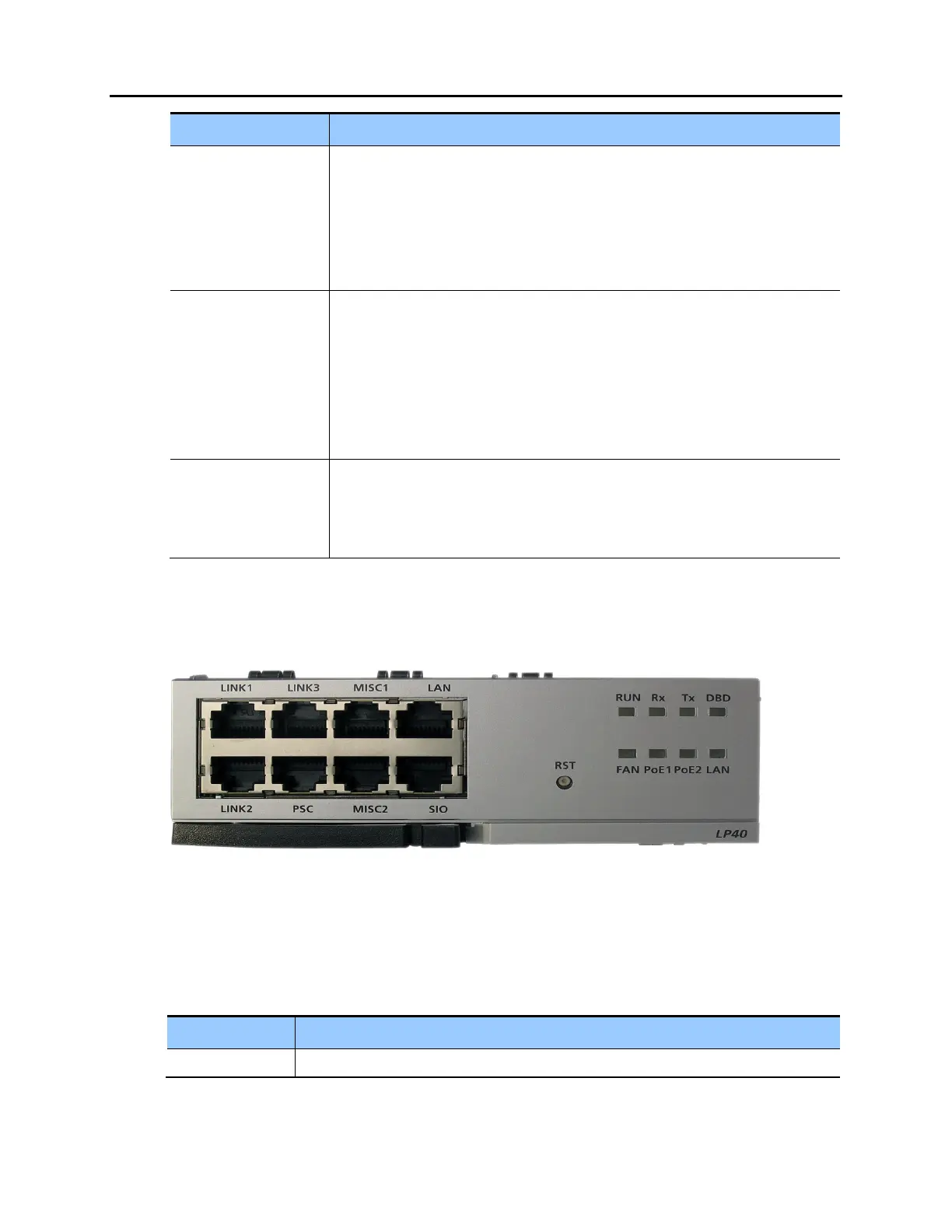
The front view of the LP40 board is shown in the picture below.
Figure 3.11 Front View of the LP40
The components on the front panel of the LP40 have the functions below:
Table 3.4 Ports and LEDs of the LP40
Ports & LEDs Function Description
LINK1~LINK3 Ports for connecting MP40 with LP40















 To Next Page