OfficeServ 7400 INSTALLATION
TECHNICAL MANUAL PART 3 MAY 2010
3.10
3.2.4 MP40 LEDs
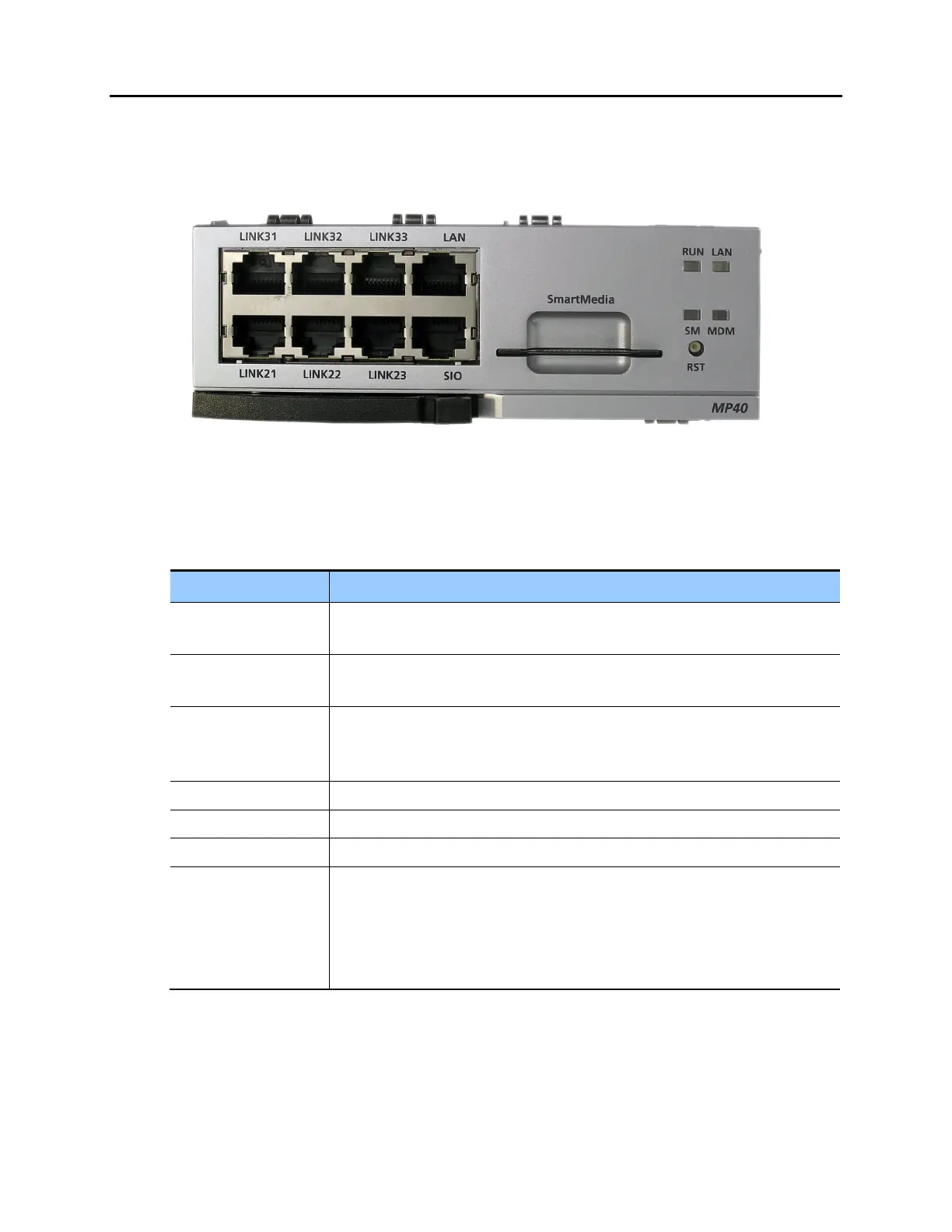
The front view of the MP40 board is shown in the picture below.
Figure 3.10 Front View of the MP40
The MP40 front panel components have the functions below:
Table 3.3 Ports and LEDs of the MP40
Ports & LEDs Function Description
LINK21~LINK23,
LINK31~LINK33
Connection ports between MP40 and LP40s in the first and second expansion
cabinets.
MISC1~MISC2 Ports that connect external music sources, paging device, loud bell, common
bell, and door bell when the optional MIS daughterboard is installed.
SD / Smart Media /
MMC+
Port for installing the 32MB Smart Media card. This card contains the main
system software. The MMC+ contains 64MB of storage and the SD contains 1
GB.
LAN Port for establishing the 10 Base-T/100 Base-Tx Ethernet connection
SIO Serial port (Samsung Engineering Use ONLY)
RST Button for resetting the MP40 board
RUN LED This LED indicates the status of the MP40
- Off: No power
- On (Green): On booting
- Blink (Green): Normal Operation of program
The blink cycle is 500ms while running S/W















 To Next Page