OfficeServ 7400 INSTALLATION
TECHNICAL MANUAL PART 3 MAY 2010
3.47
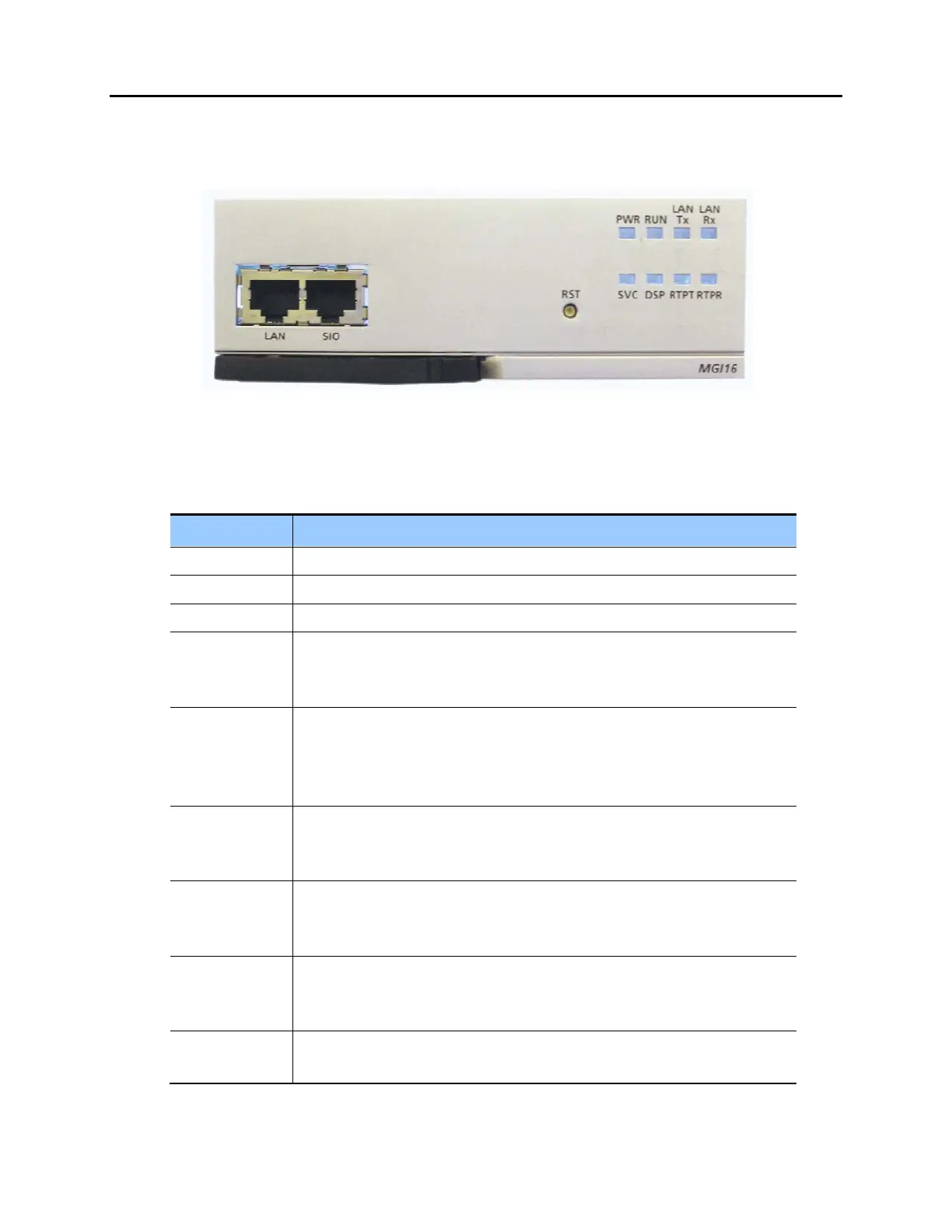
FRONT VIEW OF MGI-16 BOARD
The front view of the MGI-16 board is shown in the picture below.
Figure 3.47a Front View of the MGI-16 Board
The components on the front panel of the MGI and MGI-16 have the functions below:
Table 3.21 Ports and LEDs of the MGI and MGI-16
Ports & LEDs Function Description
LAN Port that connects the Ethernet.
SIO Serial Port (for Samsung Use ONLY)
RST Button for resetting the MGI/MGI-16.
PWR LED This LED indicates the power supply status.
- Off: Power is not being supplied.
- On: Power is being supplied properly.
RUN LED This LED indicates MCP status.
- Off: Power is not being supplied.
- On: Booting.
- Blink: The RAM program is operating.
LAN Tx LED This LED indicates the transmit status of the LAN port.
- Off: Data is not being transmitted.
- On or blink: Data is being transmitted.
LAN Rx LED This LED indicates the receive status of the LAN port.
- Off: Data is not being received.
- On or blink: Data is being received.
SVC LED This LED indicates if the service is being offered.
- This LED blinks when program is being modified or configuration is being
loaded.
DSP LED This LED indicates if the VoIP DSP is operating.
- This LED blinks when the VoIP channels are engaged.















 To Next Page