OfficeServ 7400 INSTALLATION
TECHNICAL MANUAL PART 3 JANUARY 2011
3.65
CNF24 CARD STATUS
The OfficeServ system provides conference services when the CNF24 card status is active.
In the following cases the card status will change to idle:
1. LAN connection between system and CNF24 card
System checks the card status every 5 seconds and if the network cable of the CNF24
card is disconnected, system will restrict all conference services until LAN connection
is recovered.
2. Card Parameter Setting
When IP address is not assigned to CNF24 card, the system can’t check card status.
Every time a new CNF24 card is installed user must assign an IP address.
3. Service License Key
License key is required to use conference service. Without a license key, a “NO
CONFERENCE CHANNELS ARE AVAILABLE” message displays on the phone. Check
service license key in case of system initialization or change country selection.
UPGRADING CNF24 CARD SOFTWARE
To upgrade CNF24 software follow the steps below:
1. Select the [Util] menu option.
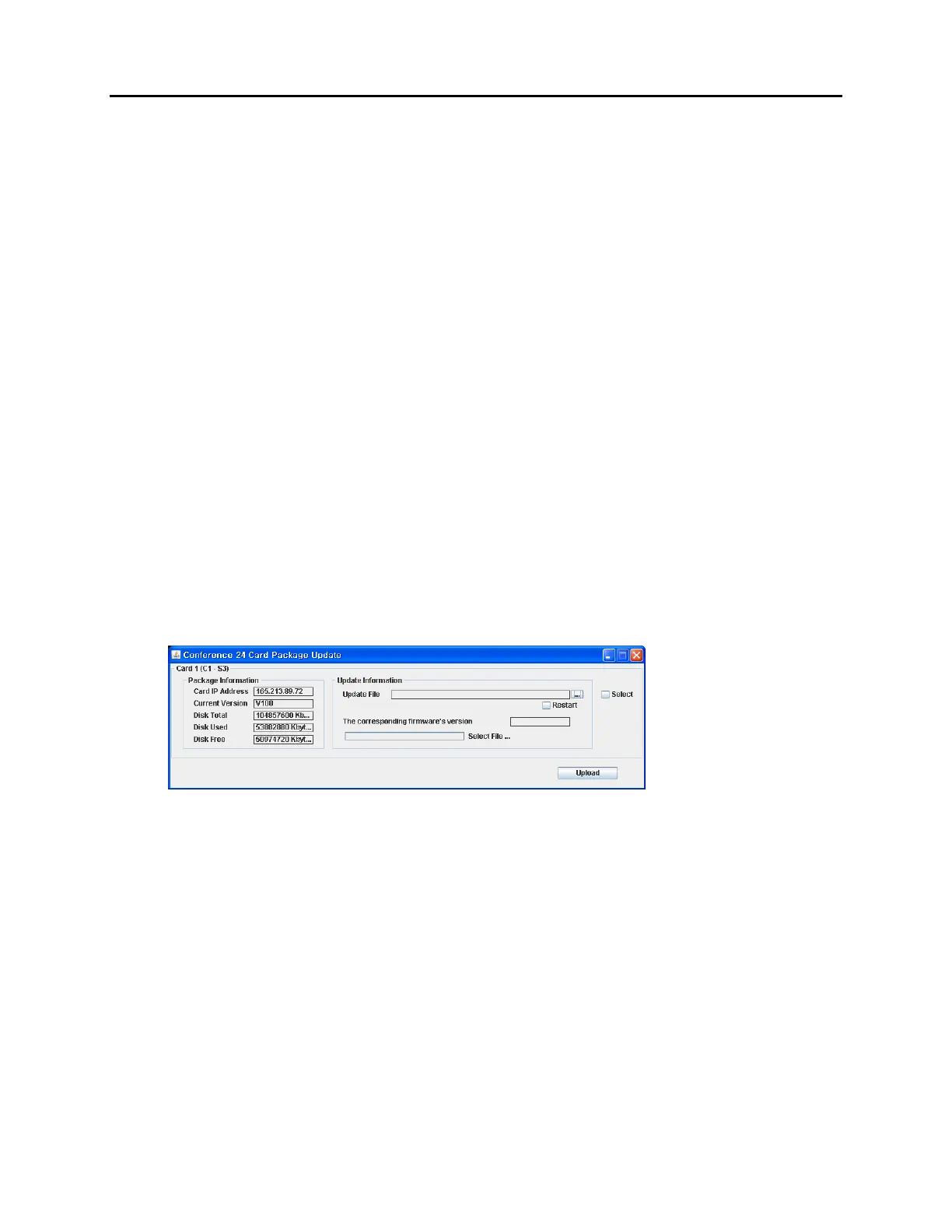
2. Select Package Update. Conference Card Package Update window displays.
Figure 3.58 CNF24 Package Update
3. Click on [...] to select file to update. When file is selected the “Corresponding Firmware
Version” will display.
4. Click on Select checkbox.
5. Click on the Upload button to start the upload process. The progress bar displays the
current state.















 To Next Page