ENGLISH
ESPAÑOL
2626
Initial Setting : System Menu Setting
✤ The Shutter Sound function works in both <Player> and <M.Cam>
modes. ➥page 19
✤ You can turn the Shutter Sound on or off, when on, with each press
of the [PHOTO] button the Shutter will sound.
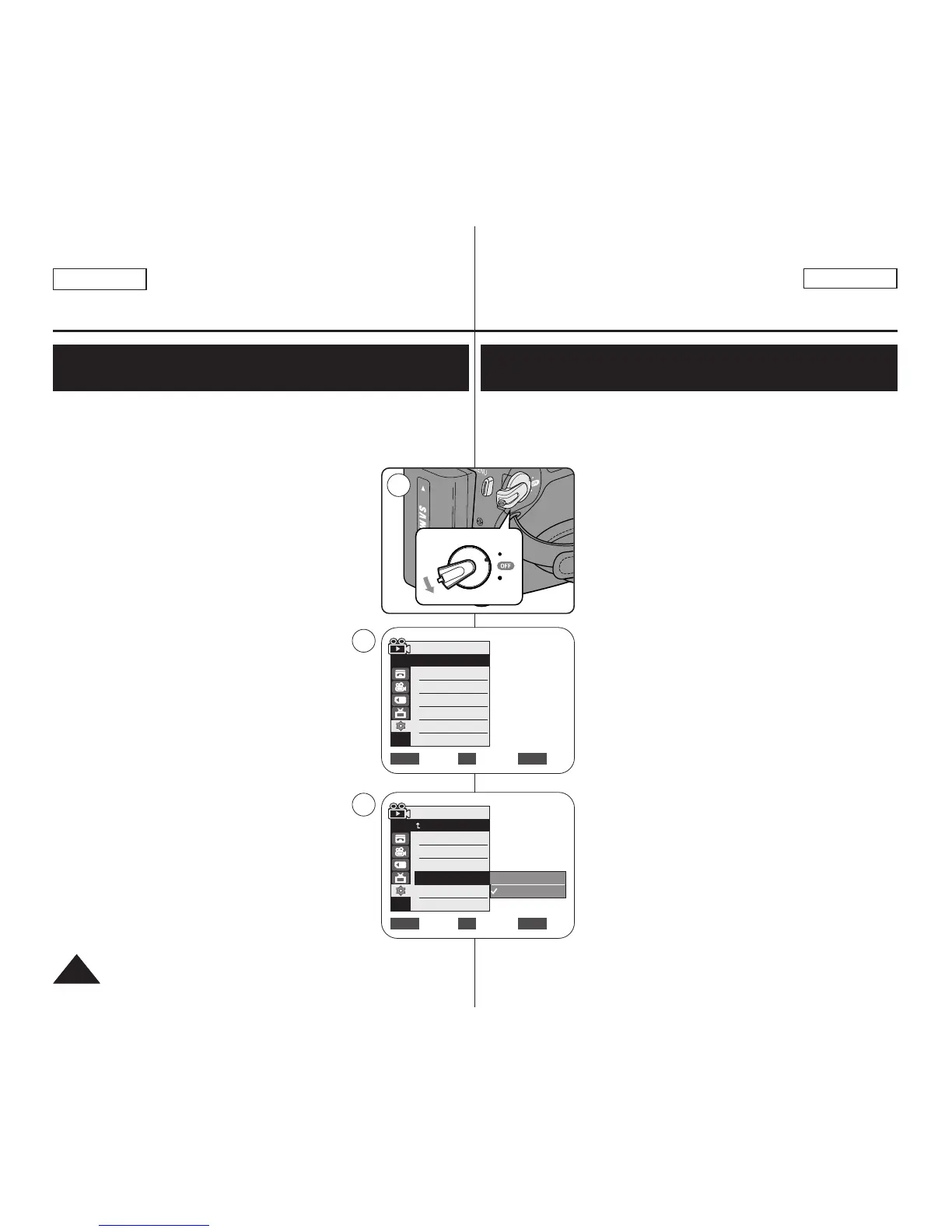
1. Set the [Power] switch to [CAMERA] or [PLAYER].
2. If the [Power] switch is set to [CAMERA], set the
[Mode] switch to [MEMORY].
If the [Power] switch is set to [PLAYER], set the
[Mode] switch to [TAPE].
3. Press the [MENU] button.
■
The menu list will appear.
4. Move the [Zoom] lever to the up or down to select
<System>, then press the [OK] button.
5. Move the [Zoom] lever to the up or down to select
<Shutter Sound>, then press the [OK] button.
6. Move the [Zoom] lever to the up or down to select
<On> or <Off>, then press the [OK] button.
7. To exit, press the [MENU] button.
Setting the Shutter Sound (Shutter Sound)
(SC-D363/D364/D365 /D366 only)
Ajuste inicial: ajuste del menú System (Sistema)
✤ La función Shutter Sound está operativa en los modos <Player> y
<M.Cam>. ➥pág. 19
✤ Puede activar o desactivar el sonido del obturador; cuando esté
activado, con cada pulsación de botón [PHOTO] se emitirá un pitido.
1. Coloque el interruptor [Power] en [CAMERA] o
[PLAYER].
2. Si el interruptor [Power] está en [CAMERA],
coloque el interruptor [Mode] en [MEMORY].
Si el interruptor [Power] está en [PLAYER],
coloque el interruptor [Mode] en [TAPE].
3. Presione el botón [MENU].
■
Aparecerá la lista de menús.
4. Mueva la palanca [Zoom] arriba o abajo para
seleccionar <System> y presione el botón [OK].
5. Mueva la palanca [Zoom] arriba o abajo para
seleccionar <Shutter Sound> y presione el botón
[OK].
6. Mueva la palanca [Zoom] arriba o abajo para
seleccionar <On> o <Off> y presione el botón
[OK].
7. Para salir, presione el botón [MENU].
Ajuste de <Shutter Sound> (Sonido Obtur)
(sólo SC-D363/D364/D365/D366)
Move Select Exit
MENUOKZOOM
Off
On
Move Select Exit
MENUOKZOOM
Player Mode
√System
Clock Set
Remote
Beep Sound
Shutter Sound
Language


 To Next Page