ENGLISH
ESPAÑOL
6666
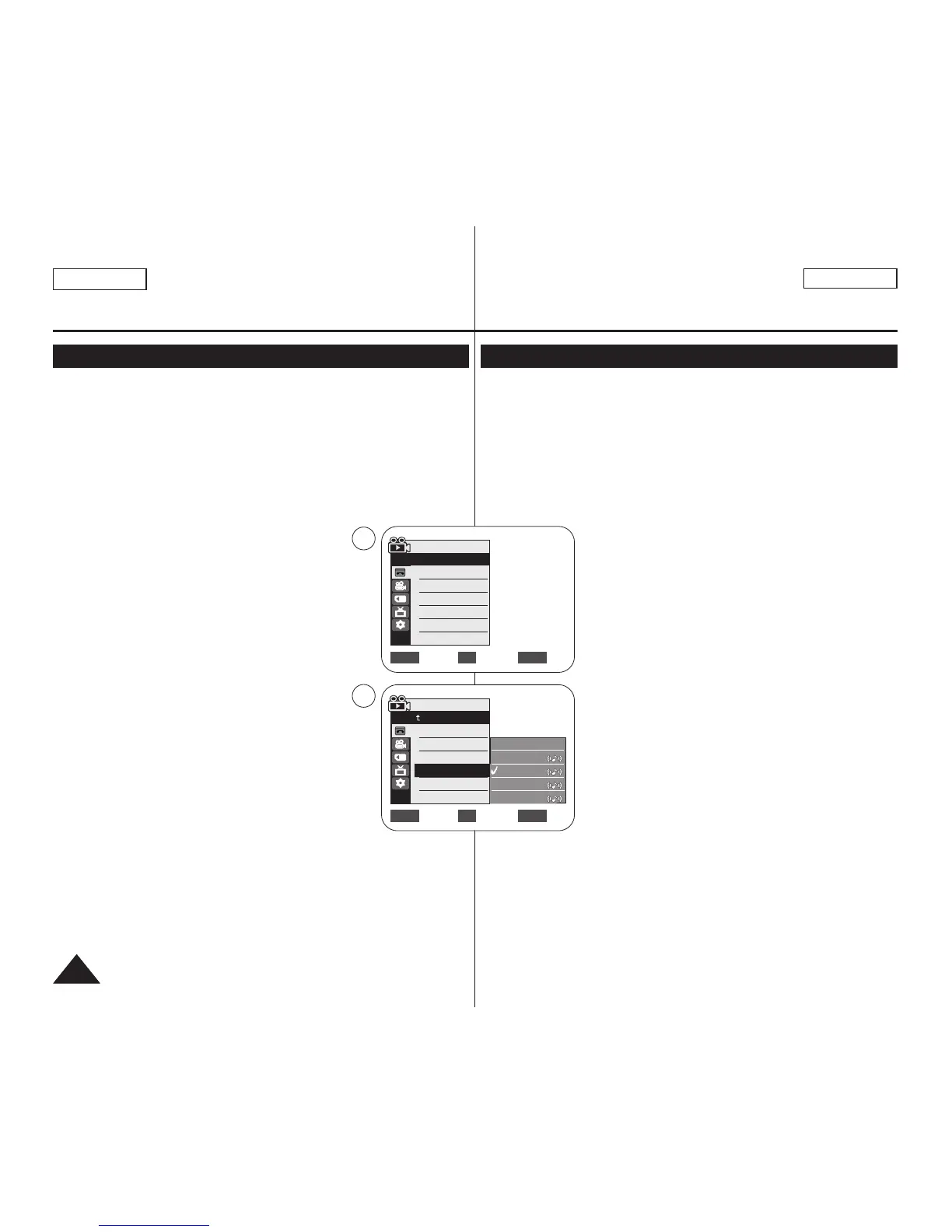
✤ Audio Effect function works only in <Player> mode. ➥page 19
✤ Audio Effect provides various playback effects to audio signals stored
on a tape.
1. Set the [Power] switch to [PLAYER].
2. Set the [Mode] switch to [TAPE]. (SC-D363/D364/D365/D366 only)
3. Insert the dubbed tape and press the [MENU] button.
4. Move the [Zoom] lever to the up or down to
select <Tape>, then press the [OK] button.
5. Move the [Zoom] lever to the up or down to select
<Audio Effect>, then press the [OK] button.
6. Move the [Zoom] lever to the up or down to select
the audio effect channel, then press the [OK] button.
■
<Voice>: Highlights the human voice.
■
<Music>: Highlights the sound by enhancing
the bass and treble.
■
<Wide>: Magnifies the stereo effect by
enhancing the left and right sounds.
■
<Echo>: Gives an echo effect.
7. To exit, press the [MENU] button.
[ Notes ]
■
It is recommended to use stereo type output devices
(TV, speakers) for better audio effects.
■
The Audio Effect function is transmittable.
■
Audio Effect function is not available in USB Streaming mode.
(SC-D362/D363/D364/D365/D366 only)
✤ La función Audio Effect sólo está operativa en el modo <Player>.
➥pág. 19
✤ Audio Effect proporciona diversos efectos de reproducción para las
señales almacenadas en una cinta.
1. Coloque el interruptor [Power] en [PLAYER].
2. Coloque el interruptor [Mode] en [TAPE].
(Sólo SC-D363/D364/D365/D366.)
3. Inserte la cinta mezclada y presione el botón
[MENU].
4. Mueva la palanca [Zoom] arriba o abajo para
seleccionar <Tape> y presione el botón [OK].
5. Mueva la palanca [Zoom] arriba o abajo para
seleccionar <Audio Effect> y presione el botón
[OK].
6. Mueva la palanca [Zoom] arriba o abajo para
seleccionar el canal del efecto de audio y presione
el botón [OK].
■
<Voice>: Resalta la voz humana.
■
<Music>: Resalta el sonido ampliando los bajos
y los agudos.
■
<Wide>: amplía el efecto estéreo mejorando los
sonidos de la izquierda y la derecha.
■
<Echo>: Proporciona un efecto de eco.
7. Para salir, presione el botón [MENU].
[ Notas ]
■
Se recomienda utilizar los dispositivos de salida de
tipo estéreo (TV, parlantes) para obtener mejores
efectos de audio.
■
La función Audio Effect es transmisible.
■
La función Audio Effect no está disponible en modo USB Streaming.
(Sólo SC-D362/D363/D364/D365/D366.)
Playback Reproducción
Audio Effect Audio Effect
Move Select Exit
MENUOKZOOM
√Sound[1]
√Off
Move Select Exit
MENUOKZOOM
Player Mode
√Tape
Photo Search
Photo Copy
Audio Select
Audio Effect
Off
Voice
Music
Wide
Echo
4
6


 To Next Page