ENGLISH
ESPAÑOL
3636
Basic Recording
✤ The REC SEARCH function works only in <Camera> mode.
➥page 19
✤ To be used to review previously recorded images or to find a point to
record a new image in the STBY mode.
Record Search (REC SEARCH)
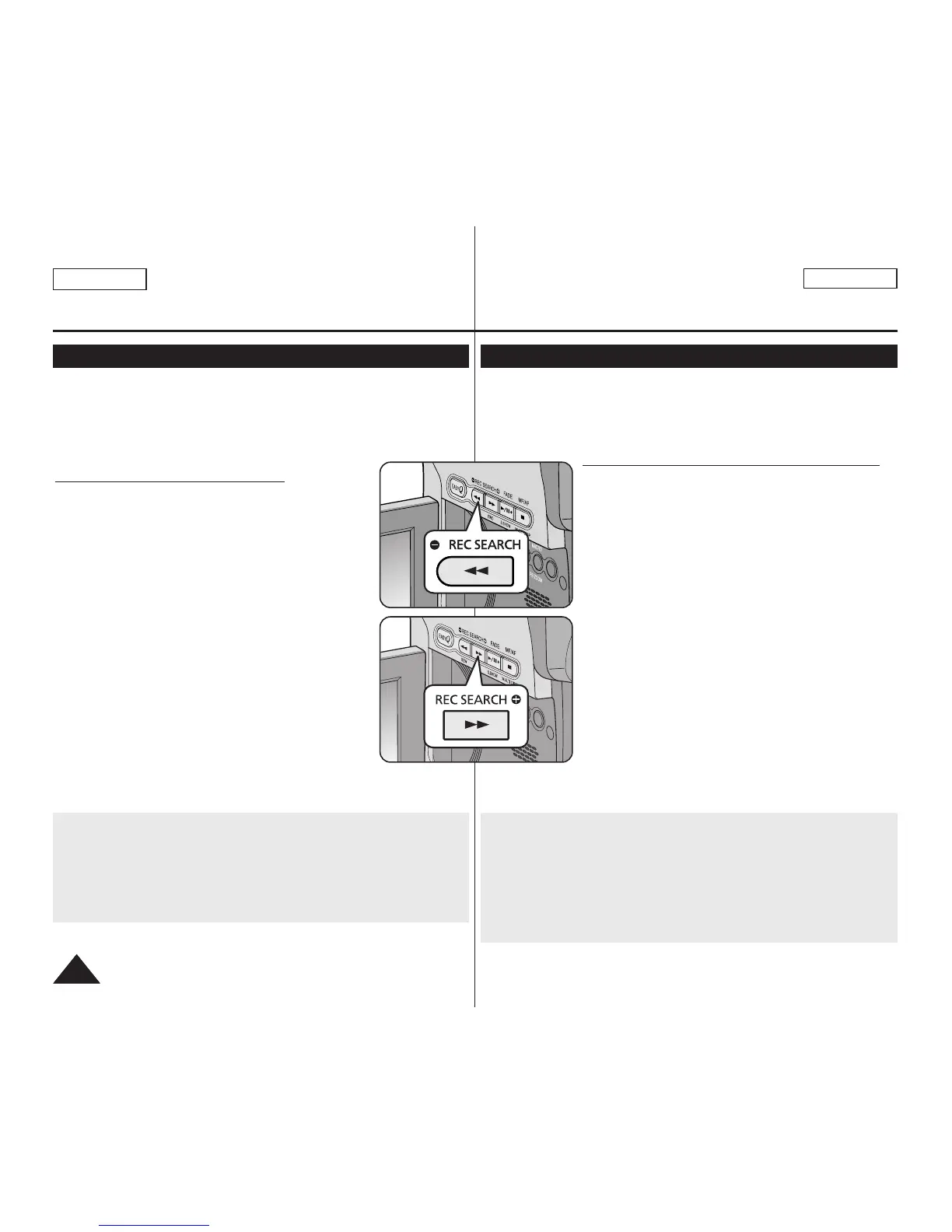
1. Set to STBY mode by pressing [Start/Stop] button.
2. [REC SEARCH -] enables you to play the recording
backwards and
[REC SEARCH +] enables you to play it forwards,
as long as you keep each button pressed down.
■
If you press the [REC SEARCH -] button in
STBY mode, your Camcorder will play
in reverse for 3 seconds and return to the
original position automatically.
[ Notes ]
■
Mosaic shaped distortion may appear on the screen
while in Record Search mode.
■
Pressing [Start/Stop] button after REC SEARCH
will overwrite the images recorded after that point.
Reviewing and Searching a Recording (REC SEARCH)
When a cassette is loaded and the Camcorder is left in the STBY
mode for more than 5 minutes without being used,
it will switch off automatically.
To use it again, press the [Start/Stop] button or set the [Power]
switch to [Off] and then back to [CAMERA].
This auto power off feature is designed to save Battery power.
Grabación básica
✤ La función REC SEARCH sólo está operativa en el modo
<Camera>. ➥pág. 19
✤ Se utiliza para revisar imágenes grabadas previamente o para
buscar un punto para grabar una imagen en el modo STBY.
Búsqueda de grabación (REC SEARCH)
1. Defina en modo STBY presionando el botón
[Start/Stop].
2. Al mantener pulsado [REC SEARCH -], la
grabación se reproducirá hacia atrás y al mantener
pulsado el botón [REC SEARCH +] la grabación se
reproducirá hacia adelante.
■
Si pulsa el botón [REC SEARCH -] en el modo
STBY, la videocámara reproducirá hacia atrás
durante tres segundos y volverá
automáticamente a la posición original.
[ Notas ]
■
En el modo de búsqueda de grabación es posible
que la imagen se distorsione y forme una especie
de mosaico.
■
Si se pulsa el botón [Start/Stop] tras REC
SEARCH sobrescribirá las imágenes grabadas tras
dicho punto.
Revisión y búsqueda de una grabación (REC SEARCH)
Si se carga un casete en la videocámara y ésta se deja en la posición
STBY durante más de cinco minutos sin usarla, se apagará
automáticamente.
Para usarla de nuevo, presione el botón [Start/Stop] o coloque el
interruptor [Power] en la posición [Off] y luego en [CAMERA].
Esta función de apagado automático está diseñada para ahorrar
energía de la batería.


 To Next Page