✤ The WindCut Plus function works in both <Camera> and <Player>
(Audio dubbing) modes. ➥page 19
✤ Use the WindCut Plus when recording in windy places such as the
beach or near buildings.
✤ The WindCut Plus function minimizes wind or other noises while
recording.
- When the WindCut Plus is on, some low
pitched tones are eliminated along with the
sound of the wind.
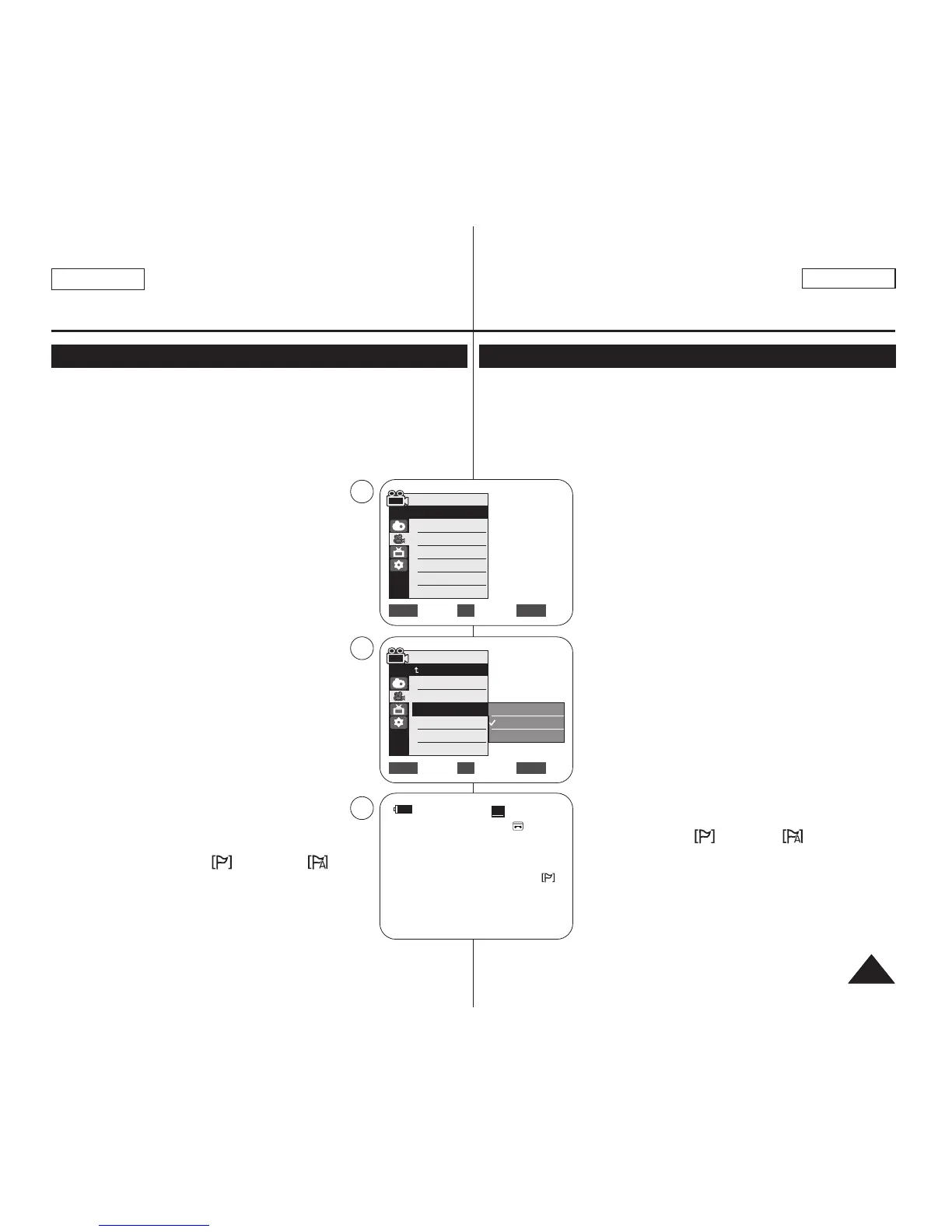
1. Set the [Power] switch to [CAMERA] or [PLAYER].
2. Set the [Mode] switch to [TAPE].
(SC-D363/D364/D365/D366 only)
3. Press the [MENU] button.
4. Move the [Zoom] lever to the up or down to
select <Record>, then press the [OK] button.
5. Move the [Zoom] lever to the up or down to select
<WindCut Plus>, then press the [OK] button.
6. To activate the WindCut Plus function, move the
[Zoom] lever to the up or down to select <On> or
<Auto> then press the [OK] button.
■
<On>: Removes the low pitched wind noise.
■
<Auto>: Minimizes the wind noise while
preserving voices.
7. To exit, press the [MENU] button.
■
WindCut Plus (<On> or <Auto> ) icon
is displayed.
[ Notes ]
■
Make sure WindCut Plus is set to off when you want
the microphone to be as sensitive as possible.
■
WindCut Plus function is not available in USB Streaming mode. (SC-
D362/D363/D364/D365/D366 only)
Advanced Recording
Cutting Off Wind Noise (WindCut Plus)
✤ La función WindCut Plus está operativa en los modos <Camera> y
<Player> (Mezcla de audio). ➥pág. 19
✤ Utilice Windcut plus cuando grabe en lugares con viento como la playa
o cerca de edificios.
✤ La función Windcut plus minimiza el ruido del viento y otros ruidos
durante la grabación.
-Cuando WindCut Plus está activado, se eliminan
algunos tonos de baja frecuencia junto con el sonido
del viento.
1. Coloque el interruptor [Power] en [CAMERA] o
[PLAYER].
2. Coloque el interruptor [Mode] en [TAPE].
(Sólo SC-D363/D364/D365/D366)
3. Presione el botón [MENU].
4. Mueva la palanca [Zoom] arriba o abajo para
seleccionar <Record> y presione el botón [OK].
5. Mueva la palanca [Zoom] arriba o abajo para
seleccionar <WindCut Plus> y presione el botón
[OK].
6. Para activar la función WindCut Plus, mueva la
palanca [Zoom] arriba o abajo para seleccionar
<On> o <Auto> y presione el botón [OK].
■
<On> : elimina el ruido del viento de baja
frecuencia.
■
<Auto> : Minimiza el ruido del viento y conserva
las voces.
7. Para salir, presione el botón [MENU].
■
Aparece el icono de WindCut Plus (Filtro
viento)(<On> o <Auto> ).
[ Notas ]
■
Asegúrese de que la función WindCut Plus esté
desactivada cuando desee que la sensibilidad del
micrófono sea la mayor posible.
■
La función WindCut Plus no está disponible en modo
USB Streaming.
(Sólo SC-D362/D363/D364/D365/D366.)
Grabación avanzada
Eliminación del ruido del viento <WindCut Plus> (Filtro viento)
ENGLISH
ESPAÑOL
4545
Move Select Exit
MENUOKZOOM
Camera Mode
√Record
Rec Mode
Audio Mode
WindCut Plus
Real Stereo
√SP
√12Bit
√Off
√Off
Move Select Exit
MENUOKZOOM
Off
On
Auto
4
6
60min
0:00:10
SP
STBY
7
œ
Camera Mode
Back
Rec Mode
Audio Mode
WindCut Plus
Real Stereo


 To Next Page