ENGLISH
ESPAÑOL
8484
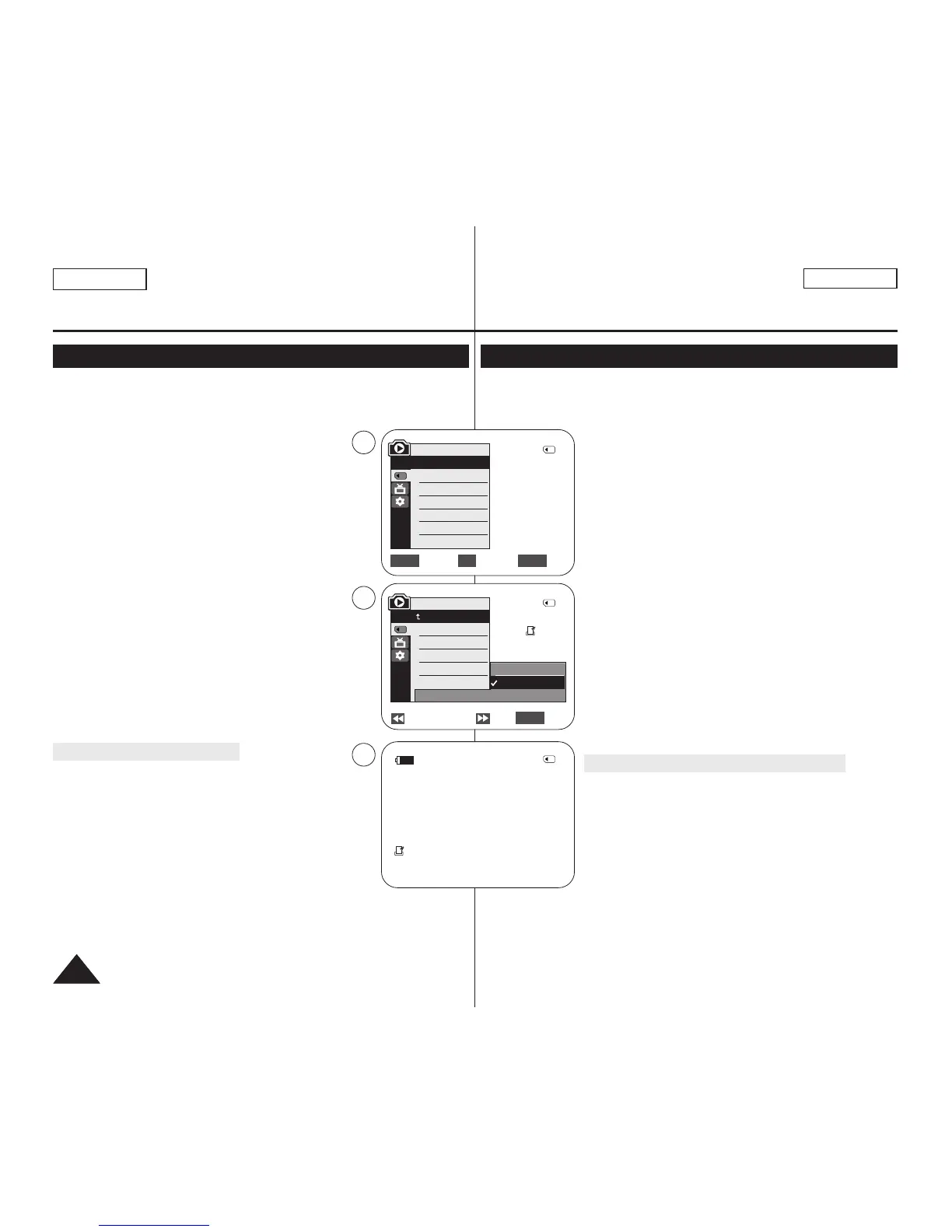
✤ The Print Mark function works only in <M.Player> mode. ➥page 19
✤ This Camcorder supports the DPOF (Digital Print Order Format) print format.
✤ You can automatically print images recorded on a Memory Card with a printer
supporting DPOF.
✤ There are 2 ways to make a Print Mark.
- <This File> : You can set a print mark on the photo
image displayed on the LCD Screen. It can be set up to
999.
- <All Files> : To print 1 copy each of all of the stored
images.
1. Set the [Power] switch to [PLAYER].
2. Set the [Mode] switch to [MEMORY].
■
The last recorded image appears.
3. Using the [
œœœœ
/
√√√√
(REV/FWD)] buttons, search for the
photo image that you want to mark.
4. Press the [MENU] button.
■
The menu list will appear.
5. Move the [Zoom] lever to the up or down to select
<Memory>, then press the [OK] button.
6. Move the [Zoom] lever to the up or down to select <Print
Mark>, then press the [OK] button.
7. Move the [Zoom] lever to the up or down to select desired
option (All Off, This File or All Files), then press the [OK]
button.
8. If you select <This File>, move the [Zoom] lever to the up
or down to select the quantity,
then press the [OK] button.
9. To exit, press the [MENU] button.
Removing the Print Mark
To remove all Print Marks select <All Off>.
To remove individual file’s Print Mark, select the file and set
<This File> to <000>.
[ Notes ]
■
You can directly access the Print Mark function using the
[QUICK MENU] button. ➥page 20
■
If the Print Mark is set to <This File>, you can set the
number of copies from <000> to <999>.
■
If the Print Mark is set to <All Files>, you can set the
number of copies to <1>.
■
The <All Files> option may require extended operation time depending on
the number of stored images.
■
DPOF supporting printers are commercially available.
■
Use the USB cable provided with the Camcorder.
✤
La función de marca de impresión sólo está operativa en el modo <M.Player>. ➥pág. 19
✤ Esta videocámara es compatible con el formato de impresión DPOF (Digital Print
Order Format).
✤ Es posible imprimir de manera automática imágenes grabadas en
una tarjeta de memoria con una impresora compatible con DPOF.
✤ Hay dos maneras de hacer una marca de impresión.
- <This File>: se puede poner una marca de impresión en la
imagen que aparece en la pantalla LCD. Se puede ajustar
hasta 999.
- <All Files>: se imprime una copia de cada una de las
imágenes guardadas.
1. Coloque el interruptor [Power] en [PLAYER].
2. Coloque el interruptor [Mode] en [MEMORY].
■
Aparece la última de las imágenes grabadas.
3. Busque la imagen que desee marcar presionando los botones
[
œœœœ
/
√√√√
(REV/FWD)].
4. Presione el botón [MENU].
■
Aparecerá la lista de menús.
5. Mueva la palanca [Zoom] arriba o abajo para seleccionar
<Memory> y presione el botón [OK].
6. Mueva la palanca [Zoom] arriba o abajo para seleccionar <Print
Mark> y presione el botón [OK].
7. Mueva la palanca [Zoom] arriba o abajo para seleccionar la
opción que desea (All Off, This File o All Files) y presione el
botón [OK].
8. Si selecciona <This File>, mueva la palanca [Zoom] arriba o
abajo para seleccionar la cantidad y presione el botón [OK].
9. Para salir, presione el botón [MENU].
Eliminación de la marca de impresión
Para eliminar todas las marcas de impresión, seleccione <All Off>.
Para eliminar una marca de impresión de un archivo individual,
seleccione el archivo y defina <This File> en 000.
[ Notas ]
■
Puede acceder directamente a la función Print Mark utilizando el
botón [QUICK MENU].➥pág. 20
■
Si Print Mark está definido en <This File>, puede definir el
número de copias de 0 a 99.
■
Si Print Mark está definido en <All Files>, puede definir el
número de copias en <1>.
■
Es posible que la opción <All Files> requiera más tiempo de funcionamiento,
dependiendo del número de imágenes guardadas.
■
Existen en el mercado impresoras compatibles con DPOF.
■
Utilice el cable USB que se facilita con la videocámara.
Digital Still Camera Mode
(SC-D363/D364/D365/D366 only)
Modo de cámara fotográfica digital
(sólo SC-D363/D364/D365/D366)
Marking Images for Printing (Print Mark)
Marcación de imágenes para impresión <Print Mark> (Marca)
Previous Next Exit
MENU
√Memory Card
√Photo
√Off
Move Select Exit
MENUOKZOOM
M.Player Mode
√Memory
Memory Type
M.Play Select
Delete
Delete All
Protect
Print Mark
All Off
This File 002
All Files
2/46
002
√
5
7
9
M.Player Mode
Back
Memory Type
M.Play Select
Delete
Delete All
Protect
Print Mark
2/46
2/46
002
100-0002
†
†
†
800x600


 To Next Page