ENGLISH
ESPAÑOL
7070
Digital Still Camera Mode
(SC-D363/D364/D365/D366 only)
Modo de cámara fotográfica digital
(sólo SC-D363/D364/D365/D366)
Selecting the Memory
Typ
e (
SC-D366 only
)
Selección de <Memory Type> (Tipo memoria) (sólo SC-D366)
✤ The Memory Type setting works in <Player>/<M.Cam>/<M.Player>
modes. ➥page 19 (SC-D366: 32MB)
✤ Images can be stored and played back using the built-in memory (Int.
Memory), or on a Memory Card.
Hence, set the memory type before storing and playing back images.
1. Set the [Power] switch to [CAMERA] or
[PLAYER].
2. Set the [Mode] switch to [TAPE] or [MEMORY].
3. Press the [MENU] button.
■
The menu list will appear.
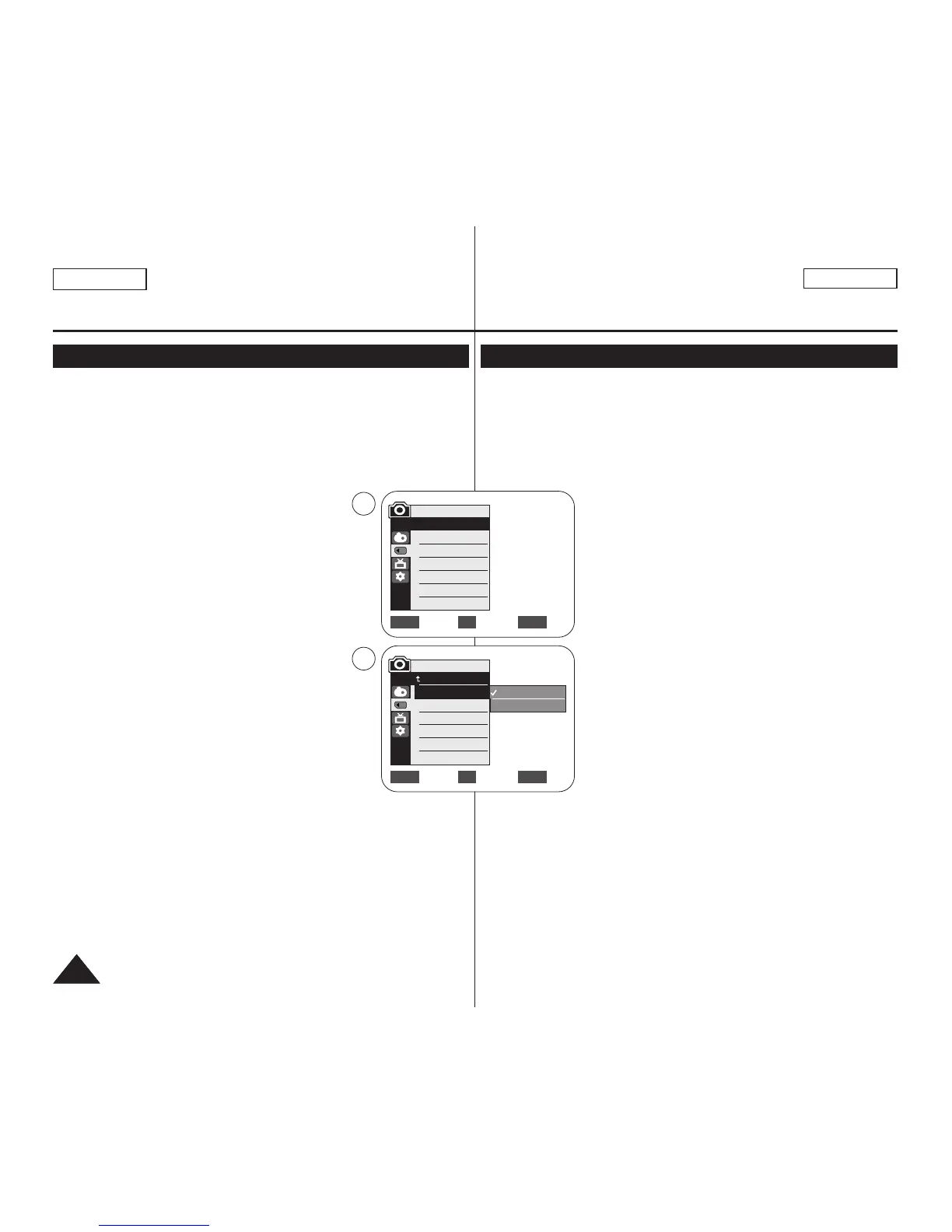
4. Move the [Zoom] lever to the up or down to
select <Memory>, then press the [OK] button.
5. Move the [Zoom] lever to the up or down to
select <Memory Type>, then press the [OK] button.
6. Move the [Zoom] lever to the up or down to select
<Int. Memory> or <Memory Card>, then press the
[OK] button.
7. To exit, press the [MENU] button.
[ Note ]
■
You can directly access the Memory Type function using the [QUICK
MENU] button. ➥page 20
✤ El ajuste Memory Type está operativa en los modos
<Player>/<M.Cam>/<M.Player>.➥pág. 19 (SC-D366: 32MB)
✤ Las imágenes se pueden almacenar y reproducir utilizando la
memoria interna o en una tarjeta de memoria.
Por tanto, defina el tipo de memoria antes de almacenar y reproducir
las imágenes.
1. Coloque el interruptor [Power] en [CAMERA] o
[PLAYER].
2. Coloque el interruptor [Mode] en [TAPE] o
[MEMORY].
3. Presione el botón [MENU].
■
Aparecerá la lista de menús.
4. Mueva la palanca [Zoom] arriba o abajo para
seleccionar <Memory> y presione el botón [OK].
5. Mueva la palanca [Zoom] arriba o abajo para
seleccionar <Memory Type> y presione el botón
[OK].
6. Mueva la palanca [Zoom] arriba o abajo para
seleccionar <Int. Memory> o <Memory card> y
presione el botón [OK].
7. Para salir, presione el botón [MENU].
[ Nota ]
■
Puede acceder directamente a la función Memory Type utilizando el
botón [QUICK MENU]. ➥pág. 20
Move Select Exit
MENUOKZOOM
√Memory Card
√Super Fine
√Series
Move Select Exit
MENUOKZOOM
M.Cam Mode
√Memory
Memory Type
Photo Quality
File No.
Int. Memory
Memory Card
4
6
M.Cam Mode
Back
Memory Type
Photo Quality
File No.


 To Next Page