ENGLISH
ESPAÑOL
7878
Digital Still Camera Mode
(SC-D363/D364/D365/D366 only)
Modo de cámara fotográfica digital
(sólo SC-D363/D364/D365/D366)
Formatting the Memory Card Formateo de la tarjeta de memoria
✤ The Format function works only in <M.Player> mode. ➥page 19
✤ You can use the Format functions to completely delete all images and
options on the Memory Card, including protected images.
✤ The Format function restores the Memory Card to its initial state.
Attention
✤ If you execute the Format function, all images will
be erased completely and erased images cannot
be recovered.
1. Set the [Power] switch to [PLAYER].
2. Set the [Mode] switch to [MEMORY].
3. Press the [MENU] button.
■
The menu list will appear.
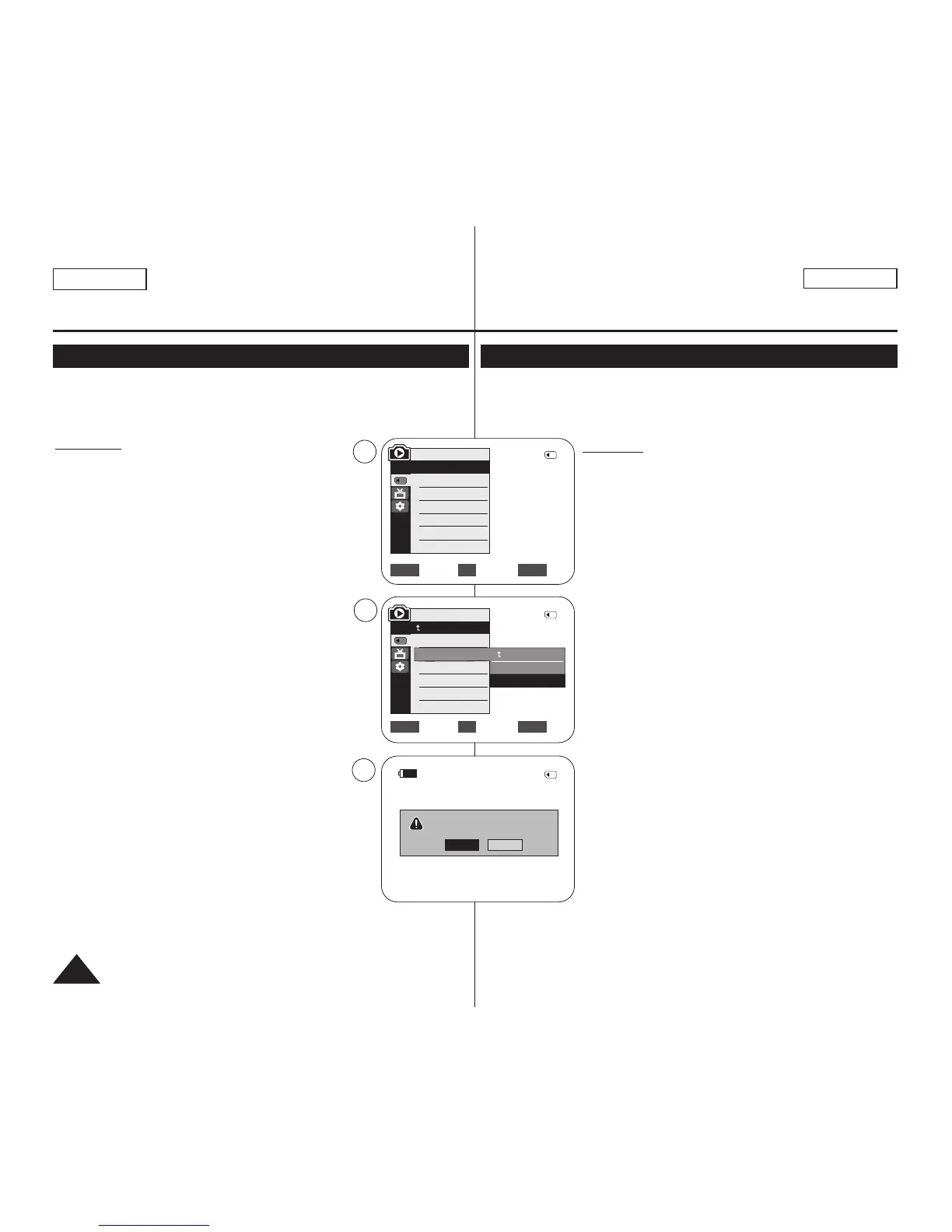
4. Move the [Zoom] lever to the up or down to select
<Memory>, then press the [OK] button.
5. Move the [Zoom] lever to the up or down to select
<Format>, then press the [OK] button.
6. Move the [Zoom] lever to the up or down to select
desired option (Int. Memory or Memory Card), then
press the [OK] button. (SC-D366 only)
■
If you select <Int. Memory> or <Memory Card>, a
message <All files will be deleted! Do you want
to format?> is displayed.
7. Move the [Zoom] lever to the up or down to select
<Yes>, then press the [OK] button.
■
<Complete!> is displayed when the format is
completed.
8. To exit, press the [MENU] button.
[ Notes ]
■
If you execute the Format function, all photo
images/moving images will be erased completely and
erased photo images/moving images cannot be
recovered.
■
Formatting the Memory Card using a different device
will cause Memory Card read errors.
■
Do not turn the power off in the middle of the formatting.
■
A Memory Card with the protection tab set to save will
not be formatted. ➥page 68
■
Do not format the Memory Card on a PC. <Not formatted!> message
may appear if a Memory Card formatted on a PC was inserted.
✤ La función de formateo sólo está operativa en el modo <M.Player>. ➥pág. 19
✤ Para eliminar por completo las imágenes y las opciones de la tarjeta de memoria,
incluidas las imágenes protegidas, puede emplear las funciones de formateo.
✤ La función de formateo devuelve la tarjeta de memoria a su estado inicial.
Atención
✤ Si ejecuta la función de formateo, todas las imágenes se
borrarán y no se podrán recuperar.
1. Coloque el interruptor [Power] en [PLAYER].
2. Coloque el interruptor [Mode] en [MEMORY].
3. Presione el botón [MENU].
■
Aparecerá la lista de menús.
4. Mueva la palanca [Zoom] arriba o abajo para seleccionar
<Memory> y presione el botón [OK].
5. Mueva la palanca [Zoom] arriba o abajo para seleccionar
<Format> y presione el botón [OK].
6. Mueva la palanca [Zoom] arriba o abajo para seleccionar
<Int. Memory> o <Memory Card> y presione el botón [OK].
(Sólo SC-D366.)
■
Si selecciona <Int. Memory> o <Memory Card>,
aparece el mensaje <All files will be deleted! Do you
want to format?>.
7. Mueva la palanca [Zoom] arriba o abajo para seleccionar
<Yes> y presione el botón [OK].
■
Aparece <Complete!> una vez finalizado el formateo.
8. Para salir, presione el botón [MENU].
[ Notas ]
■
Si ejecuta la función <Format>, se borrarán todas las
imágenes fijas y secuencias y no podrá recuperarlas.
■
Dar formato a la tarjeta de memoria utilizando un dispositivo
diferente puede causar errores de lectura en la tarjeta de
memoria.
■
No apague el aparato durante el proceso de formateo.
■
No se formateará una tarjeta de memoria con la pestaña de
protección en Lock. ➥pág. 68
■
No formatee a la tarjeta de memoria en un PC. Puede
aparecer el mensaje <Not formatted!> si la tarjeta de
memoria insertada se formateó en un PC.
Move Select Exit
MENUOKZOOM
√Memory Card
√Photo
√Off
Move Select Exit
MENUOKZOOM
M.Player Mode
√Memory
Memory Type
M.Play Select
Delete
Delete All
Protect
Print Mark
All files will be deleted !
Do you want to format?
2/46
2/46
4
5
7
†
†
Back
Int. Memory
Memory Card
M.Player Mode
Back
Copy to
Format
2/46
Yes
No
100-0002
800x600


 To Next Page